Digital Workforce: What It Is, Examples & How to Build One
Posted On: May 15, 2026
Last updated: August 2026 · Written by Rodi Taze, Co-Founder of AI Workforce
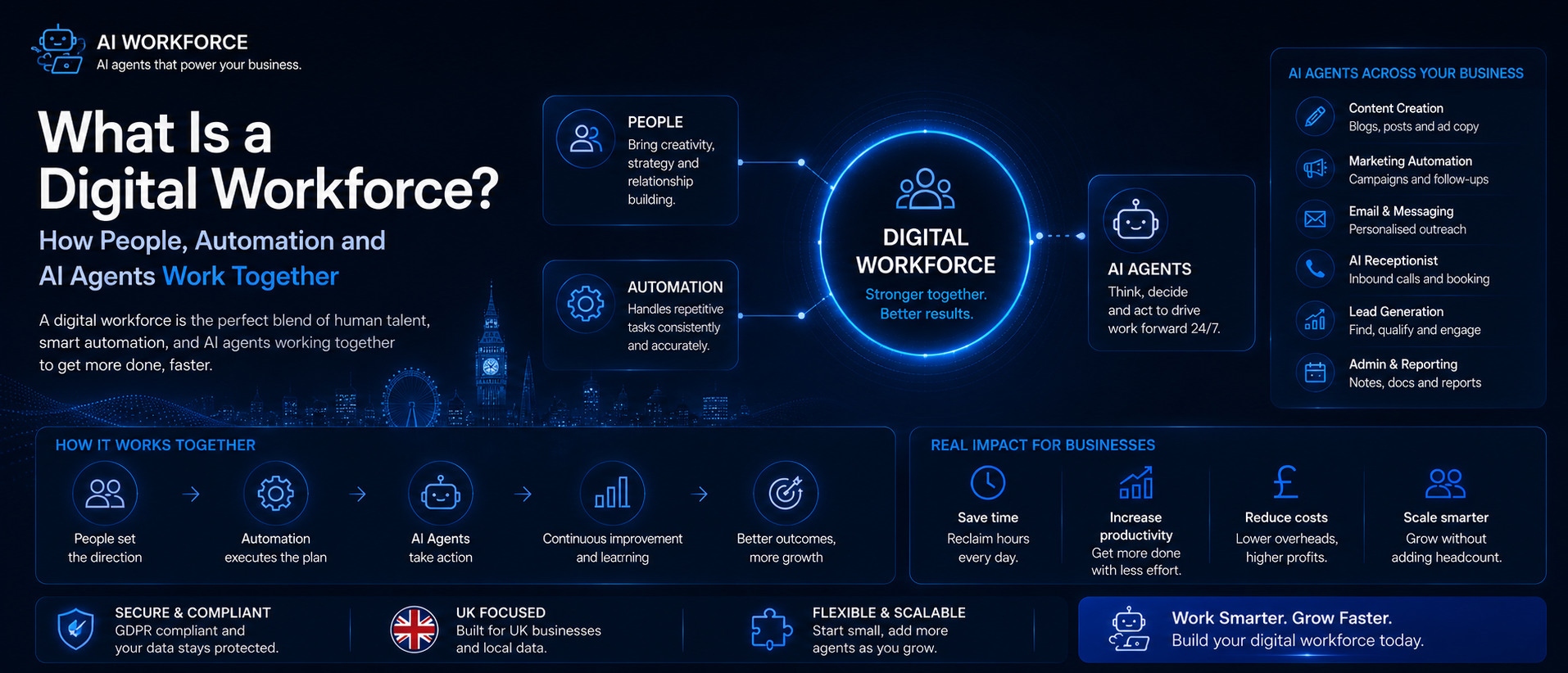
A digital workforce is not a collection of tireless virtual employees. It is an operating model in which people, deterministic automation and AI agents each do the work they are best suited to, with defined roles, permissions and oversight. This guide explains what that actually looks like in practice, where the boundaries between human and digital work should sit, and how to build toward it without overstating what any of these systems can reliably do on their own.
Quick Answer
A digital workforce combines people, rule-based automation and AI systems to complete business processes. Automation handles predictable steps, AI can interpret information and select actions within defined limits, and people remain accountable for judgement, relationships, exceptions and consequential decisions. The aim is not unrestricted autonomy, but a deliberately designed division of work with clear accountability and controls.
What's Covered
Fundamentals
Building Blocks
AI and Benefits
Governance and People
Implementation
What Is a Digital Workforce?
A digital workforce is the combination of human workers, rule-based automation and AI working together to run business processes. It is not a replacement for people; it is a different division of labour. In a well-designed digital workforce, automation handles the predictable and repetitive, AI helps interpret information and select actions within defined limits, and people handle the creative, relational, ethical and high-judgement work that software is not well suited to.
The shift toward a digital workforce is part of a broader move that has accelerated over recent years, as remote and hybrid working pushed organisations to rethink how work gets done, and as AI capability expanded quickly. The result is a working world where the line between human and digital work is less fixed than it used to be. Deciding deliberately where that line sits, rather than letting it drift, is one of the more important operational questions a business faces today.
A digital workforce is not a single technology or a single decision. It builds up over time as an organisation gets more confident combining automation and AI into its operations. Some businesses are at an early stage, using basic automation to cut down on data entry. Others have deployed AI agents that handle multi-step workflows within clearly defined permissions. Both sit on the same spectrum. They differ in maturity, not in kind. Based on AI Workforce's implementation experience, the businesses that progress fastest along that spectrum are the ones that treat each stage as something to prove out and measure, rather than skip toward the most advanced technology available.
Key Terms: Digital Workforce, Digital Worker, Automation, AI Agent and Digital Workplace
These terms are often used loosely and interchangeably, which causes unnecessary confusion. It is worth being precise:
Term | What it means |
|---|---|
Digital workforce | The combined human and technology capability an organisation uses to complete its work: people, automation and AI together |
Digital worker | A software-based system assigned to specific tasks or workflows, operating either independently within defined limits or alongside human colleagues |
Automation | Rules and systems that execute predefined actions consistently, without needing to interpret anything |
AI agent | An AI system that selects actions toward a defined goal, using specific tools and permissions someone has set in advance |
Digital workplace | The tools, systems and environment where people and digital workers actually collaborate on shared processes |
Illustrative division of labour. The right split depends on your own processes and risk tolerance.
What Is a Digital Worker?
A digital worker is a software-based system configured to complete specific tasks or workflows, either independently within defined limits or in collaboration with human colleagues. It typically operates through APIs, software interfaces, structured workflows or language-model tools rather than working "like a person"; it can replicate some outcomes of human work without doing the work the same way a person does.
Digital workers can operate outside normal office hours and process work across locations, which is a genuine structural advantage. That said, this is subject to system availability, capacity, permissions and operating limits. Service outages, rate limits, processing costs, usage caps and integration failures all still apply. A digital worker is not constrained by fatigue, but it is constrained by the systems it depends on.
The simplest form of a digital worker is a bot built on robotic process automation, software that mimics clicking through screens, extracting data and filling forms. RPA became one of the most widely adopted forms of software-based workforce automation, and more sophisticated implementations use machine learning and natural language processing to handle tasks that need some interpretation, not just execution. A digital worker that reads an inbound message, assesses the likely issue and drafts a response for review is doing something more capable than a simple RPA bot, although the draft still needs checking before it goes anywhere.
The most advanced digital worker models today are built on agentic AI: systems capable of selecting and completing multiple steps within defined goals, tools and permissions. An agentic AI digital worker can be given a goal rather than a fixed script, and it can choose among the tools and steps it has been given access to. That is different from unrestricted independence. A person must still define which tools it can use, which data it can access and which actions it may take without approval. Digital workers available in 2026 are considerably more capable than the systems available five years earlier, but more capable does not automatically mean more reliable; that still depends on how the system is configured, monitored and constrained. For a fuller definition and worked examples, see our guide to AI agents for small businesses.
The AI Workforce Digital Worker Autonomy Ladder
Not every digital worker operates the same way, and treating full independence as the default target is a mistake. We call this staged view the AI Workforce Digital Worker Autonomy Ladder, a practical way to check how much independence a specific workflow has actually earned:
The AI Workforce Digital Worker Autonomy Ladder ranks digital worker independence across five stages, from assisted drafting through to bounded, exception-based autonomy.
Assist: the system drafts or recommends; a person decides and acts
Automate: a predefined, rule-based workflow runs once configured, with no interpretation involved
Act with approval: the system prepares an action and a person signs off before it goes live
Act within limits: the system executes low-risk, pre-approved actions automatically, within agreed permissions
Escalate exceptions: routine cases run on their own; anything uncertain or higher-risk is routed to a person
Most organisations are better served spending longer at the lower rungs and only extending permissions once a workflow has earned trust through consistent, reviewable performance.
How Does Automation Fit In?
Automation is the foundation of any digital workforce. It covers everything from simple task automation, sending a confirmation email when a form is submitted, to business process automation that coordinates multiple systems across an entire workflow. Automation reduces the need for a person to perform routine tasks manually, which can lower cost, increase speed and reduce certain forms of manual re-keying error, though it also introduces new work of its own: monitoring, exception handling, maintenance and occasional data correction.
Robotic process automation was one of the earliest widely adopted forms of digital workforce automation. RPA tools mimic human actions in software: logging into systems, extracting data, moving information between applications, and completing structured processes at scale. RPA works best in stable, structured environments. When an interface, data format or process changes outside its configured rules, it may fail or need a person to step in, though more mature RPA setups include validation, branching, exception queues and retries rather than simply breaking outright. That structural stiffness is part of what intelligent automation and AI are addressing, by adding a layer that can interpret variation rather than only follow a fixed script.
Business process automation takes a broader view, looking at an entire process end to end rather than a single task. The goal is to reduce unnecessary handoffs, delays and manual steps across a workflow. An automation layer connecting your systems- CRM, HR, finance and operations- can let information move automatically based on business rules, rather than someone carrying it manually from one place to another. Automating at the process level, done well, tends to produce meaningful cumulative time savings, though the actual size of that saving depends on your own process volume and current manual overhead, and is worth measuring rather than assuming. For a practical breakdown of what a first automation project typically costs, see our guide to AI automation pricing in the UK.
What Are Digital Workplaces?
Digital workplaces are the environments, physical, virtual or hybrid, where the digital workforce actually operates. A digital workplace is not just a laptop and a video call platform. It is the integrated set of tools, systems and communication channels that let human workers and digital workers collaborate on the same processes, with people able to work from different locations and digital workers contributing to the same workflows regardless of where the humans are.
A well-designed digital workplace creates the conditions for a digital workforce to function: clear data flows, integrated tools, and defined points where AI and automation hand work back to people and vice versa. Meeting assistants, document summarisers, AI-powered search and intelligent task routing are increasingly available in mainstream workplace platforms, though access and capability still vary by product and subscription tier rather than being a universal standard.
For teams where email is a major part of the digital workload, our guide to the best AI email assistants compares 15 tools for inbox triage, drafting, summarisation, follow-ups and Gmail or Outlook integration.
For leaders whose digital workload centres on email, scheduling, meeting preparation and cross-tool coordination, our guide to AI executive assistant tools compares the main platforms and use cases.
Work that used to require a large custom implementation is increasingly available off the shelf, which lowers the barrier to entry but does not remove the need to configure it properly for your own processes.
What Is a Digital Workforce Platform?
A digital workforce platform is the software layer that lets a business configure, connect and oversee its digital workers in one place, rather than running separate point tools for each task. Instead of stitching together a chatbot, an RPA bot and a handful of disconnected automations, a platform gives you a single environment to set permissions, define handoff rules, monitor performance and manage multiple digital workers across different roles.
In practice, a digital workforce platform typically covers: connecting to the systems you already use (CRM, inbox, phone, calendar); defining what each digital worker is allowed to do and when it must hand off to a person; monitoring output and flagging exceptions; and giving a non-technical team member a way to adjust a workflow without needing a developer each time. The value of a platform over a collection of separate tools is mainly operational: one place to see what every digital worker is doing, one place to change the rules, and fewer integration gaps between tools that were never designed to talk to each other.
Not every business needs a full platform from day one. A single well-configured automation can be the right starting point. A platform becomes more useful once you are running several digital workers across different functions and need consistent oversight rather than managing each one separately.
What Does Digital Workforce Compliance Involve?
Digital workforce compliance means making sure the automation and AI systems doing the work meet the same regulatory, data protection and audit standards a human employee would be expected to meet, and that there is a clear record of what each digital worker did and why. This matters more as digital workers take on tasks involving customer data, financial information or decisions that affect someone's outcome.
The practical requirements usually include: data handling that meets UK GDPR, including what data a digital worker can access, where it is stored and how long it is kept; an audit trail showing what action was taken, when and under what permission, so a decision can be reconstructed after the fact; clear accountability, meaning a named person is responsible for each digital worker's scope and performance, not just the system itself; and sector-specific rules where they apply, such as FCA requirements in financial services or clinical governance in healthcare.
Compliance is not a one-off setup step. Permissions, data access and escalation rules need periodic review as a digital worker's scope changes, and as the underlying AI models themselves are updated. Treating compliance as part of ongoing governance, rather than a box ticked at launch, is what keeps a digital workforce audit-ready.
What Should Remain Human?
Not every task is a sensible candidate for a digital worker, and some should stay with a person regardless of how capable the underlying technology becomes:
Sensitive or disputed customer complaints
Employment and disciplinary decisions
Legal and financial advice
Ethical judgement calls
High-value negotiations
Decisions affecting a customer's eligibility or treatment
Brand and creative strategy
Genuine relationship management
Novel situations with no clear precedent
AI Workforce Insight: the businesses that get the most value from a digital workforce are usually the ones that spend real time deciding what should stay human, not just what can be automated. Treating "can this be automated" as the only question tends to produce a system that is technically impressive and operationally fragile.
Key Use Cases Across Industries
The use cases for a digital workforce span most industries, but the pattern that works well is consistent: a repeatable process, meaningful volume, and a clear rule for when a case needs a person instead.
Finance: reconciliation, invoice matching and document checking, with a person reviewing exceptions and approvals. Our guide to AI tools for financial advisors covers this in more depth
Healthcare: appointment administration, triage support and clinical documentation summaries, with clinical judgement and patient care staying firmly with clinicians. See our guide on AI in healthcare
Logistics: order status tracking, inventory updates and supplier communication, with a person handling disruption, negotiation and anything outside the normal pattern. Our guide to how AI is transforming logistics goes further into this
Professional services: document drafting, research summaries and scheduling, with the professional retaining judgement and client-facing responsibility. Our guide to AI tools for consultants covers this specifically
Customer support and contact centres: first-line enquiry handling and account lookups, with sensitive or complex complaints escalated to a person. Our guide to AI call centre agents covers what a well-governed setup looks like
Resolving customer issues is an area where digital workforce capability has moved fastest. Earlier AI in customer support could really only handle simple, FAQ-style queries. In a well-integrated and carefully tested setup, current AI-powered agents can gather account context, classify an issue, suggest a resolution, and handle approved, low-risk cases largely on their own. Sensitive, disputed or consequential complaints- anything involving refunds, vulnerability, financial hardship or reputational risk- should still escalate to a person as standard practice, not an exception.
Not Sure Which Workflow Is Safe to Automate First?
AI Workforce can help you identify a high-volume, low-risk starting point and define the permissions, approvals and success measures it needs. Book Your Free AI Readiness Review.
How Does AI Power the Digital Workforce?
Artificial intelligence is what extends a digital workforce beyond basic rule-following into something that can handle a degree of genuine variation. Machine-learning systems can be improved over time through updated data, evaluation, retraining or workflow refinement, but they do not necessarily learn automatically from every single interaction the way that phrase sometimes implies; improvement is usually the result of a deliberate review and update cycle. Generative AI adds the ability to produce content, draft communications, and generate summaries in natural language, rather than only processing structured data.
Machine learning, natural language processing and reasoning models, the broader set of technologies behind this capability, give digital workers some ability to handle ambiguity that a fixed rule cannot. A purely rule-based system breaks when reality does not match the rule. An AI-supported digital worker may be able to interpret an unfamiliar situation and propose or select an action within a defined set of options, but uncertain or consequential cases still need to be escalated rather than resolved automatically. Decision-making that previously required a person can be handled within clearly defined boundaries for lower-risk cases, with speed that varies by task, system design and workload rather than being universally faster than any human team.
Agentic AI represents the leading edge of what AI brings to a digital workforce. An AI agent built on agentic principles is not just executing a fixed sequence; it is working toward a goal: it can plan, act, evaluate the result and adjust, within the tools and permissions it has been given. This kind of system is still relatively early in adoption, and the trajectory is toward handling more complete workflows rather than single isolated tasks, with human oversight sitting at the level of strategy and exception review rather than at every single step, provided the guardrails are genuinely in place. If you are weighing up whether to build this capability in-house or buy a configured platform, our guide to build vs buy AI agents covers the cost and risk trade-offs in more depth.
What Are the Business Benefits?
The benefits of a digital workforce are real for organisations that implement thoughtfully, but they are not automatic or unconditional. Productivity is usually the first gain: when digital workers handle repetitive tasks, people get more time for work that needs judgement. Time and cost savings can accumulate quickly once automation replaces manual steps that previously consumed hours across a team each week, though the actual figure depends entirely on your own process volume and is worth measuring rather than assuming. DSIT's 2026 AI Adoption Research, based on a telephone survey of 3,500 UK businesses, found efficiency and productivity are by far the most common reasons UK businesses adopt or scale AI, which is consistent with what we see in AI Workforce implementations.
Rule-based automation can meaningfully improve process consistency, since it applies the same steps the same way every time. AI-driven systems need more care here: their outputs can vary between similar inputs, and can change after a model or prompt update, so they need ongoing evaluation rather than being assumed to behave identically every time. Customer experience can benefit through faster first responses and steadier follow-up, provided the underlying workflow is reliable and regularly reviewed. This is a design outcome, not a guaranteed property of the technology.
The ability to operate outside standard office hours is a genuine structural advantage that compounds over time; a business with a well-configured digital workforce can serve customers across time zones without night shifts, and can keep processing routine work while the human team is offline. That capacity scales with demand without the same hiring and training overhead that scaling a human team requires. It still requires monitoring, maintenance and periodic review; it is not a "set and forget" capability.
The AI Workforce Digital Delegation Risk Matrix
Deciding what to hand to a digital worker is easier with a simple risk lens. We call this the AI Workforce Digital Delegation Risk Matrix. Not everything needs the same level of caution.
Lower-risk, reasonable starting points:
Routine data entry and record updates
Drafting first-response replies for review
Scheduling, reminders and confirmations
Order status updates and tracking notifications
Summarising documents or meetings for a person to check
Routing enquiries to the right queue or person
Higher-risk, keep a person closely involved:
Refunds, credits or pricing decisions
Complaints involving vulnerability, hardship or legal rights
Employment or disciplinary decisions
Anything affecting customer eligibility
Actions with no easy way to reverse them
Situations with no clear precedent to follow
The AI Workforce Digital Delegation Risk Matrix. Illustrative starting filter. Your own risk tolerance and regulatory context still apply.
Governance, Security and Accountability
This is the section a serious digital workforce guide cannot skip, and it is the part most often missing from general explainers. Every digital worker or automated workflow worth relying on should have:
A named business owner who is accountable for how it performs
Least-privilege access: it can reach only the systems and data it actually needs, nothing broader
Defined permissions: a clear list of actions it may take automatically and actions that need approval first
Human approval thresholds for anything above an agreed value or risk level
Audit logs recording what it did, when, and on what basis
Segregation of duties, so no single automated workflow can both initiate and approve a consequential action
Vendor and model risk review: what a vendor does with your data, and how model or platform changes are communicated
Data protection basics: a lawful basis for the data involved, and data minimisation, only using what the task actually needs
Automated decision safeguards: the Data (Use and Access) Act 2025 widened the circumstances in which solely automated decisions with a significant effect on a person can be made, provided safeguards such as information, challenge and human intervention are in place; check the legislation, current GOV.UK guidance and the ICO's latest material on automated decision-making, noting that its updated final guidance was still being developed at the time of publication
Monitoring and incident response: a process for spotting and responding to something going wrong
A kill switch: a fast, reliable way to pause or stop a workflow
Rollback capability: a way to reverse an action a digital worker took
Review and retirement dates: nothing should run indefinitely without a scheduled check
A digital worker connected to your systems needs the same access discipline as a new employee, and often more, since it can act at a speed and volume no person can match. Our dedicated guide to AI and GDPR compliance for UK businesses covers the lawful basis, DPIA and vendor-contract questions in more depth.
Compliance note: this is general information, not legal advice. Check current ICO and GOV.UK guidance and take independent advice for anything that could materially affect customers or employees.
A useful rule of thumb: a digital worker should never have broader access than it needs to do its assigned job.
What About Human Workers?
The most important thing to understand about a digital workforce is that the objective should be augmentation, not indiscriminate replacement. In practice, automation can remove some tasks, reshape roles, and in some cases reduce demand for particular kinds of work; it is not accurate to claim no jobs are ever affected, and pretending otherwise makes workforce planning and staff consultation harder, not easier. Handled well, the time recovered from automating repetitive work goes back into what people do better than software: building relationships, solving unfamiliar problems, making judgement calls, and creating.
Removing frustrating administrative work can genuinely improve how people experience their jobs, but poorly managed automation can just as easily create anxiety or a feeling of losing control over how work gets done. The difference tends to come down to whether staff were involved in designing the workflow and trained before their responsibilities changed, not the technology itself. Based on AI Workforce's implementation experience, involving the people whose work is changing before a system goes live, rather than after, is one of the clearest predictors of whether a rollout actually sticks.
The relationship between human workers and digital workers works best when it is explicitly designed rather than left to develop on its own: where a digital worker hands off to a person, what a person needs from the system to make a good decision, and how a person corrects it when it gets something wrong. These are design questions, not technical ones. Organisations that work through them properly tend to see the operational benefit.
What Digital Skills Does Your Team Need?
The ability to work confidently with digital tools is becoming increasingly important across professional roles. Understanding how to direct AI tools, evaluate their output, and know the difference between routine automation and something that needs a second look is now a practical part of doing most jobs well. Digital transformation efforts that fail often do so because the technology was deployed without a matching investment in people's ability to use it properly.
Not all of the relevant skill is technical. Critical thinking about AI output, understanding where automation's limits sit, and knowing when to trust a system versus when to override it are practical skills every team member working alongside a digital workforce needs. Get this right and the whole system performs better; neglect it, and a digital worker becomes a source of errors someone else has to catch, rather than a genuine productivity gain.
Automation and AI tools change quickly, so this is not a one-off training exercise. Building a culture that experiments with digital worker tools, shares what actually works, and adapts as the tools change tends to matter more long-term than any single implementation.
How to Build a Digital Workforce in Practice
Map the existing process in detail before automating anything: inputs, steps, decisions and outputs
Simplify the process first; automating a broken process just makes the breakage faster
Choose your first use case based on volume and consistency, not ambition
Decide whether rules-based automation, AI assistance, or a bounded AI agent actually fits the task
Define permissions, approval thresholds and escalation paths before anything goes live
Test on a small, low-risk scale with a person reviewing outputs
Measure corrections, failures and time saved honestly
Expand only once performance has been consistent for several weeks
Illustrative roadmap. Pace depends on process complexity and how much oversight capacity you have.
If you are scoping the first workflow to hand to an AI agent specifically, our guide on how to write an AI agent brief covers how to define the goal, permissions and escalation rules before development starts.
Common Mistakes
Common mistakes to avoid: automating a process that was never clearly defined in the first place, treating full autonomy as the goal rather than a possible later stage, giving a digital worker broader system access than the task requires, measuring how much a system is used rather than the outcome it produces, skipping human review to move faster, assuming AI output is consistent in the way rule-based automation is, and failing to document what changed and why. Most of these are avoidable with a deliberate pilot and an honest review before expanding. Our guide to why AI agents fail covers the twelve most common implementation mistakes in more depth, including several that apply just as directly to rule-based automation.
How to Measure Digital Workforce Value
Benefits are only useful if you can show they are actually showing up. Track a mix of efficiency, quality and risk indicators rather than usage alone:
Net hours saved, measured against a real manual baseline
Cost per completed task, before and after
Error rate and human correction rate
Escalation rate, how often cases get routed to a person
Cycle time, from request to resolution
Customer satisfaction and complaint rate
Downtime and failed or reversed actions
Any security or compliance incidents logged
Employee experience, gathered directly rather than assumed
Reviewing these after a few weeks of real use gives a far more honest picture than judging a new digital worker in its first days. Our AI Agent KPI framework covers how to combine an outcome KPI, quality measure, cost measure and risk guardrail if you want a fuller measurement plan than the list above.
Sources and Further Reading
DSIT, AI Adoption Research (DSIT 2026/003), published 28 January 2026, telephone survey of 3,500 UK businesses
Data (Use and Access) Act 2025
GOV.UK: Data (Use and Access) Act 2025, data protection and privacy changes
ICO: Automated decision-making guidance
Frequently Asked Questions
Is a digital workforce the same as automation?
No. Automation is one component. A digital workforce also includes AI systems, the people working alongside them, and the governance that holds it together.
Is a digital worker an employee?
No. It is a software-based system assigned to a role or workflow. It can be given permissions and held to standards, but it does not carry the legal, ethical or professional accountability a person does; that accountability still sits with the business and the named owner of the workflow.
Can digital workers make decisions?
Within defined limits, yes. Rule-based systems follow fixed logic. AI agents can select among options within their permissions. Consequential or ambiguous decisions should still involve a person.
Do digital workers replace jobs?
Sometimes tasks are removed, and roles change; that is a realistic outcome worth planning for honestly, rather than assuming automation only ever adds capacity without affecting anyone's role.
What systems should an AI agent be able to access?
Only what its specific task requires, no more. Least-privilege access, clear permissions and an audit log are the baseline, not optional extras.
How should digital workers be monitored?
With a named owner, defined performance and error metrics, an audit trail, and a scheduled review, not a one-off setup left to run unattended.
What is a sensible first digital-worker use case?
A high-volume, consistent, low-risk task with a clear definition of done. Prove it works, measure it honestly, then expand to the next one.
How is digital workforce value actually measured?
Track net hours saved, error and correction rates, escalation rate, and any compliance incidents, over several weeks of real use rather than the first few days.
Key Takeaways
A digital workforce combines people, rule-based automation and AI, with each contributing what it does best; it is not simply a replacement for people
Digital workers, automation, AI agents and digital workplaces are related but different concepts, worth keeping distinct
The AI Workforce Digital Worker Autonomy Ladder runs from assisted drafting through to bounded independent action; full autonomy is not the default target
Some tasks should stay human regardless of how capable the technology becomes: sensitive complaints, ethical judgement, legal and financial advice among them
Every digital worker needs a named owner, least-privilege access, audit logs, a kill switch and a review date
The realistic workforce impact is augmentation with some task and role change, not a guarantee that no jobs are affected
Start with one high-volume, low-risk use case, measure honestly, then expand
Ready to Build Your Digital Workforce the Right Way?
Book a free AI readiness review to identify your best first use case, agree the permissions and oversight it needs, and build a digital workforce that is properly governed from day one.
About the Author
Rodi Taze is Co-Founder of AI Workforce. He works with UK businesses to design digital workforce models that combine people, automation and AI with clear permissions, accountability and human oversight.
About the Reviewer
This article was reviewed by Clara Miller, Content Marketing Specialist at AI Workforce, for editorial clarity, source accuracy and consistency with AI Workforce's published implementation guidance.
Reviewed: August 2026.
© 2026 AI Workforce Ltd. All rights reserved.