How to Automate Appointment Booking With AI
Posted On: August 18, 2026
Written by Clara Miller, Content Specialist at AI Workforce · Reviewed by Seth Ayush, Co-Founder of AI Workforce · Last updated: 18 August 2026
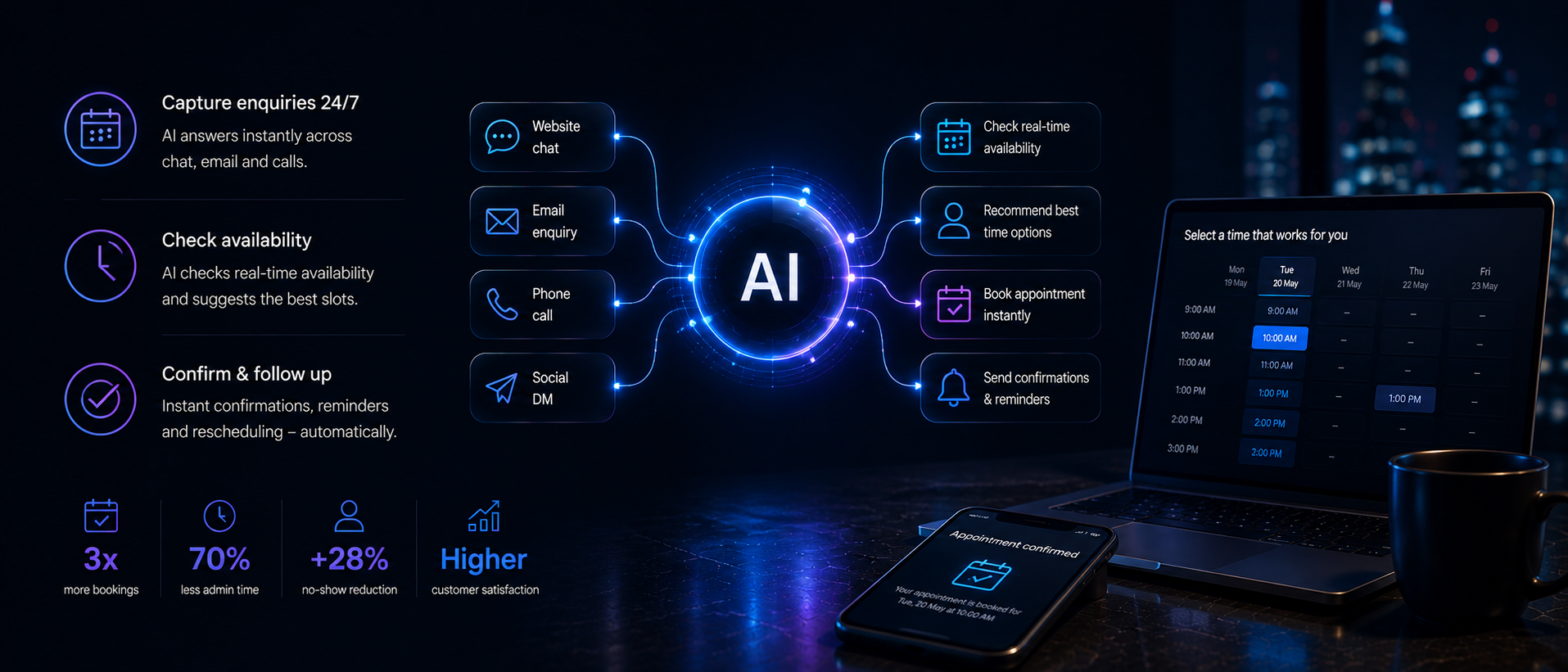
Quick Answer: A business can automate appointment booking by connecting its calendar or management system to a workflow that identifies the requested service, checks valid availability, offers suitable times, confirms the booking and sends reminders. Routine bookings, cancellations and policy-compliant rescheduling can run automatically. Requests involving complaints, vulnerable customers, unusual requirements, payment disputes or decisions outside approved rules should be transferred to a person with the booking context preserved.
At a Glance
What can be automated: service identification, availability checks, confirmations, reminders, standard cancellations and policy-compliant rescheduling
What still needs a person: complaints, disputed charges, accessibility or vulnerability requirements, and anything outside the configured rules
Which systems need connecting: the calendar or practice management system, the phone or chat channel, and the confirmation and reminder messaging tool
The biggest implementation risk: launching every channel at once, before the underlying booking rules and data are clean
What success should be measured by: completed, accurate appointments, not the number of conversations the system handled
What Does It Mean to Automate Appointment Booking?
To automate appointment booking means replacing manual, back-and-forth scheduling with a workflow that handles routine requests under defined rules. Instead of a person answering every call or email, a booking system checks live availability, offers valid time slots and confirms the appointment automatically. The result is not a booking system that runs itself; it is a booking workflow that handles routine requests under defined rules while sending exceptions to the appropriate person.
Manual scheduling can consume substantial staff time in service businesses, particularly where requests arrive across phone, email and website channels at once. Every minute spent booking a routine appointment by hand is a minute not spent with the customer standing in front of you, and a single receptionist can only handle so many calls before appointment volume creates delays.
Automating the process does not mean removing oversight. A true system connects scheduling logic, calendar sync, messaging and follow-up into one workflow, but it still needs a person reviewing exceptions, monitoring data quality and confirming that integrations are working correctly.
Does Appointment Booking Automation Always Need AI?
Not always, and it is worth being clear about the distinction, because the two are often conflated in marketing material.
Conventional automation, without any AI, can already handle a good deal of routine appointment scheduling:
Fixed booking rules and service durations
Calendar availability checks
Confirmation messages
Reminder sequences
Cancellation links
Basic rescheduling within pre-set rules
AI becomes genuinely useful once the system needs to do more than follow a fixed script. That includes situations where the workflow must:
Understand a natural-language request typed or spoken in the customer's own words
Handle a live phone conversation rather than a menu of button presses
Identify which of several services a customer actually needs from a vague description
Extract booking details from an unstructured message or voicemail
Manage more than one possible booking route, such as multiple locations or staff members
Summarise the context of a request for the person who picks it up
Recognise when a request falls outside policy and needs to be escalated rather than guessed at
If a business only needs a simple online calendar with automated reminders, standard scheduling software may be enough. AI adds the most value on phone and chat channels, and wherever requests do not arrive in a tidy, structured form.
The AI Workforce Appointment Automation Model
AI Workforce approaches appointment booking automation as a nine-step model, so a business can see exactly where automation applies and where a person needs to stay involved.
Request → Identify → Validate → Offer → Confirm → Remind → Change → Escalate → Measure
1. Request: capture the booking request from web, chat or phone
2. Identify: determine the service, location, staff member and customer requirements
3. Validate: check that the request fits approved booking rules
4. Offer: present genuinely available, suitable time slots
5. Confirm: write the appointment to the correct system and send confirmation
6. Remind: send factual reminders through the approved channel
7. Change: allow permitted cancellations and rescheduling
8. Escalate: route exceptions to a person with the context preserved
9. Measure: track booking completion, no-shows, errors and escalations
Each step maps to a specific piece of your existing technology stack, whether that is a calendar, a practice management system, a CRM or a messaging tool, and each step can be automated to a different degree depending on how much risk a business is comfortable delegating.
Appointment Automation Boundary Matrix
Because this guide covers a wide range of service businesses, from garages to dental practices, it is worth setting out clearly what should run automatically, what needs approval, and what should always go to a person.
Automatic: standard requests, confirmations, routine reminders, policy-compliant rescheduling and cancellations
Approval-based: first appointments needing extra information, repeated cancellations, unusual scheduling conflicts
Human-only: complaints, disputed charges, accessibility or vulnerability needs, emergencies, out-of-policy requests
Booking activity | Automation role | Human role |
|---|---|---|
Standard appointment request | Identify service and offer approved slots | Review only if information is missing |
Confirmation | Send automatically | None ordinarily required |
Routine reminder | Send factual message | Review messaging policy |
Policy-compliant rescheduling | Release and replace slot | Handle exceptions |
Standard cancellation | Cancel and release availability | Review repeated or unusual cases |
First appointment requiring additional information | Collect approved fields | Review sensitive or complex information |
Complaint or disputed charge | Stop automation | Respond personally |
Accessibility or vulnerability requirement | Capture request carefully | Confirm appropriate arrangements |
Emergency or clinically urgent request | Do not make a decision | Follow the organisation's urgent escalation process |
Request outside configured services | Do not invent an answer or slot | Resolve manually |
This distinction matters most for practices handling sensitive information, such as dental or medical appointments, where a request should never be resolved by guesswork.
What Can Be Automated?
The activities best suited to automation are the ones with clear rules and low ambiguity: checking availability against a calendar, matching a request to a defined service type, confirming a booking once it is valid, sending a reminder ahead of the appointment, and processing a cancellation or reschedule that falls within policy. These are repetitive, rule-based tasks, and a correctly configured system can apply the same availability and booking rules consistently, although integrations, data quality and system failures still require monitoring.
Behind the scenes, this typically means the booking workflow connects to the calendar or management system, checks staff availability and appointment duration, and applies service-specific rules, such as a longer slot for a first-time visit. On the phone or in chat, an AI assistant can carry that same logic into a natural conversation, asking for the details it needs and confirming the booking once the request is valid.
If you are comparing dedicated tools for qualification, calendar routing and automated booking rather than designing the workflow itself, see our guide to AI appointment setter tools.
What Should Still Go to a Person?
Automation should stop, not guess, when a request falls outside its rules. That includes complaints, disputed charges, anything involving a vulnerable customer, accessibility requirements that need individual judgement, and any request that does not match a configured service. A well-designed system recognises these triggers, such as a customer typing "speak to someone," and hands the conversation to a staff member with the booking context preserved, rather than forcing an automated decision.
This escalation step is what keeps the workflow trustworthy. Straightforward requests can be suitable for automation, but customers should retain a clear route to a person whenever the request falls outside the configured rules.
Not Sure Where to Start With Your Own Booking Workflow?
See which parts of your process are genuinely ready for automation.
Worked Example: Booking a Vehicle Service by Phone
A worked example makes the workflow more tangible. The timing, information collected and escalation rules below are illustrative only and would need to be configured for each individual business.
A customer calls a garage outside opening hours. A voice agent identifies the vehicle and the requested service. The system checks workshop capacity for that type of job and offers two valid appointment times. The customer chooses one, and the appointment is written into the garage's management calendar. A confirmation message follows immediately, and a reminder is sent the day before. During the call, the customer also mentions an unusual warning light on the dashboard. Rather than guessing at a diagnosis or a fix, the system notes this detail and routes the question to a service adviser to call back.
Call received → Service identified → Slots offered → Booking confirmed → Warning-light question → Human callback. This example illustrates the same nine-step model applied to a non-clinical setting: the routine part of the request, booking a standard service slot, is handled automatically, while the part requiring judgement is passed to a person with full context.
Online, Chat and Phone Booking
Appointment requests may arrive through several channels, including website forms, chat and phone calls. A connected workflow can apply the same booking rules across those channels, so a customer gets a consistent experience regardless of how they get in touch.
Phone bookings are typically the hardest channel to automate well, since they involve a live conversation rather than a structured form. An AI voice option can handle this by identifying the caller's intent, checking availability in real time, and confirming the booking verbally, while still recognising the point at which a request needs to be handed to a person. Chat and web channels are usually more straightforward, since the customer is entering information directly into a form or a guided conversation.
Confirmations, Reminders and Changes
Once a booking is made, a clear confirmation message removes ambiguity about the date, time and service booked, and it should be sent as soon as the appointment is created. From there, reminders sent by text or email in the days before the appointment give the customer a natural prompt to reschedule if something has come up, rather than simply not showing.
Releasing cancelled slots immediately can improve the chance of rebooking them, while reminders and accessible rescheduling can help reduce avoidable no-shows. Reminder messages should include a direct link to cancel or reschedule, so the customer does not need to call in, and the business does not lose the slot to a silent no-show.
UK GDPR, PECR and Sensitive Booking Data
Appointment booking systems collect personal data, so UK data protection rules apply from the outset. A few practical points are worth building into any booking workflow:
Collect only the information needed to arrange and manage the appointment
Be clear with customers about how their booking information will be used
Restrict staff and supplier access to booking data appropriately
Define how long booking records are retained
Secure calendar, CRM and messaging integrations
Confirm that any supplier handling booking data has suitable data-processing terms in place
Identify and document an appropriate Article 6 lawful basis for processing booking information
Carry out a data protection impact assessment where the processing is higher-risk
Keep factual appointment reminders separate from promotional messages
The ICO treats a purely administrative appointment reminder as a service message rather than direct marketing. If promotional content is added to that message, it may become direct marketing, and PECR rules can then apply. See the ICO's guidance on marketing and data protection.
For healthcare and similar services, appointment details can constitute special category health data where they reveal something about a person's health, such as the type of clinic or treatment booked. In that case, the business may need both an Article 6 lawful basis and an Article 9 condition, alongside appropriate safeguards. See the ICO's guidance on special category data.
This guide does not constitute legal advice, and higher-risk deployments should be reviewed by a suitably qualified professional. For a fuller treatment of AI and UK data protection obligations, see our dedicated AI GDPR compliance guide.
How AI Workforce Supports Appointment Automation
Depending on the agents, package and integrations selected, AI Workforce can help connect the parts of a booking workflow that typically sit apart: website enquiries, AI chat, voice calls, CRM records, calendars, confirmation and reminder messages, client follow-ups, and human escalation. Compatibility depends on the specific calendar, practice management system or telephone provider a business already uses, so this should be confirmed for each deployment rather than assumed. If you are unsure where to start, an AI readiness assessment is a reasonable first step, and it is worth reviewing typical AI agent costs before committing to a specific setup. Businesses considering a dedicated phone solution may also want to compare this against a standalone AI receptionist.
System Integration: Channels — phone, website and chat capture the incoming request. Workflow — booking workflow validates, offers and confirms the appointment. Systems — calendar or CRM, confirmation and reminder messages, human team.
Implementation Plan
A phased rollout reduces the number of variables being tested at once and makes faults easier to identify. A reasonable sequence looks like this:
Map every booking route currently in use, across phone, email, web and walk-in
Choose one routine service to pilot first
Document durations, buffers and eligibility rules for that service
Clean calendar and service data before connecting anything
Define which actions run automatically, which need approval, and which stay human-only
Connect the calendar, CRM, phone and messaging systems
Test conflicts, time zones, cancellations and unavailable staff scenarios
Run the new workflow in parallel with the current process for a short period
Review failures and escalations weekly during the pilot
Expand to further services or channels only once the pilot is stable
Avoid launching phone, chat, web and reminder automation simultaneously. Doing so makes it far harder to identify which part of the system is causing a problem when something goes wrong.
What to Measure
Results depend on booking volume, existing processes, customer behaviour, integrations and the quality of the underlying rules, so they should be measured against a business's own baseline rather than assumed. Useful metrics include:
Booking-completion rate
Booking abandonment
Missed-call recovery
Time to confirmed appointment
No-show rate
Cancellation and rescheduling rate
Slot rebooking rate
Duplicate or conflicting bookings
Human-escalation rate
Manual overrides
Customer satisfaction
Cost per completed booking
The central principle is to measure completed, accurate appointments, not merely how many conversations the system handled automatically.
Common Mistakes
A few mistakes come up repeatedly when businesses automate appointment booking. One high-risk mistake is launching every channel at once before the underlying rules and data are clean. Others include failing to define what should be escalated before going live, treating promotional messages the same as factual reminders, leaving staff untrained on how to handle an escalation, and assuming a result such as a lower no-show rate without measuring it against the previous baseline.
Frequently Asked Questions
Can a booking system operate without any human oversight?
No. A well-designed booking workflow handles routine requests under defined rules, but it should always include a clear path for exceptions, complaints and unusual requests to reach a person.
Does automating appointment booking require AI?
Not always. Fixed rules, calendar checks, confirmations and reminders can run on conventional automation. AI adds the most value on phone and chat channels, where requests arrive in natural language rather than a structured form.
Will automation reduce no-shows?
Missed appointments may fall when reminders make appointment details clearer and give customers an easy way to cancel or reschedule, but the effect should be measured against the business's previous no-show rate rather than assumed.
Key Takeaways
A booking workflow handles routine requests under defined rules while sending exceptions to the appropriate person; it does not replace human oversight entirely
Not every booking process needs AI. Conventional automation already covers fixed rules, calendar checks, confirmations and reminders; AI adds the most value on phone and chat channels
The nine-step AI Workforce model- request, identify, validate, offer, confirm, remind, change, escalate, measure- gives a clear structure for deciding what to automate
A boundary matrix should define what runs automatically, what needs approval, and what always goes to a person, particularly for sensitive services
UK GDPR and PECR apply to booking data from the outset, and healthcare-adjacent bookings may involve special category data
Results should be measured against a business's own baseline. Claims about fewer no-shows or higher conversion should be verified, not assumed
A phased rollout reduces the number of variables being tested at once, making faults easier to identify before the workflow expands to additional services or channels
Related Reading
AI Receptionist Pricing UK
AI Call Handling
AI Agents for Small Businesses
Automate Client Follow-Ups
AI Agent Cost
AI Readiness Assessment
AI GDPR Compliance
Want to Automate Routine Bookings Without Losing Control of Exceptions?
Talk to AI Workforce about a booking workflow designed around your services, systems and team.
About the Author
Clara Miller is a Content Specialist at AI Workforce. This guide was reviewed by Seth Ayush, Co-Founder of AI Workforce.
Last updated: 18 August 2026