AI Appointment Setter: Best Tools, Use Cases and Risks in 2026
Posted On: July 10, 2026
Last updated: August 2026 · Written by Clara Miller, Content Marketing Specialist · Reviewed by Seth Ayush, Co-Founder of AI Workforce
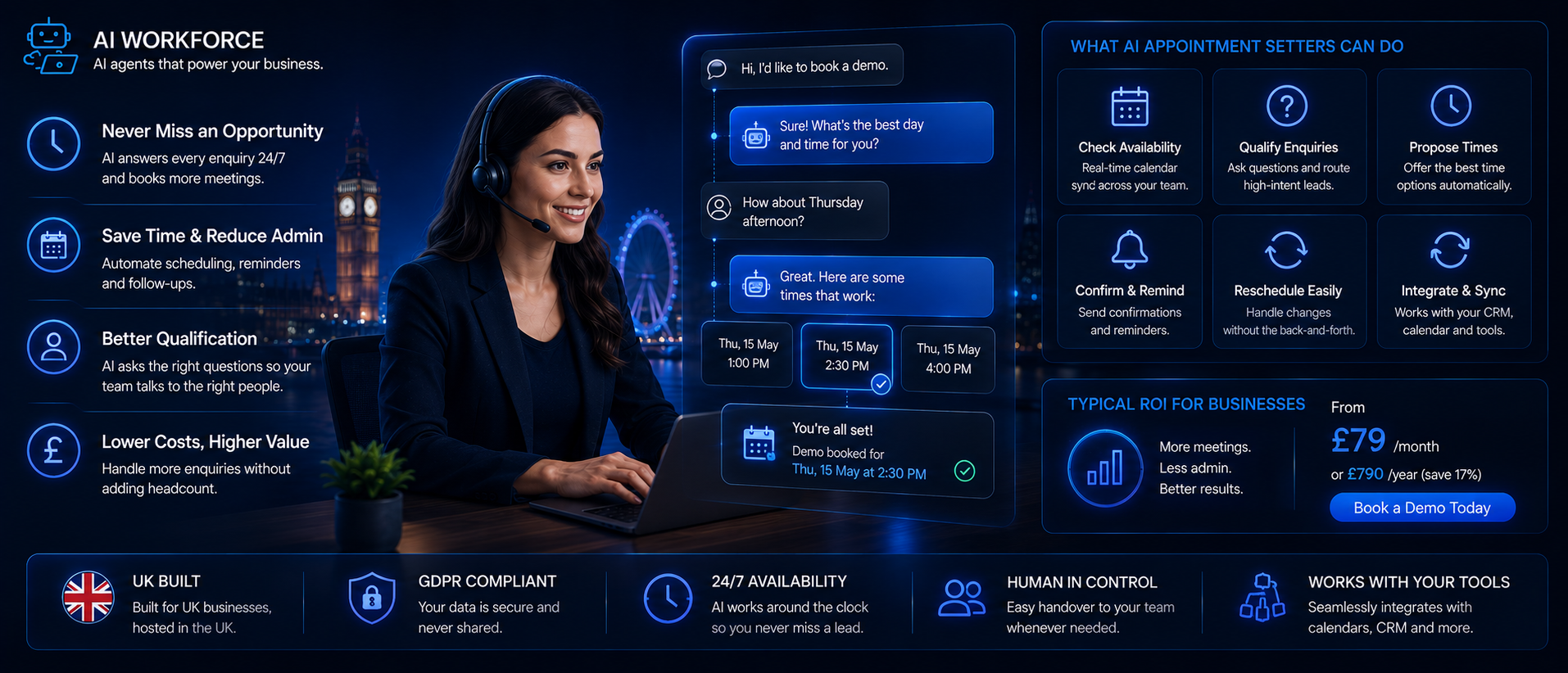
Setting up a meeting used to mean a long back-and-forth of emails just to land on one open slot. An AI appointment setter can now read a reply, check a calendar, offer a time, qualify the enquiry and confirm the booking without a person handling any of it manually. The harder question is not whether that is possible. It is which type of tool actually fits your booking volume, and whether it is safe, well governed and worth the cost for your specific workflow. This guide explains what an AI appointment setter actually does, how to choose between the main types of tools, where it commonly fails, and how to evaluate one properly before it touches a live calendar.
Quick Answer: An AI appointment setter is software that can handle parts of the conversation required to arrange a meeting, such as checking availability, proposing times, answering basic questions, qualifying the enquiry and confirming or rescheduling the appointment. Unlike a static booking link, it can interpret a reply and decide what should happen next within defined rules. Whether it is worth adopting depends on your meeting volume, the quality of your calendar and CRM data, and how much administrative time it genuinely removes, not on a general assumption that automation is always faster. The right setup depends on whether bookings are inbound or outbound, whether leads need qualifying first, how many calendars need routing, which channels are involved, and whether booking data must be written back to a CRM. The best appointment setter is not the one that books the most meetings, but the one that reliably books the right meetings and escalates anything outside its rules.
At a Glance
What it is: software that automates some or all of checking availability, proposing times, qualifying an enquiry, confirming a booking and sending reminders
Best suited to: businesses with meaningful, regular booking volume where scheduling admin is eating into real selling or service time
Biggest benefit: fewer missed replies and faster response to a lead who wants to book, particularly outside office hours
Biggest risk: incorrect qualification, a calendar permission error, or a missed cancellation or opt-out request running unchecked at volume
Best starting point: one inbound booking workflow on one calendar, before adding qualification, outbound contact or multiple channels
Key legal considerations: UK GDPR always applies to named contacts; PECR becomes directly relevant the moment a tool proactively contacts prospects rather than only responding to an existing enquiry
What's Covered
Choosing a Tool
How It Works
Buying & Governance
Best AI Appointment Setter Tools by Use Case
This category spans several genuinely different product types, so the right starting point depends on how your enquiries arrive and what you need automated. Vendor capabilities change often, so named products below are checked against current vendor documentation as of August 2026; confirm current features directly before committing.
Need | Strong starting point |
|---|---|
Inbound lead booking | Calendly (with its Callie AI assistant) or Cal.com |
Qualification before booking | No single verified named leader for this row; look for a platform where qualification questions are configurable to your own criteria, not a fixed script |
AI-driven scheduling agents and voice booking | Cal.com Agents for creating and rescheduling appointments from connected tools, or Cal.ai for AI-powered scheduling calls |
Round-robin team booking | Chilli Piper's Round-Robin Scheduling Links, or HubSpot Meetings |
Website chatbot booking | Intercom, using its Google Calendar or Outlook Calendar integration inside conversations and workflows |
Email appointment setting | No single verified named leader for this row; look for an inbox or outreach tool with scheduling built in, layered on your existing calendar |
SMS reminders and booking | No single verified named leader for this row; look for a platform with genuine SMS send/receive, not just email with SMS notifications bolted on |
Voice appointment setting | A dedicated AI voice agent platform; see our AI voice agents guide |
Trades and service businesses | No single verified named leader for this row; look for a service-booking platform with job type, postcode and technician availability built in, not a generic meeting scheduler |
CRM-led sales teams | HubSpot Meetings, where HubSpot is already your CRM |
AI SDR-style booking | A dedicated AI SDR; see our AI SDR software guide |
This is a starting shortlist, not an exhaustive or ranked listing. A small number of genuinely relevant options is more useful here than a long list; trial against your own calendar and enquiry volume before committing.
What Is an AI Appointment Setter?
An AI appointment setter manages the scheduling conversation on your behalf. Instead of a person checking their own availability and typing out options, the tool reads the calendar, proposes an opening, and locks in the appointment once the other person confirms, adjusting if something changes partway through.
This is different from a basic booking page that just shows open hours. A true AI appointment setter can hold a short conversation, answer basic questions, qualify the enquiry, and decide what to do next, rather than simply displaying a fixed list of slots and waiting for a click. That distinction matters more than it sounds, since a static link cannot interpret a reply, spot a cancellation request buried in an email, or recognise that a lead does not actually match your criteria before a meeting gets booked.
Most teams start with a narrow use case, such as booking a first call with an inbound lead, before expanding into rescheduling, reminders and qualification. The appeal is straightforward: fewer missed openings and less time spent negotiating a time by email. Whether that appeal translates into real value depends heavily on how the tool is configured and governed, which is the focus of most of this guide.
AI Appointment Setter vs Booking Link vs AI Scheduler
These three terms get used almost interchangeably in marketing copy, and that causes real confusion about what a specific product actually does.
A basic booking link shows fixed availability and lets someone pick a slot. It cannot read a reply, understand intent, or qualify anyone. It solves one part of the problem well and nothing else.
An AI scheduler goes a step further: it can usually interpret a reply, offer suitable times based on real calendar availability, and handle a straightforward reschedule request. It is more capable than a static link but does not necessarily qualify the enquiry or handle anything outside a fairly narrow scheduling exchange.
An AI appointment setter is the most capable of the three. Alongside checking availability and handling reschedules, it can qualify the enquiry against defined criteria, answer basic questions, follow up if someone goes quiet, and in some setups proactively initiate contact rather than only responding to an existing request.
Knowing which of these three you are actually buying, or building, matters because the risk profile is different at each level. A booking link carries relatively little judgement risk, because it does not normally interpret the enquiry or decide who should be booked. An AI appointment setter, sometimes marketed as an AI booking assistant, qualifies leads and can initiate outreach, which carries more risk meaningfully and needs the governance and compliance treatment covered later in this guide.
AI Appointment Setter vs AI SDR
These two categories overlap in marketing copy far more than they overlap in what the software actually does.
AI appointment setter
Availability checking
Qualification immediately before booking
Calendar routing
Confirmation and rescheduling
Reminders
AI SDR
Account research
Prospecting
Outbound outreach
Reply handling
Broader qualification, meeting booking as one output
An AI SDR may contain appointment-setting capability, but an appointment setter does not automatically perform the full SDR role. If you need account research, cold outreach and reply handling upstream of booking, see our AI SDR software guide rather than treating an appointment setter as a substitute.
AI Appointment Setting for Trades and Service Businesses
Service businesses have a distinct booking flow, and a tool built for general inbound scheduling doesn't always cover it well. A workflow suited to trades and services typically needs to:
Capture the job type from the enquiry
Check the service area or postcode against coverage
Determine urgency, since an emergency call-out differs from a routine booking
Select the appropriate appointment duration for that job type
Check engineer or technician availability, not just a generic calendar slot
Book the appointment and confirm it
Send a confirmation and reminder ahead of the visit
Notify the assigned team member with the relevant job details
Collect access details where appropriate, such as a gate code or parking note
The same principles can apply across trades, appointment-led businesses and professional services, although the qualification and routing rules will differ by sector. Dental practices are a clear example: appointment type, live diary availability and rescheduling can be automated, while urgent or clinical enquiries need predefined escalation rules. Our guide to AI receptionists for dentists covers dental booking, urgent-call escalation and practice-management integration in more detail. Estate agents are another clear example: an inbound property enquiry may need to identify the listing, check negotiator availability, apply the correct viewing duration and travel buffer, then confirm the appointment without double-booking. Our guide to AI receptionists for estate agents covers that property-specific workflow in detail, including viewing bookings, valuation enquiries and listing-data accuracy. For any sector, treat conversion and no-show claims from vendors with scrutiny and ask for evidence specific to a comparable business rather than a general industry figure.
Restaurants have a similarly specific booking workflow: reservation requests often arrive by phone during service, availability changes in real time, and unusual requests need staff judgement. Our guide to AI for restaurants in the UK covers how reservation AI fits alongside demand forecasting, staff scheduling, inventory and other restaurant operations.
How AI Appointment Setting Actually Works
An AI appointment setter receives an enquiry, interprets what the person wants, applies any qualification rules, checks live calendar availability, proposes suitable times, confirms the selected slot, sends reminders and records the outcome in the CRM. Higher-risk or unclear cases should be escalated to a person rather than resolved automatically.
Under the hood, the tool connects to a calendar and reads real, current availability rather than a fixed list of hours set up once and forgotten. When someone replies wanting to talk, the system checks open time, proposes a couple of suitable options, and confirms the booking the moment a time is chosen.
Tools built for this job typically also handle the smaller tasks around the booking itself: sending a reminder before the call, adjusting for time zones, and updating the calendar automatically if someone needs to reschedule. Where a lead goes quiet after an initial enquiry, a well-configured system can send a measured follow-up rather than letting the thread go cold, though how well this performs depends entirely on the underlying logic and data, not on the fact that it is described as AI-powered.
A typical appointment-setting flow looks roughly like this: an enquiry arrives, the system reads and classifies it, applies any qualification criteria, checks calendar availability across the relevant person or team, offers suitable times, confirms once a time is chosen, sends reminders ahead of the meeting, and logs the outcome back to the CRM.
Illustrative flow. Which steps run automatically versus require approval should be a deliberate configuration choice.
AI Workforce Insight: the best systems use AI where interpretation is genuinely useful, and conventional workflow logic where the outcome should be deterministic. Calendar availability, permission checks and conflict prevention should not depend on a language model guessing correctly. Save the model's judgement for the parts of the conversation that actually need it: reading intent, handling an unusual reply, or deciding whether a qualification answer needs a human look. If a rule must always behave the same way, such as never booking outside working hours, enforce it in the application itself rather than asking the AI to remember it.
Inbound vs Outbound Appointment Setting
This distinction is one of the most important in this guide, because it changes both the risk profile and the legal position.
Inbound appointment setting responds to someone who has already asked for a meeting: a form submission, a reply to an existing conversation, or a call to a number they found themselves. The person initiated contact, so the compliance picture is comparatively straightforward, though UK GDPR still applies to any personal data the system processes.
Outbound appointment setting is different in kind, not just in degree. Here, the system proactively contacts prospects who have not asked to hear from you, attempting to generate interest and book a meeting from a cold or lightly warmed list. This looks and functions much closer to AI SDR or outbound sales automation, and it brings PECR into play directly, alongside a materially higher standard of list hygiene, suppression handling and consent checking. Our guide to AI SDR software covers the outbound research, scoring and outreach layer that often sits upstream of an outbound appointment-setting workflow.
Treating these as the same activity, governed by the same rules, is one of the more common mistakes businesses make when adopting this category of tool. An inbound scheduling assistant and an outbound appointment-setting agent should be evaluated, configured and compliance-checked separately.
Outbound appointment setting also changes how success should be measured. A tool that books a large number of meetings by contacting poorly targeted prospects may increase activity while reducing pipeline quality and harming sender reputation. Meeting volume should never be assessed separately from qualification quality, show rate and eventual sales outcomes.
What AI Can Automate vs What Needs a Human
Used deliberately, an AI appointment setter can remove a genuine amount of repetitive admin. But not every part of the job should run without a person involved, and the split is worth being explicit about.
The system can generally be trusted, within defined rules, to offer available times, confirm a routine booking, send standard reminders, and process a clear, unambiguous reschedule request. A person should stay involved for anything involving a strategic or high-value account, an unclear or unusual qualification answer, a complaint, a pricing or contractual question, or any situation the system was not specifically configured to handle. Building this split into the workflow explicitly, rather than leaving it as an assumption, is what keeps an appointment setter useful instead of something that quietly causes problems nobody notices for weeks.
How Lead Qualification Before Booking Works
Not every enquiry deserves an immediate slot on someone's calendar, and this is where a genuinely useful appointment setter earns its keep over a plain scheduling link. A well-configured tool can ask a short set of questions before offering a time, so the meetings that do get booked are more likely to be worth having.
AI Workforce Insight: AI qualification works best when criteria are narrow, explicit and based on relevant business information. The model should not invent its own idea of what makes someone a good lead.
This only works well when the qualification criteria are defined by the business, not left for the model to invent on the fly. An agent can misread an unusual answer, reject a high-value prospect because they do not fit a rigid rule, route someone to the wrong person, misjudge budget or company size, mistake curiosity for genuine intent, or keep questioning someone who should already have been handed to a person. Narrow, clearly specified criteria, reviewed periodically against what actually turned into a good meeting, perform far more reliably than an open-ended assessment.
Good qualification also protects the time of whoever ends up in the meeting. Someone who only sees appointments that already match defined criteria can spend the day in conversations that are actually worth having, rather than sitting through meetings that were never going to go anywhere.
Qualification criteria should be based on relevant business information the organisation has deliberately chosen, not inferred personal characteristics or unrelated information the model happens to find. Our guide to writing an AI agent brief covers how to define permissions, qualification rules and escalation triggers properly before a system like this is built.
How Does AI Round-Robin Appointment Booking Work?
Where more than one person can take a meeting, round-robin routing decides who gets it. This deserves its own attention because getting it wrong either overloads one person or sends leads to whoever happens to be free rather than who's actually right for the enquiry. A properly configured round-robin setup accounts for:
Recruitment agencies are a good example of why routing needs to consider more than whoever happens to have a free slot. A candidate interview may need to go to the consultant who owns the vacancy, while a new client enquiry may belong with a different desk, branch or team entirely. An AI receptionist can identify the enquiry type, check the appropriate consultant's availability, book or reschedule the interview and pass the relevant context into the ATS or CRM. Our guide to AI receptionists for recruitment agencies covers that recruitment-specific workflow in more detail, including candidate calls, interview booking, consultant routing and human escalation.
A properly configured round-robin setup accounts for:
Multiple calendars, checked in real time rather than a cached snapshot
Fair or rules-based allocation, whether that's strict rotation or weighted by capacity
Service type, routing an enquiry to whoever actually handles that kind of work
Territory, where geography determines who should take the meeting
Staff availability, factoring in working hours and existing bookings
Leave and blocked time, kept in sync rather than manually maintained
Meeting caps, so no one person is overloaded by the routing logic
Meeting duration, applied consistently for that meeting type
Preferred-person fallback, where a lead has an existing relationship with someone specific
An audit trail showing who a lead was routed to and why
Can AI Notify My Team After a Booking?
Yes. An AI appointment setter can notify the assigned team member after a booking, create or update the CRM record and pass through qualification context. The notification should come from verified booking data and include only the information that the person actually needs.
A useful team notification typically covers:
The assigned rep or technician
Meeting date and time
Lead or company name
Qualification answers relevant to the meeting
Source or channel the enquiry came through
Meeting type and expected duration
Delivery through internal email, Slack or Teams, where the platform supports it
A corresponding CRM activity record created automatically
Email, Chat, SMS and Voice Appointment Setting
Appointment setting now happens across several channels, and each carries a different level of risk and complexity.
Email and chat are the most common starting points, since both are text-based, easy to log, and relatively forgiving if the system misreads something, because the person can simply clarify in a follow-up message.
SMS works well for reminders and short confirmations, but carries its own opt-out and consent considerations under PECR, particularly for outbound use.
Voice can be the most capable channel when the majority of enquiries arrive by phone, but it is also the most operationally demanding, since speech recognition, latency, caller disclosure and outbound calling rules all become materially more important. An AI voice agent can answer an inbound call, ask qualifying questions, and book the appointment on the spot, but it also introduces misheard names and email addresses and a stricter compliance picture for outbound calls specifically. Our dedicated AI voice agents guide covers the mechanics, disclosure requirements and UK outbound-call rules in far more depth than is useful to repeat here, and our AI receptionist guide covers the closely related inbound call-answering use case. Once a meeting is actually booked, our AI sales meeting automation guide covers the reminder, prep and post-meeting layer in more depth.
If most of your appointments begin with an inbound phone call, it is also worth deciding whether those calls should be handled by AI, a human answering service or a hybrid of the two. Our guide to AI receptionist vs answering service in the UK compares the options across booking, cost, integrations, scalability and human judgement.
Some setups benefit from using more than one channel, so a reminder or update goes out on whichever channel the person actually responds to; the right setup for you may genuinely be email-only or voice-only, depending on how your enquiries arrive. That coverage is a genuine advantage, but it also means governance and compliance checks need to be applied consistently across every channel in use, not just the one that was configured first.
Where AI Appointment Setters Commonly Fail
A fair account of this category has to include where it breaks, not just where it helps. Current appointment-setting tools can still:
Misread intent, treating a polite decline or a request for more information as a booking request
Double-book a slot or ignore a blocked hour if calendar syncing is misconfigured
Get time zones wrong, particularly for contacts outside the business's home region
Apply qualification criteria too rigidly, filtering out a lead a person would have recognised as a good fit
Miss a cancellation or opt-out request buried inside a longer reply
Continue a sequence or follow-up after someone has already asked to stop
Lose context when a conversation switches from one channel to another partway through
Write incorrect or incomplete details back to the CRM from an ambiguous exchange
Schedule the wrong meeting type or duration where multiple options exist
Fail silently when a calendar API call errors out after a prospect has already confirmed a time
None of this makes the category unsuitable. It means a tested escalation path, clear qualification rules, and a human review step during the early stages of a rollout matter more than how smooth the booking experience looks in a demo.
Buyer Integration Checklist
Before choosing a platform, check it covers what your workflow actually needs:
Google Calendar / Microsoft 365 support
Multiple calendars
Round-robin routing
Time zone handling
Working hours and buffers
Meeting caps
Create, reschedule and cancel actions
CRM write-back
Team notifications
Email support
SMS support
Chat support
Voice, if your enquiries need it
Audit logs
Human takeover
API failure handling
Permission scoping by action
Calendar, CRM and Permission Requirements
An appointment-setting agent with calendar and CRM access is handling genuine business and personal data, and it typically needs some combination of permissions to read someone's calendar, create events, modify or cancel events, view attendee details, access CRM records, and send email or SMS, sometimes across more than one person's calendar. That is meaningful system access, and it deserves the same discipline you would apply to a new member of staff.
Give the agent only the permissions the workflow genuinely needs. If it only needs free/busy information and the ability to create an event, it should not automatically receive broad access to every calendar, contact and mailbox in the business. Beyond the basic principle, it is worth checking how a platform handles:
Calendar conflict checking, so a slot that looks free is actually confirmed free at the moment of booking
Working-hour rules and buffers between meetings, not just raw availability
Maximum meetings per day, per person, where relevant
Meeting-type rules, so the right duration and format get applied automatically
Round-robin allocation across a team, where more than one person can take a meeting
Leave and blocked time, kept in sync rather than manually maintained separately
Double-booking prevention specifically, tested under real concurrent load, not just in a single-user demo
What happens, and what gets rolled back, if a calendar API call fails partway through a booking
Audit logging on every booking action, showing what the system saw, what rule it applied, what decision it made and whether a person later overrode that decision
A platform that cannot answer these clearly is asking you to trust it with more access than it has actually earned.
AI Workforce Insight: the safest appointment setters are usually the ones with the fewest permissions. If a workflow only needs free/busy information and the ability to create a meeting, permitting it to read every event title, attendee note and contact record creates unnecessary operational risk with little additional value.
UK GDPR and PECR for Appointment Setting
Appointment setting does not sit outside UK data protection and marketing rules simply because a person technically asked for the meeting, or because the message was sent by software. This section is general information rather than legal advice, but it sets out the main obligations that apply.
UK GDPR applies wherever the system processes information relating to an identifiable person, including a name, email address or phone number tied to a specific booking. This applies to inbound and outbound appointment setting alike. Our guide to AI and GDPR compliance for UK businesses covers the underlying framework in more depth.
PECR governs marketing emails, texts and calls separately from UK GDPR, and it becomes directly relevant the moment a tool moves from responding to an existing enquiry into proactively contacting prospects. Individual subscribers, including sole traders and some partnerships, generally require specific consent or an applicable soft opt-in before being contacted for marketing purposes. Corporate subscribers, such as companies, Scottish partnerships, LLPs and government bodies, generally do not require that same consent for electronic mail marketing, though the business must still identify itself clearly and provide a valid opt-out route. Legitimate interests may sometimes be an appropriate basis where PECR does not require consent, but it is not automatic; the purpose, necessity and balancing tests still need to be properly documented rather than assumed.
For inbound scheduling, where someone has already asked for a meeting, the compliance picture is comparatively straightforward, since the interaction is a response to a request rather than unsolicited contact. For outbound appointment setting, where the system initiates contact, the fuller PECR checklist applies, including a documented lawful basis, correct classification of individual versus corporate subscribers, a working suppression list, and clear sender identification on every message.
A compliance checklist worth working through before scaling any appointment-setting activity:
A documented lawful basis for the personal data the system processes
Clear identification of whether outbound contact is going to individuals, sole traders or corporate bodies, since the rules differ
A working suppression list, checked before every outbound message or call
A working route for someone to cancel, opt out or object, and a process to act on it promptly
Awareness of where the vendor stores and processes data, including any international transfer
Separate treatment of live calls, automated calls and electronic mail, since PECR regulates each differently
Where an appointment setter extends into outbound voice calls specifically, the compliance requirements are materially stricter again; see our AI voice agents guide for the UK outbound-call rules in full.
How Much Does an AI Appointment Setter Cost?
Two different kinds of cost sit inside this category, and it's worth keeping them separate before comparing figures.
SaaS / Platform Costs
Commercial scheduling and appointment-setting products are typically priced as software subscriptions: a monthly platform fee, often per seat, sometimes with limits on bookings, messages, voice minutes, SMS usage or integrations included. These figures vary by vendor and plan; confirm current pricing directly before comparing products.
AI Workforce Custom Implementation Costs
Pricing for a bespoke appointment-setting build tends to follow the same general pattern as AI automation projects across other business functions. Based on the types of UK small business automation projects AI Workforce encounters, indicative implementation ranges as of August 2026 are:
Simple automation (approximately £500 to £2,000): for example, a single calendar connected to an inbound enquiry form with basic confirmation and reminder emails
Mid-range build (approximately £3,000 to £10,000): for example, a multi-person or round-robin scheduling workflow with qualification questions, CRM write-back and reminder sequences across email and SMS
Custom voice or multi-channel workflow (£10,000 and up): for example, a voice agent that qualifies and books calls, combined with email, chat and SMS coordination across a team, and our guide to building AI agents without code covers a lower-cost DIY route into a simpler version of this workflow
Ongoing monthly cost (approximately £200 to £800): monitoring, maintenance and support, scaling with usage and complexity
These are indicative AI Workforce implementation ranges for a custom build, not industry-wide benchmarks, and they are separate from commercial SaaS scheduling and appointment-setting products, which are typically priced per seat, per booking or per minute of voice usage rather than as a one-off build. Our AI automation pricing guide covers the underlying UK cost drivers in more depth.
Total Cost Checklist
Platform fee
Seats
Bookings
Voice minutes
SMS usage
AI usage
CRM connection
Other integrations
Additional calendars
Additional channels
Onboarding
Custom qualification logic
Ongoing monitoring and support
Rather than judging the business case on a flat monthly fee, weigh it against meeting volume, administrative time actually saved, the change in no-show rate, implementation cost, and the number of additional qualified meetings that genuinely take place. A tool that books more meetings but lowers their quality has not necessarily paid for itself.
What to Look for in a Vendor
Put these questions to a vendor directly, and expect specific answers rather than marketing language:
Can the tool work from free/busy availability without requiring broad access to every calendar, contact and mailbox?
Can permissions be scoped by action, so read access and write access are genuinely separate?
How are double bookings prevented, and has this been tested under real concurrent load?
What happens, and what gets rolled back, if a calendar API call fails after a prospect has already confirmed?
Can it handle multiple calendars and round-robin assignment across a team?
Can it reliably recognise a cancellation, reschedule or opt-out request, even when it is not the main point of the message?
How are time zones resolved, and how is that tested for contacts outside your home region?
Can qualification rules be customised to your own criteria, rather than a fixed generic script?
Can an uncertain reply be escalated to a person rather than guessed at?
Can a human take over a conversation instantly if something looks wrong?
Is every conversation and booking action logged, and can you inspect it after the fact?
What CRM fields can the platform modify, and can those permissions be restricted?
What channels does it actually support, and is coverage consistent across all of them?
Where is data stored and processed, and is conversation data used to train the vendor's own wider models?
Can every automated decision be overridden by a person without breaking the workflow?
Can it notify the correct team member after booking, not just log the booking silently?
Can routing rules be tested before going live, rather than only observed after the fact?
Can inbound and outbound workflows be configured and compliance-checked separately?
Can one channel be disabled without breaking the wider workflow?
Can qualification be bypassed for existing customers or predefined VIPs, where that's appropriate?
A vendor that cannot answer most of these clearly, or treats the question as unusual, is a signal to slow down and test further before granting real calendar or CRM access.
AI Appointment Setting Best Practices
Start with inbound before considering outbound
Start with one calendar before expanding to more
Define qualification criteria explicitly; don't leave them for the model to infer
Enforce availability rules in code or workflow logic, not in a prompt
Use least privilege on every permission granted
Escalate ambiguous replies to a person rather than guessing
Test cancellation and rescheduling deliberately, not just the happy path
Test what happens when an API call fails
Log every action the system takes
Measure attended, qualified meetings, not bookings made
Expand to new calendars or channels only after a period of low-error performance
A Four-Week Pilot Plan
Rolling an AI appointment setter into an existing workflow usually starts small: one calendar, one enquiry channel, rather than every team and channel at once. If you are not sure your data, systems and ownership are in a fit state to start at all, our AI readiness assessment is a useful self-check to run first. A more controlled approach, run over roughly four weeks, works better for most teams.
Week one: define qualification criteria, working-hour rules, buffers and escalation triggers, and agree a baseline for the metrics you will compare against.
Week two: test the tool against known scenarios, including good-fit enquiries, poor-fit enquiries, deliberate double-booking attempts, and reschedule requests, so you can see how it handles cases where you already know the right answer.
Week three: review real conversations and booking outcomes against your qualification criteria, checking specifically for misread intent and missed cancellation requests.
Week four: expand to a limited live segment with human review on uncertain cases, and track outcomes through to meeting show rate, not just bookings made.
Illustrative roadmap. Expand to additional calendars or channels only once the earlier stages have proven themselves.
Metrics That Matter
Bookings made alone is not a sufficient measure, since a system can produce more bookings while quietly lowering their quality. Track a broader chain of numbers that follows an enquiry from first contact through to a completed meeting:
Response time to a new enquiry, and how consistently that response goes out
Booking rate among enquiries the system actually engaged with
No-show rate, before and after introducing the tool
Qualification accuracy, checked against which meetings actually turned out to be worth having
Qualification pass rate
Reschedule and cancellation handling accuracy
Double-booking or calendar-conflict rate
Human correction rate, how often a person has to step in or fix a booking
Escalation rate
Team-notification success rate
CRM-write error rate
Qualified meeting rate and pipeline generated
Net admin time saved
Cost per qualified, completed meeting, not cost per booking made
Review these over several weeks of real activity before deciding whether to expand an AI appointment setter to a new calendar, team or channel.
Before an AI Appointment Setter Goes Live
Before switching on live bookings, confirm that:
Calendar permissions are limited to what the workflow actually needs
Working hours, buffers and meeting limits are enforced technically, not just described in a prompt
Qualification criteria are documented and based on relevant business information, not left for the model to infer
Ambiguous replies escalate to a person rather than being guessed at
Cancellations and opt-outs stop future contact immediately
Calendar API failures fail safely, without a false confirmation reaching the prospect
Every booking and override is logged
CRM write permissions are restricted to the fields the workflow genuinely touches
Test cases cover time zones, rescheduling and concurrent bookings
One named person owns monitoring and review
Is an AI Appointment Setter Right for Your Business?
An AI appointment setter tends to be a good fit where you have a meaningful, regular flow of booking requests, reasonably clean calendar and CRM data, clearly defined qualification criteria, and a genuine cost from slow replies or missed follow-ups. It is a weaker fit, or at least needs closer oversight, for very low booking volume, highly bespoke meeting types, or situations where nearly every enquiry needs individual judgement before a time is even offered.
Judge the decision against cost per qualified, completed meeting and the change in no-show rate, not against how many bookings the tool technically produces. A smaller number of well-qualified, attended meetings is worth more than a full calendar that half shows up.
When an AI Appointment Setter Is Probably the Wrong Choice
It is worth being equally direct about when this is not a good fit. An AI appointment setter is probably the wrong choice, at least for now, if:
You handle only a small number of appointment requests each week, and the manual process is not creating a meaningful bottleneck
Every booking already requires a partner or senior colleague's personal approval before it is confirmed
Your calendars change constantly through manual workarounds that never quite match what is actually blocked
Your CRM data is too unreliable to trust for qualification or routing decisions
Almost every enquiry is genuinely unique and needs individual judgement before a time is even offered
In these cases, fixing the underlying process or data is usually a better use of time than automating it as it stands. An agent built on top of a messy process will simply produce the same problems faster.
Related Guides
Frequently Asked Questions
What is an AI appointment setter?
An AI appointment setter is software that can handle parts of the conversation required to arrange a meeting, such as checking availability, proposing times, answering basic questions, qualifying the enquiry and confirming or rescheduling the appointment. Unlike a static booking link, it can interpret responses and decide what should happen next within defined rules.
What is the best AI appointment setter?
There isn't a single universal best option; the right choice depends on how enquiries arrive and what you need automated. See the use-case table above for a starting shortlist across inbound booking, qualification, round-robin routing, chat, SMS and voice.
What is the difference between an AI appointment setter and a scheduling tool?
A basic scheduling link only shows availability. An AI scheduler can interpret a reply and handle a straightforward reschedule. An AI appointment setter goes further still, qualifying the enquiry, answering basic questions, and in some setups proactively initiating contact rather than only responding to an existing request.
What is the difference between an AI appointment setter and an AI SDR?
An AI appointment setter focuses on availability, qualification immediately before booking, calendar routing and confirmation. An AI SDR covers a wider workflow including account research, prospecting, outbound outreach and reply handling, with meeting booking as one output of that process. See the comparison section above.
Can AI qualify leads before booking?
Yes, provided the qualification criteria are defined explicitly by the business rather than left for the model to infer. Narrow, clearly specified criteria, reviewed periodically against what actually turned into a good meeting, perform far more reliably than an open-ended assessment.
Can AI book directly into my calendar?
Yes, provided the tool has the right calendar permissions and conflict checking. Give it only the access the workflow genuinely needs, such as free/busy information and event creation, rather than broad access to every calendar and mailbox by default.
Can AI notify my team after a booking?
Yes. An AI appointment setter can notify the assigned team member after a booking, create or update the CRM record and pass through qualification context, typically by internal email, Slack or Teams where the platform supports it.
Can AI handle round-robin booking?
Yes, when the platform supports rules-based allocation across multiple calendars, factoring in service type, territory, staff availability, leave and meeting caps. See the round-robin section above for what a properly configured setup should account for.
Can AI appointment setters work through chatbots?
Yes. A website chatbot can qualify an enquiry and check calendar availability before offering a time, provided it's connected to a real calendar rather than a static list of hours.
Can AI appointment setters work by email?
Yes, and email is one of the most common starting points for this category, since it's text-based, easy to log, and forgiving if the system misreads something, because the person can simply clarify in a follow-up message.
Are AI appointment setters suitable for trades?
Yes, provided the workflow captures job type, service area, urgency and technician availability rather than treating every enquiry as a generic meeting request. See the trades and service-business section above.
Can AI appointment setters make outbound calls?
Yes. Some AI appointment setters can make outbound voice calls, qualify interest and offer available meeting times during the conversation. Outbound calling needs additional controls around call quality, disclosure, consent and PECR, so voice appointment setting should be assessed separately from inbound scheduling.
How much does an AI appointment setter cost?
Commercial SaaS platforms are typically priced per seat, per booking or per minute of voice usage. A custom build with AI Workforce typically starts from around £500 for simple automation, with mid-range workflows commonly running £3,000 to £10,000, plus £200 to £800 a month in ongoing costs. See the cost section above for the full breakdown.
Is AI appointment setting legal in the UK?
It can be, but the rules differ by activity. UK GDPR applies to any identifiable contact. PECR becomes directly relevant once a tool proactively contacts prospects rather than only responding to an existing enquiry, and the requirements differ for individual and corporate subscribers.
What should I check before buying an AI appointment setter?
Work through the buyer integration checklist and vendor questions above: calendar and CRM support, permission scoping, double-booking prevention, escalation handling, audit logging and where conversation data is stored and processed.
What is the biggest risk of an AI appointment setter running unsupervised?
Errors compounding at volume before anyone notices: a missed cancellation or opt-out request, incorrect qualification filtering out a genuinely good lead, or a calendar permission scoped more broadly than the workflow actually needed. A human review step for uncertain cases reduces this risk considerably during the early stages of a rollout.
Do I need a voice agent, or is email and chat enough?
It depends on how your enquiries actually arrive. If most bookings come through calls, a voice agent closes a real gap; if they mostly come through forms, email or chat, starting there is simpler to test and govern before adding voice.
Key Takeaways
An AI appointment setter, an AI scheduler and a basic booking link are three different levels of capability with three different risk profiles; know which one you are actually evaluating
An AI appointment setter and an AI SDR are related but distinct: appointment setting handles availability, qualification and routing, while an AI SDR covers the wider research and outreach workflow upstream of it
Inbound appointment setting, responding to an existing enquiry, and outbound appointment setting, proactively contacting prospects, should be governed and compliance-checked separately
Common failure points are specific: misread intent, double bookings, missed cancellation or opt-out requests, and rigid qualification that filters out a genuinely good fit
Give the agent only the calendar and CRM permissions the workflow genuinely needs; broad access by default is a real operational risk, not a convenience
UK GDPR always applies to identifiable contacts; PECR becomes directly relevant the moment a tool starts proactively contacting prospects rather than only responding to requests
Separate commercial SaaS pricing from custom implementation cost; a custom build typically ranges from roughly £500 for simple automation to £3,000 to £10,000 for a mid-range workflow, plus £200 to £800 a month ongoing
Roll an AI appointment setter out on one calendar and one channel at a time, with human review on uncertain cases, before expanding further
Measure cost per qualified, completed meeting and the change in no-show rate, not bookings made alone
This article is general information rather than legal advice. The core UK GDPR and PECR rules are established, but regulatory guidance, enforcement priorities and the way they apply to newer AI appointment-setting systems continue to develop. Take independent legal advice before relying on an AI appointment setter for outbound contact with prospects.
Ready to Simplify Your Scheduling Safely?
We'll help you identify which parts of your booking and appointment-setting workflow are genuinely ready for automation, check the calendar, CRM and compliance risks in the parts that are not, and build a properly governed pilot before you rely on it for live enquiries or outbound appointment-setting activity.
About the Author
Clara Miller is a Content Marketing Specialist at AI Workforce. She writes guides that explain how AI automation actually works in practice, translating technical capability and risk into terms a business buyer can use to make a decision.
This article was reviewed by Seth Ayush, Co-Founder of AI Workforce. Seth works on how AI Workforce's scheduling and workflow agents are designed, tested and deployed, with a focus on permission scoping and escalation logic before a system is trusted with a real calendar.
Reviewed: August 2026