How to Automate Client Follow-Ups Without Losing the Human Touch
Posted On: August 16, 2026
Written by Clara Miller, Content Specialist at AI Workforce · Reviewed by Seth Ayush, Co-Founder of AI Workforce · Last updated: 16 August 2026
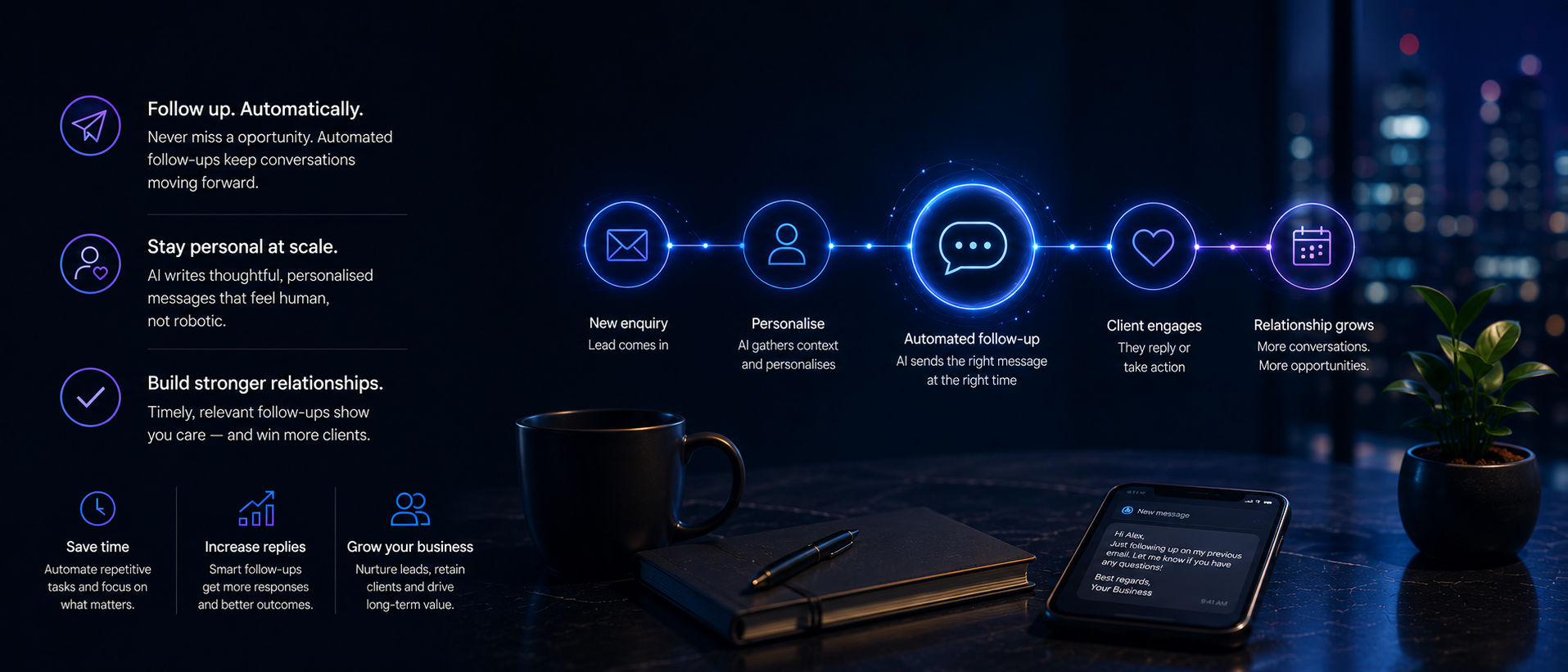
Quick Answer: Small businesses can automate client follow-ups, such as new enquiries, meetings, quotations, appointments, payments and renewals, by using AI and CRM tools to trigger the right message at the right time, while keeping a human in control of anything sensitive. The result is fewer missed follow-ups without clients feeling processed.
At a Glance
Client follow-ups are often missed because of timing, workload and unclear ownership
Automation should handle the trigger and the draft; a person should stay responsible for tone, judgment and anything sensitive
The AI Workforce Human Follow-Up Model gives a repeatable structure: Trigger, Context, Purpose, Draft, Control, Stop, Escalate, Measure
A follow-up boundary matrix helps decide, in advance, which follow-ups can run automatically and which always need a person
UK businesses must treat service messages and marketing messages differently under PECR and UK GDPR
What's Covered: Why follow-ups get missed, what automation should and shouldn't do, the Human Follow-Up Model, a boundary matrix, a real inline template, a worked example, personalisation, the UK legal line between service and marketing messages, measurement, and escalation.
Why Client Follow-Ups Get Missed
Client follow-ups are often missed not because a business does not care, but because the next action depends on someone remembering to complete it at the right time. A quotation sent on a Tuesday afternoon, a meeting that ended with "I'll follow up next week," a payment that's a few days overdue: each one relies on a person noticing and acting at the right moment, and the busier the week, the more of these moments get missed.
The cost is not always visible. A prospective client who receives no follow-up after a proposal may go quiet or choose another supplier without explaining why. Automating the trigger reduces reliance on manual reminders, although setup, monitoring and exception handling still require staff time.
What Automated Client Follow-Ups Actually Means
Automated client follow-up is not about replacing the conversation. It means the system reliably notices when a follow-up is due, such as three days after a quotation with no reply, and either drafts a message for a person to send or sends a simple, low-risk message directly. The judgment about what to say, and whether to say it at all, stays with a person for anything that isn't routine. For a deeper look at automated sequences, reply classification, stop conditions, CRM states and multichannel follow-up, see our AI follow-up automation guide.
This is a narrower idea than general customer service automation. It applies specifically to the follow-up moments in a client relationship: after a new enquiry, after a meeting, after a quotation, before an appointment, when information is missing, when a payment is due, at renewal time, for a periodic check-in, and when a client has gone quiet. A chatbot answering FAQs on a website is a different, related tool, and only a small part of this picture.
The AI Workforce Human Follow-Up Model
We use an eight-step model, supported by AI and CRM tools, to design follow-up automation that stays accountable to a person at every stage:
Trigger: the event that starts the clock: a quotation sent, a meeting ended, a payment due date
Context: the minimum relevant information needed for the message, such as the specific proposal, appointment, or agreed next step
Purpose: what this follow-up is actually for: closing a gap, confirming a detail, checking in
Draft: the system prepares a message using the context and purpose, not a generic template
Control: a person reviews or approves the message before anything sensitive goes out
Stop: a clear condition that ends the sequence, such as a reply, a booking, or a set number of attempts
Escalate: a rule that routes the follow-up to a person immediately if it meets certain conditions
Measure: tracking whether the follow-up achieved its purpose, not just whether it was sent
Follow-Up Boundary Matrix
This table shows which common follow-ups can generally run with light automation, and which should always involve a person directly.
Follow-up type | Automation role | Human role |
|---|---|---|
New enquiry acknowledgement | Send immediate confirmation | Write the substantive reply |
Post-meeting summary | Draft a summary from notes | Review and send |
Quotation follow-up | Trigger reminder after set days | Decide on any discount or change |
Appointment reminder | Send automatically | Handle rescheduling requests |
Missing information request | Send automatically | Answer any questions raised |
Payment reminder (first notice) | Send automatically | Handle disputes or hardship cases |
Payment reminder (overdue) | Flag for review | Send personally |
Renewal notice | Draft and schedule | Approve pricing and terms |
Client check-in | Draft from account history | Personalise and send |
Dormant client reactivation | Flag as dormant | Decide whether and how to reach out |
Complaint or dispute | Never automate | Always human |
Sequence stop condition | Detect reply or booking | Confirm and close the loop |
How AI Workforce Supports Client Follow-Ups
AI Workforce can support this process by connecting approved follow-up rules to the systems a business already uses. Depending on the selected agents and integrations, the workflow can draw on CRM records, draft emails in an agreed tone, create calendar actions, trigger multi-channel steps, record replies and route exceptions to a person.
The important part is not sending more messages automatically. It is ensuring that every follow-up has a defined trigger, relevant context, a stop condition and a named human owner. The final capabilities and channels depend on the selected package, with overall investment set out in our guide to AI agent cost.
Not Sure Where to Start?
Map which client follow-ups are safe to automate before you build anything.
A Real Template You Can Use Today
Rather than promise a downloadable file, here is the structure directly, built around a "Proposal sent" workflow. Copy this into a spreadsheet or CRM automation:
Field | Example |
|---|---|
Trigger event | Proposal sent to client |
Wait period | 3 working days, no reply |
Context pulled | Client name, proposal date, service discussed and agreed next step |
Purpose | Confirm proposal was received, offer to answer questions |
Draft message | "Hi [name], just checking you received the proposal we sent on [date]. Happy to talk through any of it if useful." |
Approval needed | Yes, during the pilot. Automatic sending may be enabled later for the approved first-follow-up template if the message remains low-risk, legally permitted and within the defined workflow. |
Internal approval rule | Human approval required above the business's agreed proposal-value threshold |
Stop condition | Client replies, books a call, or proposal is accepted or declined |
Escalate if | Client asks about price, raises an objection, or does not respond after two attempts |
Owner | Account manager assigned to the client |
Review frequency | Weekly, as part of pipeline review |
Worked Example: Following Up After a Proposal
Illustrative example; timings and approval thresholds should be set by the individual business.
A small consultancy sends a proposal to a prospective client on a Monday. Three working days later, with no reply, the system triggers a follow-up: it pulls the client's name and the date the proposal was sent, then drafts a short, specific message asking if the proposal arrived and offering to answer questions. During the pilot, the account manager approves the first few messages. Once the wording, CRM fields and stop rules have been tested, the business allows this low-risk first follow-up to send automatically.
The client replies two days later with a question about payment terms. The system recognises this as an escalation condition; pricing and terms fall outside what it's allowed to answer, and routes the conversation to the account manager, who reviews the context and replies personally.
This retains the human touch because:
The first message was accurate and specific, not a generic nudge
A person, not the system, answered the moment real judgement was needed
The sequence stopped the instant the client engaged, rather than continuing to send scheduled messages
Nothing about the pricing conversation was automated
Personalisation That Reflects Real History
Personalisation in a follow-up sequence means the message reflects what has actually happened with that client, not just their name. A CRM can supply the minimum context needed for the follow-up, such as the proposal date, service discussed and agreed next step. Only details that improve the accuracy or usefulness of the message should be included; proposal value or broader meeting notes may support internal routing, but they do not normally need to appear in the client-facing draft. Well-applied personalisation like this stands in contrast to a generic mail-merge nudge, which clients can spot immediately.
Service Messages, Marketing Messages, and UK Law
Under UK law, it matters whether a follow-up is purely administrative or contains direct marketing. A service message is sent for an administrative or customer-service purpose, such as confirming an appointment, providing requested information or explaining an existing payment. If the message includes promotional material, cross-selling or encouragement to purchase another service, it may count as direct marketing regardless of the label placed on it.
The rules also depend on the recipient and communication channel. Under PECR, marketing emails and texts to corporate subscribers, including most limited companies and LLPs, generally do not require prior consent, although the sender must identify itself and provide a valid opt-out. Sole traders and some partnerships are treated as individual subscribers, meaning consent or a valid soft opt-in is generally required. Where a named business contact or other personal information is used, UK GDPR also applies, including lawful basis, transparency and objection requirements.
A renewal notice is a good example of where the line can blur: a plain reminder that a contract is ending is administrative, but the same message with upsell language attached becomes marketing. For further detail, see the ICO's guidance on electronic and telephone marketing and on business-to-business marketing.
When Should Escalation Send a Follow-Up to a Person?
Escalation in a follow-up workflow works on two levels. Explicit rules always take priority: a complaint, a dispute, a cancellation, or a client directly asking for a person should escalate immediately, with no exceptions, regardless of what any other signal suggests.
Alongside these fixed rules, AI-supported signals can flag conversations that need a closer look, such as a sharp change in tone, repeated unanswered attempts, or language suggesting frustration. These signals should route the follow-up to a person for review rather than triggering an automatic response, because judgement calls like these are exactly where automation should stop and a person should start.
Measuring Whether Follow-Ups Are Working
The right metric depends on the type of follow-up, so it is worth tracking several rather than relying on one number. Broadly useful measures include reply rate, time to first reply, missed-follow-up rate, escalation rate, client satisfaction after a follow-up sequence, number of manual overrides, and sequence completion rate. The most relevant metric also changes by workflow: a proposal follow-up should be judged on whether it produced a meaningful reply or a booked discussion. When a follow-up reaches the point where a prospect is ready to book, our guide to AI appointment setter tools covers qualification, calendar routing and booking in more depth. An appointment reminder should be judged on confirmation and attendance, a missing-information request on completion rate, a payment reminder on payment or an agreed resolution, and a renewal notice on whether a decision was reached before the renewal date.
A high automation rate, meaning the proportion of follow-ups that required no human intervention, is not automatically a positive outcome on its own. It should be considered alongside reply quality, client satisfaction, complaint rates and whether the workflow escalated the right cases. Reviewing these figures regularly, rather than treating automation as a one-off setup, is what shows whether it is genuinely reducing repetitive follow-up administration or quietly annoying clients.
The Principle to Keep
Automation should close gaps in memory and timing, not replace judgement. If a follow-up needs a decision, concession or empathy, it goes to a person. Lower-risk routine steps can run in the background under defined rules, stop conditions and regular review.
Frequently Asked Questions
Will automating follow-ups make my business feel impersonal?
Not if the automation only handles the trigger and the routine drafting, while a person stays responsible for anything that needs judgement. Relevant timing and accurate context help a follow-up feel considered, and the client should still be able to reply normally and reach the responsible person when needed.
What should I automate first?
Start with high-volume, well-defined and lower-risk follow-ups, such as routine appointment reminders or missing-information requests. Check that the message does not contain unnecessary sensitive information, and test the workflow before allowing automatic sending.
How do I know when a follow-up needs a person instead of automation?
Use explicit rules for anything involving complaints, disputes, pricing or a direct request to speak to someone, and treat AI-flagged tone or frustration signals as a prompt for human review, not an automatic response.
Key Takeaways
Client follow-ups are often missed when the next action depends entirely on someone remembering it
Automate the trigger and the draft; keep a person in control of judgement, tone and anything sensitive
Use the AI Workforce Human Follow-Up Model to design a workflow with a clear stop and escalation point
Check whether a follow-up is a service message or marketing message before automating it under UK law
Track several metrics, not just time saved, to know if a workflow is actually working
Related Reading
Why Businesses Lose Leads to Slow or Missed Follow-Up
AI Agent Cost
AI Agents for Small Businesses
AI GDPR Compliance for UK Businesses
AI Receptionist Pricing UK
Is Your Business Ready for AI? Readiness Assessment
Want Help Designing a Follow-Up Workflow That Keeps You in Control?
We'll help you build one around your team, not replace it.
About the Author
Clara Miller is a Content Specialist at AI Workforce. This guide was reviewed by Seth Ayush, Co-Founder of AI Workforce.
Last updated: 16 August 2026
Sources: Information Commissioner's Office (ICO), guidance on PECR electronic and telephone marketing, and business-to-business marketing.