AI Follow-Up Automation: 8 Workflows, Rules & Examples
Posted On: July 14, 2026
Written by Seth Ayush, Co-Founder of AI Workforce · Reviewed by Luca Controlo · Last updated: September 2026
Sales opportunities often stall after the initial conversation, when a reply never comes back, a quote goes unchased, or a lead that went quiet is never followed up again. AI follow-up automation can reduce that operational gap by tracking every open conversation, sending or preparing the next message according to the approved cadence and conversation state, reading what a reply actually means, and keeping the CRM accurate without a rep having to remember any of it. This guide explains how these systems work, what should trigger a follow-up, when AI should stop and hand over to a person, and how to build a workflow that stays compliant and safe as it scales.
Quick Answer: AI follow-up automation handles the operational side of chasing unanswered leads, quotes and proposals, and stalled sales conversations. It tracks which conversations are open, sends timely follow-up messages on a defined cadence, classifies what each reply actually means, updates CRM records automatically, and escalates to a person whenever a reply is ambiguous, an objection appears, or a prospect opts out. The goal is not more messages; it is the right message, or no message, sent at the right moment.
8 Follow-Up Workflows You Can Automate
Follow-up automation is not one workflow; it is a set of related workflows, each with its own trigger, automated action and point where a human should check in.
Workflow | Trigger | Automated action | Human check |
|---|---|---|---|
1. Unanswered Inbound Lead Follow-Up | A lead enquires but does not reply to the first response | Send a defined sequence of follow-up touches on a set cadence until a reply, meeting or opt-out | Review before sending to a high-value or sensitive account |
2. Quote or Proposal Follow-Up | A quote or proposal is sent and no decision follows | Chase on a schedule, referencing the specific quote, until a reply or expiry | Any pricing question or objection routes to a person |
3. Cold Prospect Follow-Up | No reply after the first outbound message or previous approved touch | Continue the approved follow-up cadence until its defined end point, unless another stop condition occurs | Objections, sensitive replies or uncertain intent route to a person; opt-outs and suppression stop the workflow automatically |
4. Post-Call Follow-Up | A sales call or discovery meeting ends | Send a summary, agreed next steps and any promised materials shortly after the call | Confirm action items match what was actually agreed on the call |
5. Meeting No-Show Follow-Up | A booked meeting is missed | Send a reschedule message and offer new times automatically | Repeated no-shows from the same contact should be reviewed by a person |
6. Re-Engagement Follow-Up | A lead has gone quiet for an extended, defined period | Send a low-pressure check-in on a longer interval to reopen the conversation | Confirm the contact is still valid and has not previously opted out |
7. Out-of-Office Rescheduling | An automated out-of-office reply is detected | Pause the sequence and reschedule the next touch for after the stated return date | Uncertain or missing return dates should default to a person's judgement |
8. Unanswered Call Follow-Up | A sales call is attempted but the lead does not answer | Send an approved SMS or email follow-up, create the next call task and update the CRM with the unanswered-call outcome | Pause or review where repeated attempts, an objection, an opt-out or unusual context is present |
At a Glance
What it is: software that tracks open sales conversations, decides when a follow-up is due, drafts or sends the next touch, and updates CRM records without manual tracking
Practical uses: consistent timing, reply classification at volume, and keeping CRM state accurate without a rep logging it by hand
Where it commonly fails: treating an email open or click as genuine interest, continuing a sequence after an opt-out or objection, and sending on a rigid schedule regardless of what a reply actually said
Key legal considerations: UK GDPR for any identifiable contact, and PECR separately for email, SMS and call channels, which are regulated differently from each other
Safest way to evaluate a tool: run it in draft-only mode against real historic threads before letting it send anything automatically
What's Covered
Fundamentals
Autonomy and Control
Compliance and Delivery
Buying and Measuring
What Is AI Follow-Up Automation?
AI follow-up automation handles the operational side of staying in touch with a prospect: scheduling the next message, drafting it from the context of what has happened so far, classifying a reply, and updating the CRM the moment something changes. It is different from a basic reminder tool that simply tells a rep to check in, because it can draft the actual message and, within rules you set, send it.
The most useful way to think about this category is that follow-up becomes a system state rather than a memory task. Instead of a rep trying to hold forty open threads in their head, each lead sits in a defined state, such as awaiting reply, positively engaged, objection raised, or suppressed, and the system moves a lead between states based on what has actually happened, not on whether a person remembered to check.
Manual follow-up becomes increasingly difficult to manage consistently as the number of active leads and conversations grows, which is exactly why this category has grown. But automation only helps if it makes good decisions about what a reply means. Sending more messages faster is not the goal; sending the right message, or no message, at the right moment is.
How Does AI Follow-Up Automation Work?
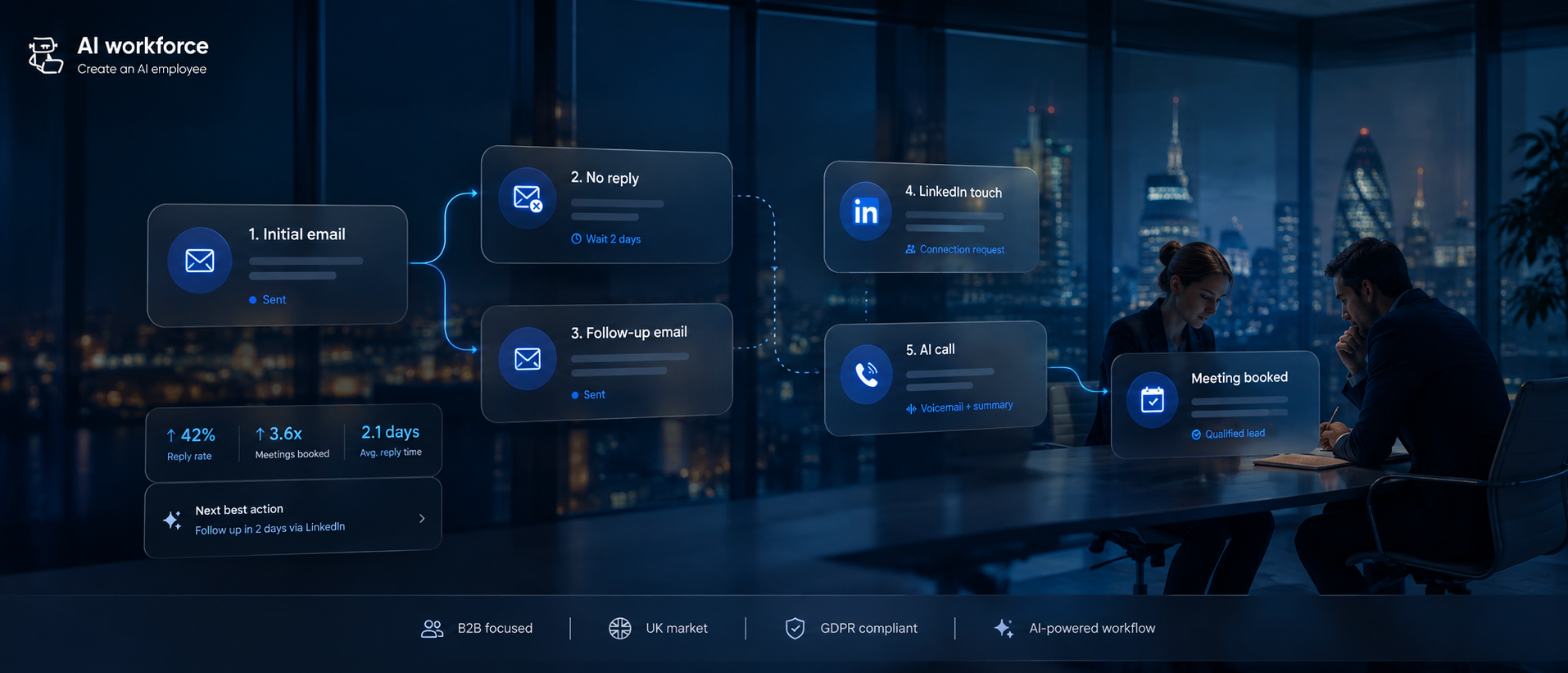
At a basic level, an AI follow-up system reads a reply, checks the lead's current CRM state, classifies what the reply means, and decides what happens next: another touch, a pause, a change in channel, or a handoff to a person. Where no reply arrives, the system checks whether a follow-up is due based on the cadence and rules you have configured, then drafts or sends it.
More capable systems also retrieve the previous messages in the thread, relevant CRM notes, the current opportunity stage and recent account activity before classifying the latest reply. This matters because the same sentence can mean something different depending on what was said immediately before it; "let me check and get back to you" reads very differently after a pricing question than after a request to stop emailing.
Illustrative flow. Which steps run automatically versus require a person's review should be a deliberate configuration choice, not a default.
Every step in this flow depends on accurate, current CRM data. A system that classifies replies well but writes the outcome back to the CRM inconsistently will still produce a messy pipeline, since the next action for any lead depends on the system trusting what it already knows about that lead.
What Should Trigger an Automated Follow-Up?
Not every signal deserves the same response. A design risk is treating weak behavioural signals as though they were explicit intent, so it is worth separating them explicitly before building any trigger logic.
Explicit signals, worth acting on directly:
A direct reply of any kind
A meeting request or calendar action
A pricing or contract question
A form completed on your site
An explicit objection stated in a reply
Indirect signals, worth treating as a clue rather than confirmed interest:
An email open
A link click
A repeated page visit
Time spent on a page
An inferred intent score from a third-party tool
Email opens in particular are increasingly unreliable. Privacy protections, automatic image proxying and security scanners can register an open without a human ever seeing the message, and a link can be clicked by a scanning tool rather than a person. A follow-up system should not aggressively increase cadence purely because a message was opened; it is a reasonable input into a wider decision, not a trigger to act on alone.
A time-based cadence should be defined for the specific sales process, then overridden immediately when an explicit signal changes the contact's state. Indirect signals can inform that decision but should not determine cadence on their own.
Reply Classification: Positive, Negative, Objection, Out of Office and Opt-Out
Reply classification is a central control point in this category because the classification determines whether the workflow sends, pauses, suppresses or escalates, which matters more than the quality of the drafted message itself.
No reply → Awaiting reply: continue the approved cadence; no human review typically needed
Positive interest → Engaged: pause the automated sequence immediately and route to a person
Simple question → Question raised: the system can draft an answer, but a person should review it, at least until the pattern is well established
Objection → Objection raised: route to an approved objection-handling path, or to a person, rather than continuing the standard sequence unchanged
Out of office → Temporarily unavailable: reschedule the follow-up for after the stated return date rather than continuing on the original cadence
Wrong contact → Invalid contact: update the record and treat the original contact as invalid; a request for a referral may be appropriate depending on how the reply was phrased
Not interested → Closed: stop the sequence; do not attempt a different angle automatically
Unsubscribe or explicit opt-out → Suppressed: AI Workforce's recommended operational standard is to suppress the contact immediately across every channel the system controls, not just the one the message arrived on, unless there is a documented reason and lawful basis to treat channel preferences separately
Meeting booked → Booked: end the prospecting sequence for that contact
Hard bounce → Suppressed: suppress the address
Spam complaint → Incident: stop all outreach to that contact and treat it as an incident worth investigating, not just a suppression event
When a positive reply is ready to move from qualification into an actual meeting, our guide to AI appointment setter tools covers calendar routing, booking and confirmation in more depth.
A useful way to picture how a lead actually moves through these states:
Awaiting reply → Engaged → Human handoff → Meeting booked
Awaiting reply → Objection raised → Human review
Awaiting reply → Not interested → Closed
Any state → Opt-out or complaint → Suppressed, immediately, regardless of what state the lead was previously in
Negative and non-standard replies deserve particular care, because similar-looking phrases can require very different actions. "Not interested" should stop the sequence. "Contact me in six months" should create a future follow-up state rather than a closed one. "Wrong person" should invalidate the contact. An out-of-office reply should pause until the stated return date rather than being treated as a decline. A system that collapses all of these into one generic negative category can either lose a viable opportunity by closing it too early, or, worse, keep contacting someone who has clearly asked to be left alone. Continuing an automated sequence after an objection or opt-out is one of the most damaging failure modes in this category, both for compliance and for domain reputation.
How Should AI Handle Uncertain Replies?
Not every classification should be treated as equally certain, and a good follow-up system should not act as if it were. Where a model has high confidence that a message is a routine out-of-office reply, a tested workflow may act on it automatically. A medium-confidence classification can prepare the next action without sending it. A low-confidence or conflicting classification should pause the workflow and go to a person.
A simple operating model:
High confidence: follow the approved automated action
Medium confidence: prepare the next action, but require a person's approval before it goes out
Low confidence: pause the workflow and escalate to a person rather than guessing
The threshold for each tier should be tested against real historic conversations rather than chosen arbitrarily, since what counts as "high confidence" varies by classification type and by how much historical data a business actually has.
What AI Can Send Automatically vs What Needs Approval
The right level of autonomy depends on the type of action, not a single blanket setting for the whole workflow.
Illustrative split. Start with lower autonomy and expand only where the classification accuracy has actually been checked, not assumed.
A simple way to frame it in four tiers:
Low autonomy: AI drafts a message; a person reviews and sends it
Medium autonomy: AI sends routine, low-risk follow-ups automatically, within rules that have been tested against real threads
Higher autonomy: AI classifies replies, adjusts cadence and routes contacts to the right list or person, still within defined limits
Never autonomous: overriding an opt-out, offering a commercial concession, handling a complaint, responding to an ambiguous or sensitive message, or recontacting a suppressed contact
If your main need is inbox triage, drafting, summarisation and follow-up rather than a full outbound sales sequence, our guide to the best AI email assistants compares 15 tools for Gmail, Outlook and shared inbox workflows.
AI Workforce Insight: the hard part of automated follow-up is not generating another email. It is correctly deciding when not to send one. A mature workflow treats positive replies, objections, opt-outs, out-of-office messages and uncertain intent as different states, each with a different action and a different escalation rule, rather than treating every non-reply the same way.
When Should AI Stop Following Up?
AI should stop following up when a prospect opts out, clearly declines, books a meeting, becomes invalid, or sends a message where intent is genuinely ambiguous. Automated follow-up should pause on ambiguity rather than guessing what a prospect meant, since a wrong guess in either direction can either close a viable opportunity too early or continue contacting someone after the workflow should have paused.
Beyond that core rule, a sequence should also stop, or at minimum pause for review, when: sending would exceed an agreed frequency limit, the domain or mailbox shows signs of a deliverability problem, the contact has been unreachable across every channel for an extended period, or a previous message in the sequence bounced or was flagged.
CRM State and Workflow Design
What is a CRM state machine? A CRM state machine treats each lead as being in a defined operational state, such as awaiting reply, engaged, objection raised, booked or suppressed. New events, such as a reply, a bounce or an opt-out, move the contact between those states and determine what the workflow is allowed to do next.
The CRM underneath the workflow matters because it remains the system of record for contact state, ownership, suppression and next actions. If you're choosing that underlying platform, our Best AI CRM comparison covers Salesforce, HubSpot, Microsoft Dynamics 365, Zoho, Pipedrive and Freshsales across AI capability, automation, pricing, integrations and governance.
For an automated system to make good decisions, the CRM needs to store more than a static contact record. At minimum, track:
Last contact date and channel
Reply category, using the classifications set out above
Next scheduled action and date
Owner, meaning which person is responsible if the lead needs human attention
Lead status within the wider pipeline
Suppression status, including the reason
Qualification state, separate from engagement state
Escalation state, showing whether the lead is currently waiting on a person
Every reply should update these fields automatically rather than requiring a rep to log it after the fact. A system that classifies replies accurately but does not write the outcome back to the CRM consistently will still degrade into the same manual-checking problem it was meant to solve, just one step removed. When a qualified conversation is moving toward a sales call, our AI Sales Meeting Automation guide covers the wider workflow around booking, qualification, meeting preparation and post-call follow-up. Once a lead is an active opportunity, our guide to AI sales pipeline management explains how those CRM signals can support stage updates, next actions, stalled-deal detection and forecasting. The same follow-up logic applies once someone is an existing client rather than a lead, covered in our guide to automating client follow-ups.
Follow-Up Automation for Trades and Construction Businesses
For many trades and construction businesses, follow-up centres on quotes, estimates, missed enquiries and booked visits. A customer may request a quote and then go quiet while comparing options or waiting for a project decision, making consistent follow-up difficult to manage manually. This is a practical use case for follow-up automation because quote status, cadence and stop conditions can be represented explicitly in the CRM. A quote-follow-up sequence can chase an outstanding quote on a defined cadence, reference the specific quote or job details, and pause the moment a customer replies, accepts, or asks a question that needs a person's answer. A longer re-engagement sequence can then check back in with customers who went quiet on an older quote, without needing a rep to remember who is still open.
Automated chasing of outstanding quotes and estimates on a set schedule
Re-engagement follow-up for customers who went quiet weeks or months ago
CRM state that reflects where each quote actually stands, not just when it was sent
Worked Example: Following Up a Quote for a Small Building Business
Illustrative workflow, not a measured client result. Timing should reflect the customer’s expectations, the quote’s validity and the business’s approved contact rules.
A builder sends a customer a quote for a kitchen renovation. The quoting system or CRM records the quote reference, scope, amount, expiry date and person responsible for the enquiry.
Quote sent: mark the record as awaiting a decision. Schedule a reminder only if the contact rules allow it.
No reply: prepare or send an approved reminder referencing the correct quote and job. Check first that the customer has not already replied through another connected channel.
Customer asks a question: pause the reminder sequence and assign the conversation to the builder. AI can prepare a summary, but should not change the price, scope or promised start date.
Customer accepts: stop quote chasing, update the CRM and create a task for the person responsible to confirm the booking and next steps.
Customer declines or opts out: stop the sequence and record the outcome. Apply any contact restriction across the connected follow-up systems.
Quote expires without a decision: end the scheduled sequence and flag the record for review rather than continuing indefinitely.
The useful outcome is a clear next action for every outstanding quote. Measure replies, accepted quotes, time spent chasing and incorrect follow-ups—not simply the number of reminders sent.
AI Workforce's follow-up automation service is built to handle this kind of quote-chasing and re-engagement workflow for trades and construction businesses, so outstanding quotes can follow a defined workflow without relying entirely on someone remembering each next action.
Email, LinkedIn, SMS and Calling
Follow-up sequences increasingly span more than one channel, and each carries a different risk profile.
Email, LinkedIn, SMS and calling each have different platform, deliverability and compliance constraints. Automating LinkedIn activity needs particular care: check whether a tool uses an approved API or partner integration, or instead relies on browser-level automation, credential sharing or scraping, since the latter carries real account-restriction risk and is enforceable against the account holder under LinkedIn's own terms, not just against the tool provider. SMS and calling bring PECR's rules on automated and live calls into play directly, and these are stricter than the email rule in one important respect: unlike electronic mail, PECR's rules on live and automated calls apply to corporate subscribers as well as individual subscribers, so calling is not simply another outreach channel governed by the same rules as corporate email. Live calls need screening against the Telephone Preference Service and Corporate Telephone Preference Service before dialling, and automated calls need specific consent regardless of subscriber type.
Combining channels inside one coordinated sequence can make follow-up easier to manage consistently, provided suppression and channel permissions are enforced across the whole workflow, but every additional channel is also an additional place where a suppression or opt-out needs to be honoured consistently, not just on the channel it arrived on.
UK GDPR and PECR for Follow-Up Automation
Automated follow-up touches personal data, and often marketing communications, so both UK GDPR and PECR apply. This section is general information rather than legal advice.
Corporate subscribers versus individual subscribers. PECR's electronic mail marketing rule does not apply to corporate subscribers, meaning companies, limited liability partnerships, Scottish partnerships and some government bodies, provided you do not conceal your identity and give a valid opt-out address. Sole traders and certain types of partnership are treated as individual subscribers, the same as a private person, and generally need consent or the soft opt-in before you can email or text them. If you are not sure which category a contact falls into, treat them as an individual subscriber.
UK GDPR applies regardless of subscriber type. If a record identifies a person, such as a name and email address or job title, UK GDPR applies to processing it, even in a business context. You need a lawful basis, most often legitimate interests for B2B contacts, supported by a documented assessment rather than assumed by default.
Right to object. Any individual has an absolute right under UK GDPR to object to their data being used for direct marketing, and you must stop processing it for that purpose once a valid objection arrives. Where you are marketing to a corporate subscriber, PECR's electronic mail consent rule differs from the rule for individual subscribers. However, if the campaign processes a named employee's personal data, UK GDPR still applies to that processing, including relevant direct marketing rights, because the subscriber for PECR purposes being a company does not remove the individual's own data protection rights. In practice, any valid objection or unsubscribe request should be honoured promptly regardless of subscriber type.
Suppression must work across every channel a workflow touches, not just the one an opt-out arrived on. A contact who unsubscribes from email but is still reachable through a connected SMS or calling channel has not genuinely been suppressed.
Tracking pixels are a separate compliance point. Where a pixel in a follow-up email stores or accesses information on the recipient's device, PECR's rules on cookies and similar technologies apply on top of the electronic mail rules, for all subscriber types.
Data retention and provenance matter too. Keep a record of where each contact's details came from, and do not retain follow-up and engagement history indefinitely by default; define a retention period appropriate to the activity.
Our guide to AI and GDPR compliance for UK businesses covers the wider framework in more depth.
Deliverability and Frequency Limits
Automation amplifies whatever is already true about your list and infrastructure. If the underlying list is poor, automated follow-up does not fix the campaign; it scales the problem faster than a person sending manually ever could.
The basics still apply: SPF, DKIM and DMARC configured and aligned on every sending domain. As of this guide's September 2026 review, Google's sender guidance for domains sending more than 5,000 messages a day to Gmail accounts includes SPF, DKIM and DMARC authentication together, plus one-click unsubscribe support for marketing and subscribed messages at that scale, and advises keeping spam complaint rates below 0.1% and avoiding 0.3% or higher. Verify the current guidance before configuring a live sending programme.
If email is a major part of your follow-up workflow, our guide to the best cold email software compares leading platforms on deliverability controls, mailbox infrastructure, personalisation, pricing and UK compliance.
Beyond authentication, a follow-up-specific system needs its own frequency discipline:
A sensible cap on how many touches a contact receives in a given period, across every channel combined, not just per channel
Automatic suppression on a hard bounce, rather than a manual clean-up run later
Monitoring for a rising complaint or bounce rate as a signal to pause a segment, not just a single contact
A defined point at which a stale, unresponsive lead exits active follow-up rather than sitting in the sequence indefinitely
Gradual, monitored increases in sending volume rather than an abrupt jump when a new sequence launches
Common Failure Modes
The main operational failure modes to test for include:
Treating an email open or click as confirmed interest and escalating cadence on that basis alone
Continuing a sequence after an opt-out, objection or "not interested" reply because a classification step misread it
Sending from a domain or mailbox with an existing deliverability problem, which repeated follow-up then makes worse
Losing suppression consistency across channels, so a contact who opted out of email still receives a text or LinkedIn message
Repeating the same message with only the date changed, rather than varying the angle across a sequence
Letting a stale, long-unresponsive lead sit in active follow-up indefinitely instead of exiting the sequence
What Does AI Follow-Up Automation Cost?
Costs for a follow-up automation project tend to follow the same broad pattern as other AI automation work.
Illustrative cost drivers. Actual pricing depends on scope, the number of channels involved and how much historical data needs reviewing.
These are AI Workforce internal planning ranges, not UK market averages or guaranteed quotations. Based on AI Workforce's own project scoping for custom automation builds, and drawing on the AI automation projects covered in our AI automation pricing guide, indicative ranges as of September 2026 are:
Simple automation (roughly £500 to £2,000): for example, a single-channel, time-based follow-up sequence connected to an existing CRM
Mid-range build (roughly £3,000 to £10,000): for example, multichannel follow-up with reply classification, suppression logic and CRM state tracking
Custom AI build (£10,000 and up): for example, a bespoke classification model trained on a business's own historical reply data, with routing and escalation rules tailored to a specific sales process
Ongoing monthly cost (roughly £200 to £800): monitoring, maintenance and support, separate from any underlying CRM or sending platform subscription
DIY option: platforms such as Zapier, Make or n8n can support a simpler workflow where someone in-house can configure and maintain it; software cost depends on platform, usage and hosting. Our guide to building AI agents without code covers that route in more depth
If follow-up is only one part of a wider AI sales workflow that also includes lead qualification, email or voice outreach, CRM updates and pipeline actions, see our guide to AI sales agent pricing in the UK for the broader total-cost model.
Which Tools Can Automate Lead Follow-Up?
The right tool depends on what starts the follow-up and what must happen when someone replies. A CRM workflow may be enough for scheduled quote reminders, while unanswered-call follow-up needs a recorded call outcome connected to the next action. AI reply handling adds another requirement: interpreting the response and deciding whether to pause, update the CRM or involve a person.
Tool type | Best suited to | What to check |
|---|---|---|
CRM-native automation | Quote reminders, lead-status updates and follow-up tasks | Can it use your quote status, stop on a reply and assign the next action to the right person? |
Sales engagement or sequencing platform | Approved email follow-up sequences | Can it stop on replies, enforce contact limits and keep suppression records consistent? |
Calling platform connected to a CRM | Follow-up after an unanswered sales call | Does it record the call outcome and trigger an approved message or next-call task without duplicating contact? |
Configurable workflow platform | Connecting forms, quoting software, calendars and CRM records | Are the required integrations available, and what happens if a step fails? |
AI-enabled follow-up system | Reply classification, contextual drafting and human handoff | Can you test its classifications, control sending permissions and audit its actions? |
What Tools Help Follow Up After an Unanswered Call?
Look for a calling platform that records the unanswered-call outcome, a CRM that stores contact status and ownership, and a workflow tool that can connect the two. These functions may be available within one platform or require an integration.
A practical workflow is: record the unanswered call → check contact permissions and recent activity → prepare an approved email or SMS, where appropriate → create the next call task → update the CRM. Stop or pause when the person replies, books, declines or opts out.
Confirm that the system distinguishes an unanswered call from a connected conversation, failed number or voicemail outcome. It should also prevent an automated message from being sent when a salesperson has already followed up manually.
Start with the software you already use. Add AI where interpreting replies or drafting from conversation context solves a real problem; a fixed reminder does not necessarily need an AI agent.
How to Evaluate a Vendor
Put these questions to a vendor directly before relying on a tool for live follow-up:
How does the system distinguish a strong signal, such as a reply, from a weak one, such as an open?
What reply categories does it recognise, and can those categories be customised for your sales process?
Can autonomy be set separately for different action types, rather than as a single on/off switch for the whole workflow?
How quickly does suppression apply across every connected channel once an opt-out is detected?
Does any LinkedIn or social automation use an approved integration, or browser-level access that could put an account at risk?
Can you export a full audit log showing what the system classified a reply as, and what action it took?
What happens to in-progress sequences if you pause or cancel the platform?
If follow-up is one part of a wider software decision, see our AI sales automation tools comparison. It compares options across CRM automation, prospecting, sales engagement and other sales workflows, helping you assess where a follow-up tool should fit within your existing systems.
A Four-Stage Follow-Up Automation Pilot
A staged pilot, tested against real, known conversations, allows performance and governance to be evaluated before the workflow runs unattended on live leads.
Illustrative roadmap. Compare AI decisions against what a rep actually did before trusting the system with a live segment.
Stage 1, Map and Label: map your current follow-up process and define reply states, stop conditions and cadence rules.
Stage 2, Historical Evaluation: test the system against historic conversation threads where you already know how each one was actually handled. These threads are useful precisely because you already know the correct outcome, which gives you a labelled benchmark for checking whether the system would have classified and routed each conversation correctly before it ever touches a new prospect.
Stage 3, Draft-Only Live Evaluation: run in draft-only mode on live leads, comparing the system's proposed classification and next action against what a rep decides.
Stage 4, Controlled Automation: automate only the lower-risk follow-ups for a limited live segment, with a person reviewing overrides and misclassifications closely.
How Should You Measure an Automated Follow-Up Sequence?
Open rate is a weak metric for the reasons covered earlier in this guide; treat it as a secondary diagnostic at most, not a measure of success.
Where a follow-up starts from a sales call rather than an email thread, a meeting assistant can capture the conversation, extract action items and push approved notes into the CRM before the next step is triggered. Our guide to the best AI meeting assistant tools compares the leading options for transcription, summaries, CRM workflows, pricing and governance.
A more useful hierarchy to track:
Positive reply rate
Qualified reply rate
Meeting rate
Sales-accepted opportunity rate
Time to response, both the system's and, where relevant, the human handoff
Unsubscribe rate
Complaint rate
Bounce rate
Human takeover rate, how often a lead needed to be handed to a person
Incorrect-classification rate, checked by sampling and reviewing actual replies against what the system decided
Cost per accepted opportunity
Is AI Follow-Up Automation Worth It?
AI follow-up automation is worth evaluating wherever a meaningful number of leads are going quiet simply because nobody had time to check back in. Its value depends on classification accuracy, stop-condition reliability, human takeover burden and commercial outcomes, not simply how many extra touches it sends. Measure human takeover rate, incorrect-classification rate and cost per accepted opportunity, not sequence volume, before judging whether it has paid for itself.
Related Guides
Follow-up automation sits alongside several other parts of the outbound stack covered elsewhere on this site:
Sources and Further Reading
Google: Email Sender Guidelines
LinkedIn: User Agreement
The AI Workforce Follow-Up State Model, confidence model, autonomy framework, workflow table, measurement hierarchy, custom-build ranges and pilot methodology described in this guide are AI Workforce frameworks and internal planning assumptions rather than industry standards or independently verified benchmarks.
This article is general information rather than legal advice; confirm current requirements directly against the sources above before relying on them for live marketing activity.
Frequently Asked Questions
What is AI follow-up automation?
AI follow-up automation uses software to monitor prospect activity, classify replies, schedule the next appropriate action, draft or send follow-up messages and update CRM records. A governed system should also know when to stop automation and hand a conversation to a person.
When should AI stop following up?
AI should stop following up when a prospect opts out, clearly declines, books a meeting, becomes invalid, or enters a workflow that requires human handling. Automated follow-up should also pause when intent is ambiguous rather than guessing what the prospect meant.
Are email opens and clicks a reliable sign of interest?
Not on their own. Privacy protections, image proxying and security scanners can register an open or click without a person actually engaging. Treat these as weak signals that inform a decision, not as confirmed intent that should trigger faster or more aggressive follow-up.
Do UK GDPR and PECR apply to automated follow-up?
Yes. UK GDPR applies to any identifiable contact, and PECR applies separately to email, SMS and call channels, which are regulated differently from each other. Corporate subscribers and individual subscribers, such as sole traders, are also treated differently under PECR. See the compliance section above for the details.
Can AI fully replace a rep's judgement on follow-up?
No. AI can assist with timing, drafting and classifying routine replies at volume. Positive interest, objections, complaints and ambiguous messages should still involve a person, at least until a workflow's classification accuracy has been properly tested.
What happens if the underlying contact list is poor quality?
Automation does not fix a poor list; it can propagate poor data or targeting across more automated actions. Clean, verified, properly sourced contact data matters more than any follow-up feature built on top of it.
How is this different from a basic reminder tool?
A reminder tool tells a rep to check in manually. AI follow-up automation can classify what a reply actually means, draft or send the next message itself, and update CRM state automatically, within rules a business sets in advance.
Can AI decide when not to follow up?
Yes. A well-designed AI follow-up workflow can stop or pause when it detects an opt-out, a clear rejection, a meeting booking, an invalid contact, or uncertain intent. A governed workflow needs explicit stop and pause conditions as well as rules for generating the next message.
Key Takeaways
Treat follow-up as a managed CRM state rather than relying on a rep's memory
Email opens and clicks are weak signals; a reply, meeting request or explicit objection is a strong one, and the two should not trigger the same response
Reply classification is a central control point because it determines whether the workflow sends, pauses, suppresses or escalates
Autonomy should vary by action type: draft-only for sensitive replies, automatic sending only for tested, low-risk touches, and never automatic for opt-outs or complaints
UK GDPR applies to any identifiable contact, and PECR applies separately across email, SMS and call channels
Automation amplifies whatever is already true about your list and infrastructure, for better or worse
Track qualified reply rate, human takeover rate and cost per accepted opportunity, not open rate or sequence volume
Pilot any workflow in draft-only mode against real historic threads before trusting it with live leads
This article is general information rather than legal advice. UK GDPR and PECR rules are established, but guidance and enforcement priorities continue to develop, particularly around AI-assisted reply classification. Take independent legal advice before relying on automated follow-up for live marketing activity.
Ready to Build a Properly Governed Follow-Up Workflow?
We will help you map your current follow-up process, identify which replies and actions are suitable for bounded automation, and build a piloted workflow that respects opt-outs and deliverability before it runs on live leads.
About the Author: Seth Ayush is Co-Founder of AI Workforce, a British AI company building AI agents for UK businesses. He works on how AI Workforce's outreach and workflow agents are designed, tested and deployed, with a focus on reply classification, escalation logic and compliance before a system is trusted with real prospects.
About the Reviewer: This article was reviewed by Luca Controlo of AI Workforce. Luca reviews AI Workforce's guides for accuracy and practical relevance, checking that claims about automation capability, cost and compliance hold up against how these workflows actually run for UK businesses.
Editorially reviewed and updated: September 2026.
This article is general information rather than legal advice. Vendor pricing and features change frequently; confirm current details directly with each vendor before purchasing. Take independent legal advice before relying on automated outreach or scoring for live commercial activity.
© 2026 AI Workforce Ltd. All rights reserved.