AI Document Automation: How It Works, Use Cases and Risks
Posted On: July 30, 2026
Written by Rodi Taze, Co-Founder of AI Workforce · Reviewed by Luca Controlo, AI Adoption and Marketing Automation Lead at AI Workforce
Last updated: August 2026
Quick answer: AI document automation uses optical character recognition, machine learning and, increasingly, generative AI to extract data from business documents, check it against expected values, and route it to the right system or person. It works best on structured, repetitive paperwork such as invoices, forms and applications. The goal is not zero human involvement. It is to automate high-confidence documents while routing low-confidence extractions and genuine exceptions to a person.
At a Glance
AI document automation extracts, validates, generates and routes data from invoices, contracts, forms and applications, using a mix of OCR, machine learning and AI
Modern platforms can often classify and extract fields from varying layouts without a fixed template for every document design, though a target schema and confidence thresholds still matter
The clearest wins are high-volume, repetitive document types where the layout and fields are broadly predictable
Extraction errors still happen, including wrong-field mapping and silent errors that pass validation. Confidence thresholds and human exception handling matter as much as raw automation speed
A good platform integrates with the systems you already use rather than replacing your system of record, and can extend into document generation and e-signature readiness
UK GDPR applies wherever a document contains identifiable personal data, which covers most invoices, contracts and application forms
What's Covered
What Is AI Document Automation and How Does It Work?
What Documents Can AI Document Automation Handle?
Can AI Process Documents Without Fixed Templates?
The AI Workforce Document Automation Model
The Document Automation Boundary Matrix
Document Automation vs Intelligent Document Processing
What Are the Best AI Document Automation Use Cases?
Worked Example: Automating Supplier Invoices
How Do You Handle High-Volume Document Processing?
Enterprise-Scale Governance
Document Automation vs Manual Processing
What Should an AI Document Automation Platform Include?
How Do You Choose the Right AI Document Automation Platform?
Document Generation and Electronic Signing
UK GDPR and Document Automation
How to Measure Whether It's Working
Common Mistakes
A Four-Week Rollout
Frequently Asked Questions
Key Takeaways
What Is AI Document Automation and How Does It Work?
Document automation refers to using software to handle the repetitive parts of working with paperwork: pulling out data, checking it, applying a template, and routing the result to the right person, without someone retyping it by hand. AI is extending this from a rules-based system into something closer to genuine document understanding.
Earlier document automation systems often relied heavily on fixed templates and predefined rules, which made them less tolerant of changing layouts. Modern document AI uses OCR, machine learning and, increasingly, generative AI to interpret text, tables, layouts and document fields. This allows modern platforms to handle considerably more layout variation than workflows built primarily around fixed templates and predefined fields. Generative AI adds the ability to summarise or rewrite extracted content once it has been pulled out of the source document.
Most modern platforms expose this through an API, so the extraction and routing logic can plug directly into the systems that already run your business, rather than living in a separate silo.
In our experience, the businesses that get the most value treat document automation as a way to remove repetitive data entry on high-volume, predictable documents, not as a way to remove human review from anything that carries real financial or legal weight.
What Documents Can AI Document Automation Handle?
A tool's range varies a lot between platforms. Some specialise in a handful of business documents, invoices, contracts and purchase orders, while others aim to cover a much wider range of formats.
Some modern platforms can process several document formats through a common workflow, while specialised or highly variable documents may still require a dedicated processor, schema or custom extraction configuration, similar to the custom extractors offered by platforms such as Google Document AI for organisation-specific document types. Document formats worth checking before you commit include scanned images, native PDF, Word documents, electronic forms, and structured exports from other systems.
Beyond the common categories above, it is also worth confirming a platform can handle claims documents, compliance submissions, mixed document packs, and email attachments that contain several document types bundled together, since these are common in practice but less predictable than a single-format upload. Specialist professional documents, including drawings, specifications and technical reports, also need tighter verification; our guide to AI tools for architects explains how this applies to architectural workflows. Documents containing handwriting remain harder to process reliably than typed or printed text, and typically warrant a lower confidence threshold and closer review
The bigger efficiency gain comes when multiple document sources feed the same governed pipeline, rather than each new document type creating another manual process.
Can AI Process Documents Without Fixed Templates?
Can AI process documents without manual templates? Yes, to a meaningful degree. Modern document AI can often classify and extract fields from varying layouts, different suppliers, different form designs, and different scan quality, without a person building and maintaining a manual template for every single document design. This is one of the clearest practical differences between older rules-based automation and current document AI, and it is a large part of why onboarding a new supplier or document source no longer has to mean a manual configuration project.
This capability comes with real limits worth being clear about:
A target schema, the list of fields you actually need extracted, still has to be defined before the system knows what to look for
A genuinely unfamiliar layout can reduce extraction confidence, even where the system copes reasonably well with routine variation
Handwriting and poor-quality scans remain more difficult to extract reliably than typed or printed text
Low-confidence fields still need to be routed to a person rather than accepted automatically
Specialist or highly unusual document types may still need a custom processor, schema or extraction rule rather than relying on general-purpose extraction alone
Template-free does not mean configuration-free. The model interprets layout variation, while the target schema, validation rules, confidence thresholds and approval controls still define what the workflow should accept, which is what makes onboarding a new document source considerably faster than it used to be.
The AI Workforce Document Automation Model
Most document automation tools are built around a version of the same underlying pattern, even where the interface looks different. We call this the AI Workforce Document Automation Model, and it is a useful way to check whether a specific tool, or a specific document type, is actually a good fit.
The nine stages behind a well-configured document automation workflow
Capture: the document enters the workflow from email, upload, scanner, API or a connected system
Classify: the system identifies whether it is an invoice, contract, application, purchase order or another document type
Extract: it pulls the required fields, tables, text and entities from the document
Validate: extracted values are checked against expected formats, business rules and existing system data
Decide: the workflow determines what should happen next, based on predefined rules and, where appropriate, an AI reasoning layer
Route: approved information is sent to the correct CRM, accounting platform, document store, workflow or person
Review: low-confidence, unusual or consequential cases are escalated to a named person
Record: an audit trail is kept of what was extracted, changed, approved and routed
Learn: corrections and exception patterns are reviewed and, where the platform supports retraining or configurable rules, used to improve the workflow over time
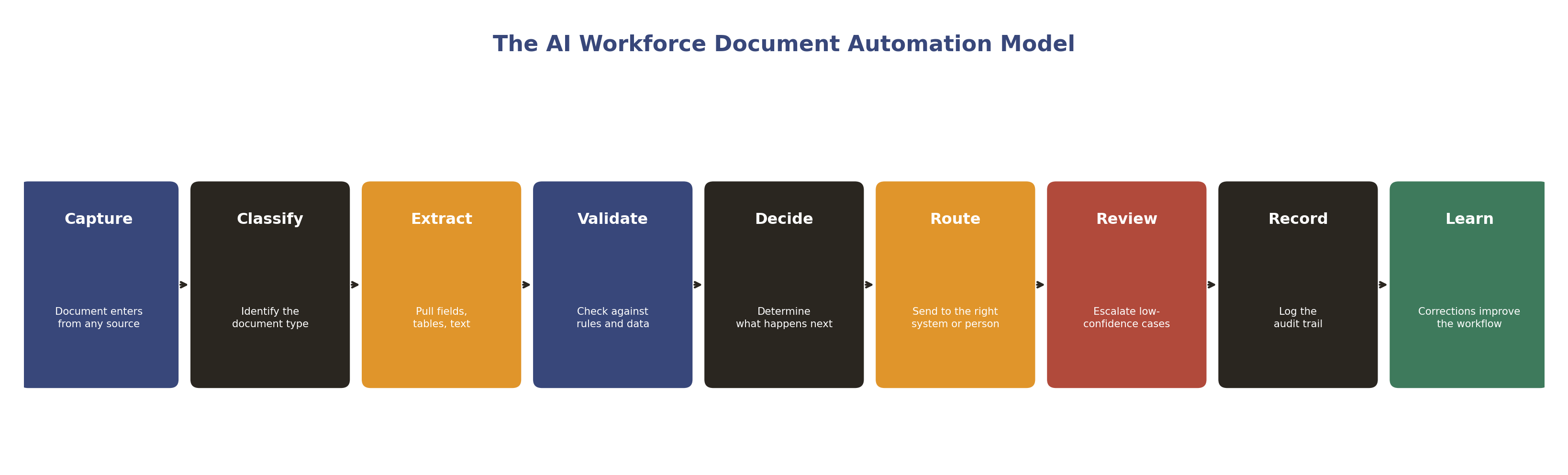
The AI Workforce Document Automation Model is an AI Workforce framework, not an industry standard.
A tool that jumps straight from Extract to Route, with no Validate, Review or Record step, is one to be cautious about. The Validate, Review and Record stages are what separate a system you can trust with real documents from one that quietly lets errors through.
The Document Automation Boundary Matrix
Not every document or field carries the same risk, and treating them all the same is where document automation rollouts tend to go wrong. This is how we group document work by how much autonomy is appropriate.
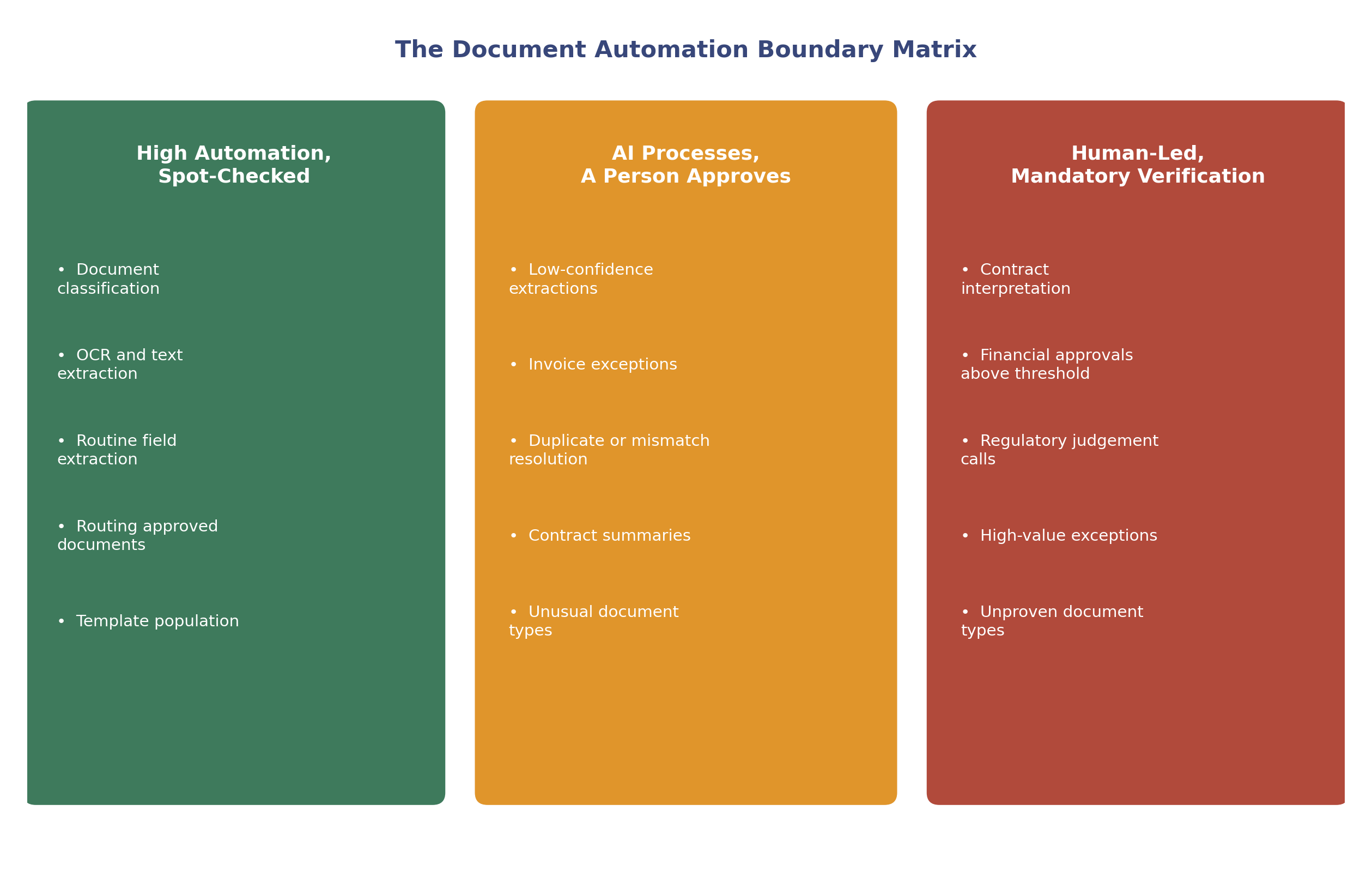
Illustrative starting point. Your own risk tolerance and document volume should adjust where a task sits.
High Automation, Spot-Checked
Document classification
OCR and text extraction
Routine field extraction from a known template
Routing already-approved documents to the correct system
Populating a document from a template
AI Processes, A Person Approves
Low-confidence extractions flagged by the system
Invoice exceptions and mismatches
Duplicate or conflicting record resolution
Contract summaries prepared for review
Unusual or previously unseen document types
Human-Led, Mandatory Verification
Contract interpretation and legal commitments
Financial approvals above an agreed threshold
Regulatory or compliance judgement calls
High-value exceptions
Anything a person has not yet seen the system handle reliably
A document type sitting in the top tier today does not have to stay there forever, and one that starts in the bottom tier is not necessarily permanent either. The point of the matrix is to make the current boundary explicit, so that moving a document type up a tier is a deliberate decision based on evidence, not something that happens by default because the tool technically could.
Document Automation vs Intelligent Document Processing
These two terms are often used interchangeably, which causes confusion. Traditional document automation focuses on predefined workflows and templates: a known document type moves through a fixed sequence of steps. Intelligent document processing, usually shortened to IDP, adds OCR, machine learning and document understanding to classify documents and extract information from less predictable layouts.
Document automation is the wider workflow, from capture through to routing and record-keeping. IDP is typically the extraction and interpretation layer inside that workflow, the part that actually reads the document and turns it into structured data. Major platforms such as Microsoft Azure Document Intelligence, Google Document AI and Amazon Textract offer OCR and machine-learning-based extraction capabilities, though exact features vary by product and configuration, which is what makes current document automation considerably more capable than the fixed template-matching of a decade ago.
What Are the Best AI Document Automation Use Cases?
Document automation use cases span nearly every back-office function: invoice processing, contract review, onboarding paperwork, compliance filing. Each use case looks slightly different, but the underlying pattern- extract data, validate it, route it- stays the same.
Common starting points include: supplier invoices and receipts, purchase orders, customer or employee onboarding forms, insurance or finance applications, contract metadata extraction, compliance documentation, delivery notes, expense claims, and structured data extraction from PDFs received by email. In financial services, our guide to AI tools for mortgage brokers shows how document extraction can support payslips, bank statements, identity documents and mortgage case preparation while material information remains subject to broker review.
Data extraction is usually the use case businesses start with, since it has the clearest, most measurable payoff: pulling data from an invoice, a form or a contract without anyone typing it into a spreadsheet by hand. Amazon Textract, for example, specifically supports extraction from invoices and receipts, while Google and Microsoft provide both general and custom extraction capabilities depending on the document type.
AI agents take this further, chaining extraction together with a decision: not just pulling data out, but acting on it within defined limits, approving a routine request or flagging an exception without waiting for a person to look at every document. Used this way, the data from a document becomes usable the moment it arrives, rather than sitting in a queue until someone has time to process it. Our guide to AI agents for small businesses covers this broader category in more depth. Where a large share of the workload is repetitive administrative correspondence rather than documents alone, our guide to an AI executive assistant covers how the same principles apply to everyday admin work.
Worked Example: Automating Supplier Invoices
To make this concrete, here is what a well-configured document automation workflow does with a single supplier invoice, following the model above.
A single supplier invoice, shown against each stage of the model.
Capture: a supplier sends an invoice to the accounts inbox, and it enters the workflow automatically
Classify: the system recognises it as an invoice rather than a statement or a credit note
Extract: supplier name, invoice number, date, purchase order number, VAT and total are pulled out
Validate: supplier details are checked against the accounting system, totals are checked for consistency, and the purchase order number is matched against an existing record
Decide: a £450 invoice that matches an approved purchase order passes automatically. A £12,000 invoice, or one with a mismatched purchase order, is flagged for review
Route: approved data is entered into the accounting system, and the original document is stored against the transaction
Review: the finance team only sees the exceptions, not the routine invoices that matched cleanly
Record: the extracted values, confidence scores, checks performed and approval decision are logged against the transaction
Learn: recurring mismatch patterns, for example a supplier that regularly omits the purchase order number, are reviewed and fed back into the validation rules
The finance team's actual workload is now the exceptions: the £12,000 invoice and the mismatched purchase order, rather than every invoice that arrived that week.
Not sure which document workflow to automate first? AI Workforce can assess document volume, exception rates and approval requirements before you choose a platform.
How Do You Handle High-Volume Document Processing?
Intelligent document processing combines OCR with machine-learning or AI models that analyse document structure, relationships and context rather than recognising characters alone, which is why it can process documents at scale without falling apart on the first one that does not match the expected template exactly.
Volume changes what a workflow needs to look like: a document processing system built for ten documents a day looks different from one built for ten thousand. Real-time processing means exceptions get flagged within minutes rather than surfacing in a batch review the next morning, which matters more as volume grows.
An automated system can apply the same validation rules consistently across every document. Extraction errors still happen, particularly with poor scans, handwriting, unusual layouts or ambiguous content, so confidence thresholds and exception handling need to be designed into the workflow from the outset. Where the platform supports retraining or configurable extraction rules, recurring corrections can also be used to improve the workflow over time.
Enterprise-Scale Governance
As document automation extends across multiple business units and document types, the operational questions shift from "does extraction work" to "can this be governed reliably at scale". A concise governance checklist worth working through before extending automation across an organisation:
Clear queues and exception prioritisation across business units, so high-value or time-sensitive exceptions do not sit behind routine ones
Consistent approval thresholds applied across teams, rather than each department setting its own informal rules
Role-based access, so a person only sees the documents and fields relevant to their role
Version control over templates, extraction schemas and validation rules, so an outdated configuration cannot silently keep running
Clear data residency and retention rules across every connected system, not just the primary platform
A defined process for reviewing the effect of a model or processor change before it goes live
Auditability that spans connected systems, not just the document automation platform in isolation
A business-continuity procedure for what happens, and who is notified, if automated processing stops or degrades
Named ownership of each workflow, so there is always a specific person accountable for how a given document type is handled
None of this needs to be built on day one, but a business planning to scale document automation beyond a single team should have a rough answer to each of these before it does.
Document Automation vs Manual Processing
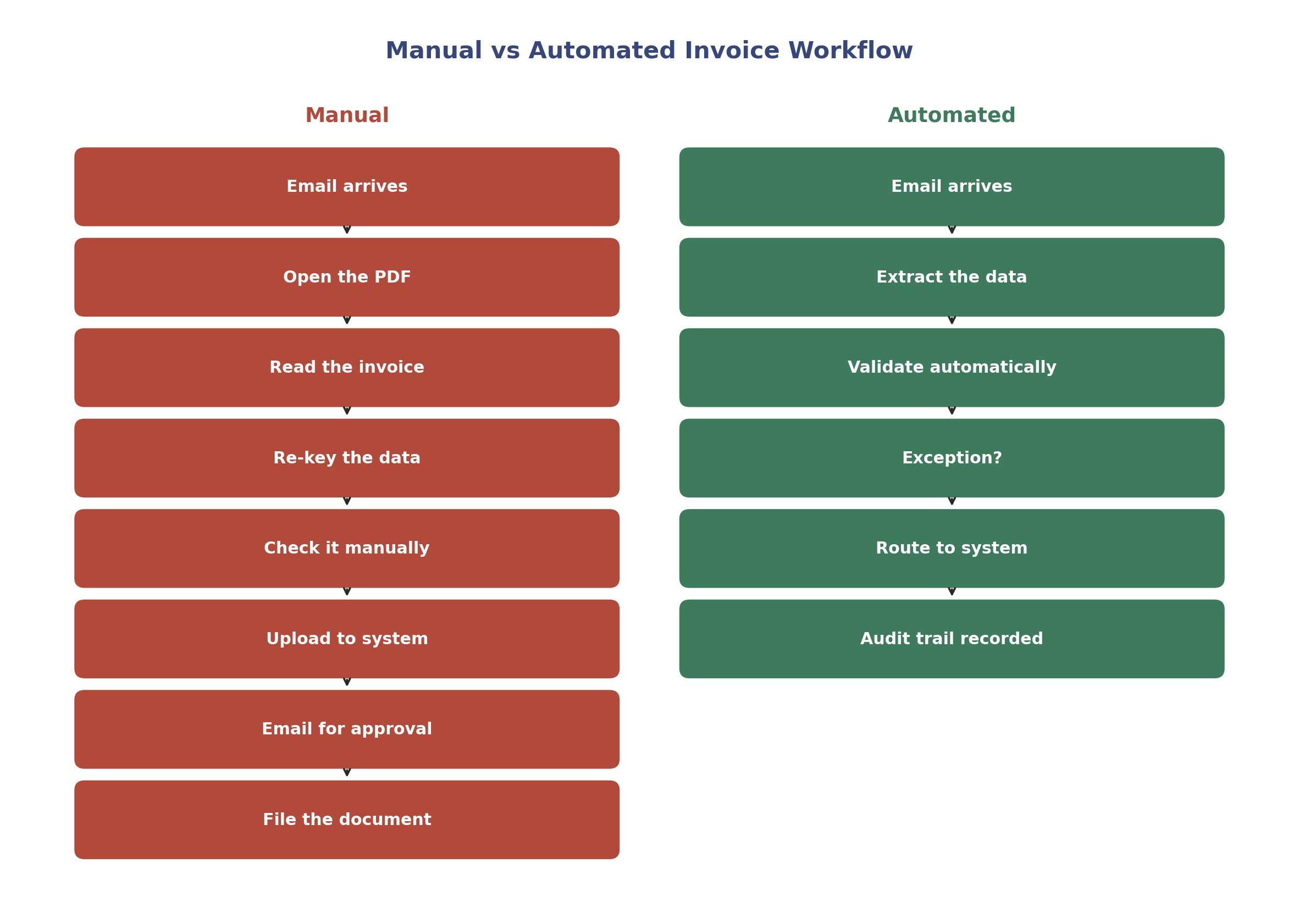
Consistency is where a meaningful difference shows up between a manual process and an automated one: a person handling the same task many times over will eventually make a mistake through fatigue or distraction, while an automated system applies the same validation rule the same way every time. Manual processing generally requires additional staff time as document volume increases, whereas a well-configured automated workflow can absorb considerably more volume before staffing requirements increase at the same rate.
AI-supported document management changes how documents are organised too: instead of a shared drive full of loosely sorted files, the system routes each document into the right place automatically based on what it actually contains.
None of this means handling everything with zero human oversight from day one. Use document automation for the repetitive majority of a document type, and keep a named person reviewing anything genuinely unusual, low-confidence or high-value.
What Should an AI Document Automation Platform Include?
Beyond the choice of vendor, it helps to be clear on the specific capabilities a genuinely capable platform needs, rather than judging tools purely on a features list in a sales deck.
Swipe to see all columns →
Capability | Why it matters |
|---|---|
OCR and computer vision | Reads text, tables and layout from scans, PDFs and images, including varying quality and orientation |
Document classification | Correctly identifies document type before extraction rules or schemas are applied |
Field and table extraction | Pulls structured data, including line items and tables, not just headline fields |
Validation against business rules and system data | Checks extracted values against what your existing systems already know to be true |
Workflow and approval logic | Defines what happens next based on confidence, value and business rules |
Field-level confidence scores | Shows which specific fields are uncertain, not just an overall document score |
Human-review interface | Gives a person a clear, efficient way to check and correct flagged documents |
APIs and integrations | Connects to the CRM, accounting platform or system of record you already run |
Audit logs and version history | Records what was extracted, changed, approved and by whom, and when rules or templates changed |
Role-based permissions | Limits who can see, approve or change documents and extracted data |
Encryption and security controls | Protects documents and extracted data in transit and at rest |
Export and e-signature readiness | Supports moving a generated or approved document into a signing workflow without manual re-entry |
How Do You Choose the Right AI Document Automation Platform?
A document automation platform should fit your existing systems, not force you to rebuild them. The best platforms integrate with what you already run day to day rather than becoming a separate silo you have to maintain alongside it.
Value shows up fastest when you implement AI on the highest-volume, most repetitive document type first, rather than trying to automate everything at once. Choosing the right platform for your team means testing it on your own documents, not a polished demo file, since real-world scans, unusual layouts and edge cases are what actually reveal how a tool performs.
A short evaluation checklist is worth working through before you commit to a platform:
Extraction accuracy on your own documents, not a vendor's demo file
Confidence scores available at field level, not just an overall document score
Custom extraction support for document types outside the platform's standard templates
API and system integrations with the tools you already run
A defined human-review workflow for low-confidence or flagged documents
Audit logs covering what was extracted, changed and routed
A clear data retention policy, and where documents are actually processed and stored
Pricing basis, per page, per document or per API call, and how that scales with your volume
Whether low-confidence fields can be routed automatically for review rather than blocking the whole document
Look for a platform that adds new extraction capability over time as the underlying models improve, rather than one built around a rigid, fixed tool list, so today's capable platform does not quietly become tomorrow's bottleneck. If you are still working out whether this is the right moment to invest, our AI readiness assessment is a useful starting point, and our guide to AI automation pricing in the UK covers what this kind of project typically costs, including how usage-based pricing models are structured.
Document Generation and Electronic Signing
Document generation works best when it starts from a template rather than a blank page: a contract, a proposal or an onboarding pack, each built from a template that pulls in the right variables automatically. This keeps every version consistent, since the template controls formatting and only the variable fields change between documents.
Where AI is involved, the practical sequence generally looks like this:
Extract verified data → validate it → generate the document → review and approve → send for electronic signature → store the signed version and audit record
Used this way, AI can:
Draft proposals or onboarding documents from approved information already sitting in a CRM or form submission
Populate agreements from validated CRM or form data, rather than a person copying fields across by hand
Produce summaries and supporting documents to accompany a contract or application
Prepare a completed, reviewed document for services such as DocuSign or Adobe Acrobat Sign, so it moves into signing without manual re-entry
AI should not independently invent contractual terms or approve legal commitments. Its role in this sequence is to speed up drafting and population from verified data, not to decide what a document should legally commit to. That decision, and the actual approval to send a document for signature, should stay with a named person.
Templates should live in one place, not scattered across individual folders, so an update to the template updates every future document generated from it. Workflow automation ties this together with document classification: a new file is sorted into the right category, the right template is applied, and the right approval workflow starts, without anyone deciding each time manually.
UK GDPR and Document Automation
Documents frequently contain personal data: names, addresses, invoice details, employment records, contract terms, bank information and sometimes special category data. Where a document contains information relating to an identifiable person, UK GDPR applies to processing it, in the same way it applies to any other personal data processing. Our dedicated guide to AI and GDPR compliance for UK businesses covers the underlying principles in more depth.
Before connecting a document automation platform to real documents, it is worth having clear answers on a short list of points. What lawful basis applies to the processing involved? Whether the platform is genuinely limited to the data each workflow actually needs, rather than extracting everything a document contains by default. How long the vendor retains uploaded documents and extracted data. Whether submitted documents are used to train or improve the vendor's wider models. Where documents and extracted fields are processed and stored, and what international transfer mechanism applies if that is outside the UK.
Access and audit matter just as much as extraction accuracy. Confirm who can see original documents and extracted data within the platform, whether you can see what the system extracted, changed or routed after the fact, and whether documents and derived data can actually be deleted in line with your retention policy, not just archived indefinitely by default.
For higher-risk uses, for example, large-scale processing of special category data or systematic profiling built on extracted document data, it is also worth assessing whether a Data Protection Impact Assessment is required before deployment.
Compliance note: this is general information, not legal advice. Check current ICO guidance and take independent advice for anything that could materially affect customers, employees or other individuals.
How to Measure Whether It's Working
The most useful signal is not how many documents pass through the system, but how many are processed correctly without needing a person to step in. A useful metric is straight-through rate: the share of documents that move from capture to route without manual correction.
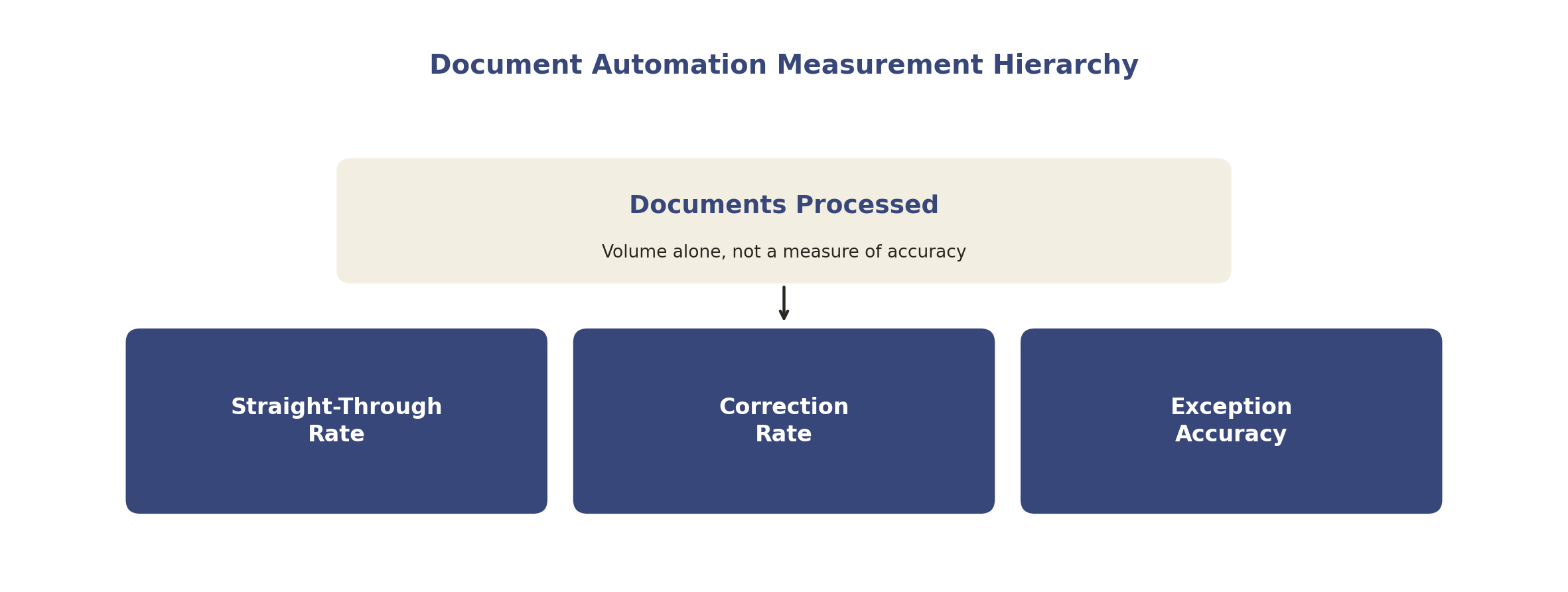
Straight-through rate, correction rate and exception accuracy should always be read together.
This should always be read alongside a correction rate, how often a person has to fix a field the system extracted, and an exception accuracy figure, whether the documents the system flagged for review genuinely needed a person to look at them. A high straight-through rate paired with a rising correction rate on the documents that did pass automatically is a sign that confidence thresholds have been set too loosely. A low straight-through rate, where too many routine documents are being pushed back to a person unnecessarily, suggests the thresholds are too conservative for the accuracy the system is actually achieving.
Reviewing these figures every few weeks, alongside a manual spot check of a sample of automatically processed documents, gives a far more honest picture than judging a new platform on volume processed in its first few days.
Common Mistakes
Common mistakes to avoid: assuming a platform needs almost no manual intervention from day one rather than building in confidence thresholds and exception handling, connecting a platform to every document type at once instead of proving it on the highest-volume type first, skipping validation against existing system data, giving a platform broader access than a specific workflow requires, and not reviewing straight-through rate and correction rate together before extending automation further.
Three risks are worth calling out specifically, since they are easy to miss until they cause a real problem:
Wrong-field mapping: the correct text is extracted, but it lands in the wrong system field, for example, a purchase order number written into an invoice number field. This is often harder to catch than a missing value, since the field is not empty; it is just wrong
Silent errors: a plausible but incorrect value passes validation because it looks reasonable, not because it is actually correct. A wrong VAT figure that still falls within an expected range is a good example
Version control: an outdated template, processor or piece of contractual wording keeps being used after it should have been replaced, because nobody had ownership of retiring the old version
Building periodic spot checks and clear ownership of templates and rules into the workflow is what catches these before they compound.
A Four-Week Rollout
Week one: pick the single highest-volume, most repetitive document type, most commonly invoices, and connect the platform with extraction and validation only, routing everything to a person for review.
Week two: review what was extracted and validated correctly, and what needed correction. Note recurring error patterns by supplier, layout or field.
Week three: extend to automatic routing for high-confidence documents that pass validation cleanly, keeping everything else routed to a person.
Week four: review the straight-through rate, correction rate and exception accuracy together, decide whether to extend automation to a second document type, and set a recurring review date.
Frequently Asked Questions
What is AI document processing?
AI document processing is the use of OCR, machine learning and, increasingly, generative AI to read, classify and extract structured data from business documents, then validate and route that data automatically. It is often used interchangeably with intelligent document processing, or IDP.
How does automated document processing work?
A document is captured, classified by type, and has its fields, tables and text extracted. Extracted values are validated against business rules and existing system data, then routed automatically for high-confidence documents or flagged for human review where confidence is low or the case is unusual.
Can AI process documents without manual templates?
Yes, to a meaningful degree. Modern platforms can often classify and extract fields from varying layouts without a fixed template for every document design, though a defined target schema, confidence thresholds and human review for low-confidence cases still matter.
What is an AI document automation platform?
It is software that combines OCR, machine learning and workflow automation to capture, classify, extract, validate and route business documents, typically integrating with the CRM, accounting or other systems a business already runs.
Can AI generate documents automatically?
Yes. AI can draft proposals, populate agreements and onboarding packs from verified data, and produce supporting summaries, but a person should review and approve the content before it is sent, particularly for anything involving a contractual commitment.
Can AI prepare documents for electronic signing?
Yes. Once a document has been generated, reviewed and approved, it can typically be sent directly into an e-signature service such as DocuSign or Adobe Acrobat Sign without manual re-entry, keeping the signed version and audit trail linked to the original record.
How is machine learning used in document processing?
Machine learning models are trained to recognise document types, locate and extract specific fields and tables, and assign a confidence score to each extraction, which is what allows a platform to handle layout variation rather than relying only on fixed templates.
How do enterprises reduce risk in automated document processing?
By defining approval thresholds and role-based access, keeping version control over templates and rules, maintaining audit logs across connected systems, naming an owner for each workflow, and having a business-continuity plan if automated processing stops.
Does this replace my existing software?
No, in most cases it sits alongside what you already use and feeds cleaner, structured data into it, rather than replacing your system of record entirely.
How long does setup actually take?
It depends on the document type and how many systems are involved. A narrow workflow using a standard document type can be considerably quicker to deploy than a multi-system process involving custom extraction, approvals and exception handling.
Is my data safe?
It depends on the vendor. Confirm encrypted processing, a clear data retention policy, and whether submitted documents are used to train the vendor's wider models before connecting a platform to real documents.
What is the difference between document automation and intelligent document processing?
Document automation is the wider workflow, from capture through to routing. Intelligent document processing, or IDP, is typically the extraction and interpretation layer inside that workflow that reads and structures the document.
What should never be automated?
Contract interpretation, legal commitments, financial approvals above an agreed threshold, and regulatory judgement calls should stay human-led, with the system supporting the decision rather than making it.
How do I know if it's working well?
Track straight-through rate alongside a correction rate and exception accuracy, rather than judging the platform on volume processed alone.
Key Takeaways
AI document automation extracts, validates, generates and routes business documents using OCR, machine learning and, increasingly, generative AI
The goal is not zero human involvement. It is automating high-confidence, repetitive documents while routing low-confidence extractions and exceptions to a person
Modern platforms can often classify and extract from varying layouts without a fixed template, though a defined schema and confidence thresholds still matter
Document automation is the wider workflow; intelligent document processing is typically the extraction layer inside it
Grade document types by risk: high automation for classification and routine extraction, human approval for exceptions, human-led for contracts and financial approvals
Watch for wrong-field mapping, silent errors and outdated template or processor versions, not just missing extractions
Document generation can extend into electronic signing, but AI should not independently invent contractual terms
UK GDPR applies wherever a document contains identifiable personal data, which covers most invoices, contracts and application forms
Measure straight-through rate alongside a correction rate and exception accuracy, not volume processed
Start with the single highest-volume, most repetitive document type before expanding to others
Ready to Automate Your Paperwork?
AI Workforce helps UK businesses identify which documents are genuinely ready for automation, set the right validation and review thresholds, and introduce document automation without losing control of the details that matter.
Get a free review of which documents to automate first, and what to check before you commit to a platform.
Related Guides
About the Author
Rodi Taze is Co-Founder of AI Workforce, working with UK businesses on where AI-driven automation is genuinely ready to deploy and where human review still matters.
About the Reviewer
Luca Controlo is AI Adoption and Marketing Automation Lead at AI Workforce, reviewing this guide for accuracy and alignment with how AI Workforce's own document and workflow agents are designed and governed.
Reviewed: August 2026.
© 2026 AI Workforce Ltd. All rights reserved.