LinkedIn Sales Navigator Automation: What You Can and Can't Automate
Posted On: September 29, 2026
Last updated: September 2026
Written by Luca Controlo, Co-Founder of AI Workforce · Reviewed by Seth Ayush, Sales Automation Specialist at AI Workforce
Quick answer: Sales Navigator itself already automates or assists parts of prospect research through search filters, saved leads and accounts, alerts and other native functionality. AI can help analyse and prioritise the information that functionality surfaces. Official integrations can connect certain Sales Navigator and CRM functions where LinkedIn actually supports them. What a Sales Navigator subscription does not do is authorise the use of unauthorised third-party software to control the LinkedIn account, scrape data, or automate connection requests and messages. This guide separates what Sales Navigator does on its own from what AI can add around it, and from what remains governed by LinkedIn's platform rules.
What Is LinkedIn Sales Navigator?
LinkedIn describes Sales Navigator as an "AI-powered B2B sales tool" built for individual sellers and sales teams, using LinkedIn's network to help identify and engage relevant prospects. Its documented functionality includes advanced search with filters for function, seniority, tenure and experience, real-time alerts on job changes and role shifts, saved leads and accounts, InMail messaging with a monthly credit allowance, TeamLink for visibility into a team's warm connections, AI-assisted drafting through Message Assist, AI-generated prospect summaries through Lead IQ, account-level insight through Account IQ, and relationship mapping across an account's decision-makers.
For the workflow in this guide, AI Workforce treats Sales Navigator primarily as a research, prioritisation and relationship-intelligence environment rather than as permission to automate member-account actions. It is not, by itself, an automation platform for performing LinkedIn actions, and this distinction runs through the rest of this guide.
What Does "Sales Navigator Automation" Actually Mean?
The phrase gets used to describe several genuinely different things, and collapsing them together leads to poor decisions.
Native automation covers features LinkedIn itself provides inside Sales Navigator: saved searches, alerts, recommendations.
AI assistance covers AI analysing or summarising information without acting on LinkedIn on your behalf.
CRM integration covers the supported data and workflow connection between Sales Navigator and a CRM.
Approved integration or API access covers third-party functionality operating within permissions LinkedIn has actually granted, through its Developer Program.
Direct account automation covers software that directly controls the account to perform LinkedIn actions without LinkedIn's authorisation.
Scraping or data extraction covers software extracting LinkedIn data outside approved access.
These six categories are materially different, and a workflow or a vendor claim that blurs them is worth examining closely.
The AI Workforce Sales Navigator Automation Map
The following is an AI Workforce implementation framework rather than an official LinkedIn process or industry standard.
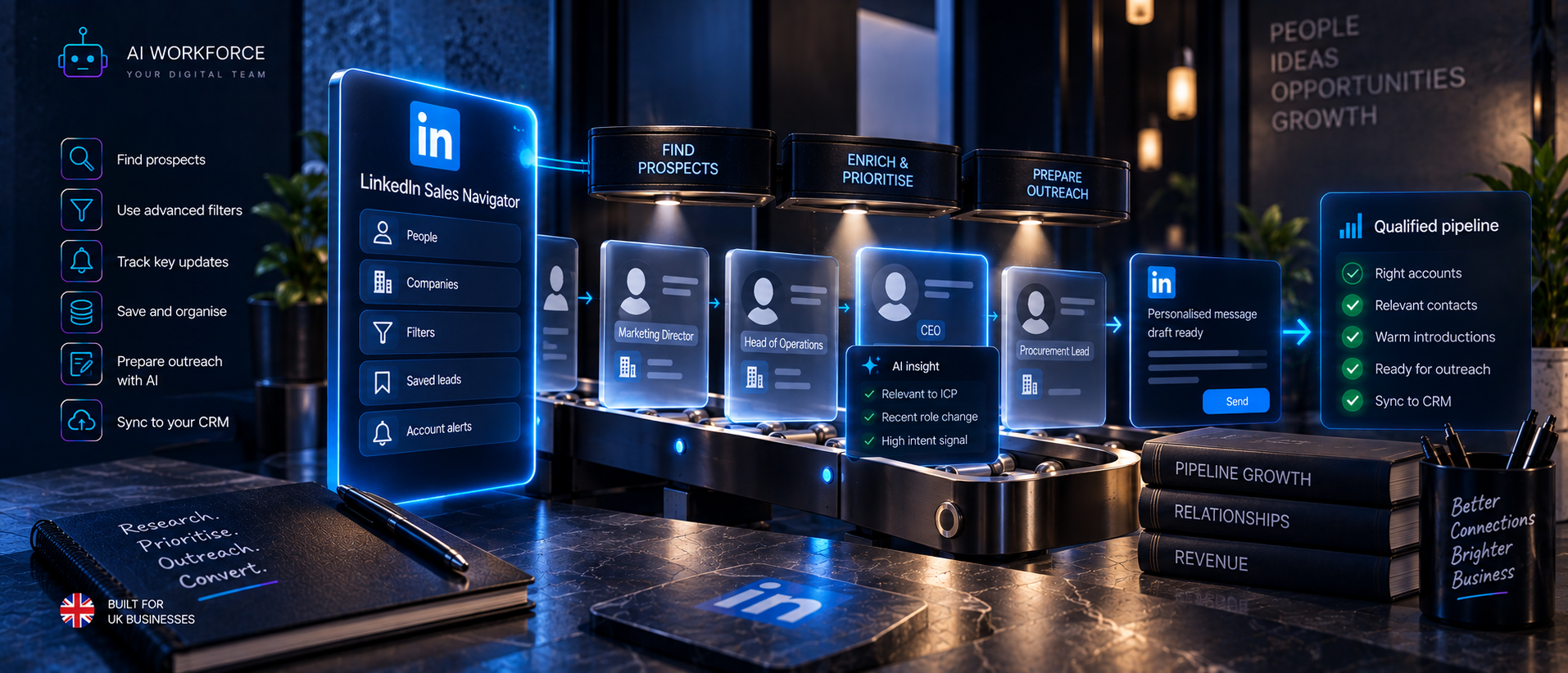
Search → Save → Monitor → Research → Verify → Prioritise → Sync → Prepare → Human Action → Record
Search. Use Sales Navigator's available filters to identify candidate accounts and contacts.
Save. Organise relevant leads and accounts using native functionality.
Monitor. Use LinkedIn-provided alerts and updates where available.
Research. Review company and contact context.
Verify. Cross-check important facts rather than assuming every profile field is current.
Prioritise. Apply transparent business criteria.
Sync. Move supported information into CRM through approved functionality where available.
Prepare. AI can prepare research notes, message drafts or next-action recommendations.
Human Action. A person performs the LinkedIn account action, unless an authorised integration specifically supports it.
Record. Update CRM state and provenance.
What Can Sales Navigator Automate Natively?
Function | Native Sales Navigator capability? | Plan-dependent? | Human decision still required? |
|---|---|---|---|
Advanced search and filtering | Yes | Filter depth varies by plan | Yes, results are candidates, not qualified leads |
Saved searches | Yes | Check current plan documentation | Yes, review still needed |
Saved leads and accounts | Yes | Check current plan documentation | Yes, organisation only, not qualification |
Real-time alerts, job changes and role shifts | Yes | Check current plan documentation | Yes, an alert is new information, not a decision |
Account IQ, account insight | Yes | Check current plan documentation | Yes, interpretation still needed |
Lead IQ, AI prospect summaries | Yes | Check current plan documentation | Yes, accuracy should be reviewed |
Message Assist, AI drafting | Yes | Check current plan documentation | Yes, drafts require human review before sending |
CRM sync | Yes, where enabled | Restricted to Advanced Plus customers, requiring LinkedIn account representative enablement | Yes, configuration and monitoring required |
InMail sending | Yes, within monthly credit allowance | Credit allowance varies by plan; verify current allowance in your account | Yes, a person composes and sends |
These native research features do not themselves mean Sales Navigator autonomously sends connection requests or messages; they surface and organise information for a person to act on. CRM Sync and other supported integrations can perform documented data synchronisation separately, covered below.
What Can AI Assist With Around Sales Navigator?
AI can assist with summarising account information, comparing an account against an ICP, organising research, classifying business context, preparing prospect notes, generating prioritisation recommendations, drafting messages, summarising alerts, and preparing CRM notes. What it should not be treated as doing is performing the LinkedIn account action itself. AI analysis is not the same thing as a LinkedIn account action, and a useful working principle follows from that: AI can prepare the decision without necessarily performing the action.
Sales Navigator Search Automation
A supported workflow can systematise the process around search without using unauthorised software to execute searches outside LinkedIn's own interfaces: define ICP criteria, apply them as Sales Navigator filters, use saved searches and lists where available, review results periodically, verify what is found, and prioritise it. A search result is a candidate, not a qualified lead, and treating it as anything more skips the verification and enrichment work covered in AI Workforce's LinkedIn Lead Generation guide.
Saved Leads, Accounts and Alerts
Native saved leads, saved accounts and alerts can support a repeatable workflow by keeping relevant contacts organised and surfacing changes worth reviewing: a role change, a company update, relevant activity, or an account change. An alert is new information, not evidence of buying intent, and this guide does not treat it as such. The more accurate terminology is context, or timing evidence where the alert genuinely relates to a relevant business change.
Sales Navigator and AI Lead Prioritisation
AI Workforce Sales Navigator Evidence Model, an AI Workforce implementation framework.
Account Fit, Contact Relevance, Current Business Context, First-Party Engagement, Verified Explicit Need. Sales Navigator data may contribute evidence to the first three categories; it does not automatically establish first-party engagement or verified explicit need, both of which require direct interaction with, or a statement from, the prospect.
Where a score is used, it should be transparent. An illustrative AI Workforce formula: Priority = 40% Account Fit + 30% Contact Relevance + 20% Current Business Context + 10% First-Party Engagement. These are illustrative AI Workforce planning weights, not LinkedIn's own score, not an industry benchmark, and not a measure of buying intent. Each business should test weights against its own historical outcomes. A score is an input to a decision, not an instruction, and a person should always be able to override it.
Sales Navigator CRM Integration
As documented by LinkedIn in September 2026, its CRM sync documentation for Salesforce describes a bi-directional connection: CRM data, opportunities, tasks, contacts, accounts, account teams and leads, is imported into Sales Navigator, matched using a scoring model based on names, contact information and geographic details, while Sales Navigator activity, InMails, messages, phone call logs and notes, is written back to matched CRM records. Sync runs on an initial import followed by updates roughly every 12 hours, with activity writeback occurring instantly. This level of CRM Sync is restricted to Advanced Plus customers and requires enablement through a LinkedIn account representative, and the Salesforce side requires an Enterprise, Unlimited, Developer, Performance or Professional edition with API access, a Salesforce Administrator account for installation, and a Sales Navigator Administrator account. Authentication uses OAuth, and LinkedIn states it does not have access to the member's CRM credentials.
Before relying on CRM integration, evaluate it against a checklist: which CRM is supported, which plan is required, which fields and data are actually available, what write permissions exist, how duplicates are handled, who owns each record, whether suppression status is respected, how frequently data updates, whether provenance is preserved, and what happens if the sync fails. CRM integration should create a usable sales state that a person can act on, not merely copy data from one system to another.
Sales Navigator and Message Drafting
AI can help draft a message based on verified Sales Navigator research, following the sequence Research, Verify, Draft, Human Review, LinkedIn Action. This guide keeps that principle brief; the full message structure, personalisation approach and worked examples belong to AI Workforce's LinkedIn Outreach Automation guide.
Can You Automate Connection Requests From Sales Navigator?
A person can manually send a connection request through Sales Navigator or LinkedIn's standard interface. Native Sales Navigator functionality does not itself send connection requests without a person initiating the action. An approved integration might support a relevant action if LinkedIn has specifically granted it permission to do so. Unauthorised third-party software directly controlling the account to send connection requests sits within the restrictions covered in LinkedIn's Prohibited Software and Extensions policy and User Agreement, addressed in full in AI Workforce's LinkedIn Automation Limits guide. This guide does not invent a numerical limit, and does not provide guidance on working around LinkedIn's restrictions.
Can You Automate Sales Navigator Messages or InMail?
The same evidence discipline applies. Drafting a message is not the same as sending it. A human sending a message is not the same as software sending it automatically. Having a Sales Navigator subscription does not itself authorise unauthorised automated sending of messages or InMail. InMail is available with a monthly credit allowance that varies by plan, current allowances should be verified directly in your account or LinkedIn's own plan documentation rather than assumed from this guide.
Sales Navigator API and Approved Integrations
LinkedIn does not document Sales Navigator as offering a general-purpose public API through which any third-party developer can automate arbitrary Sales Navigator or member-account actions. Access to deeper integrations is governed by LinkedIn's Developer Program, product permissions and partner arrangements. LinkedIn operates a formal Developer Program with its own API Terms of Use, through which specific, approved integrations, such as CRM sync, can interact with LinkedIn's systems within the permissions LinkedIn grants. Access falls broadly into categories: publicly available developer access for specific approved use cases, restricted or partner-level access for deeper integrations such as CRM sync, and integrations built and maintained directly by LinkedIn or its named partners. Unauthorised browser or account automation sits outside all of these categories. The key question for any tool claiming Sales Navigator or LinkedIn integration is whether LinkedIn has actually granted that tool permission to perform the specific action it claims to perform; a vendor stating that it "uses LinkedIn" or "integrates with LinkedIn" is not, on its own, evidence of that.
Sales Navigator Scraping and Data Export
LinkedIn's User Agreement and its separate Crawling Terms and Conditions govern automated data collection from LinkedIn's platform, including Sales Navigator. Having authorised access to view information inside Sales Navigator is not the same as having permission to scrape or bulk-export it outside LinkedIn's own supported functionality. This guide does not provide scraping methods, and visibility of information within the product does not, on its own, establish that automated extraction of it is permitted. Where personal data is exported into a CRM or another system through supported functionality, UK GDPR obligations apply to that data from the point it is stored or processed, separately from any platform permission question.
What Sales Navigator Does NOT Prove
Sales Navigator data, on its own, does not prove buying intent, budget, authority, urgency, a genuine need, willingness to speak with you, marketing consent, a lawful basis for processing personal data, or the current accuracy of every profile field it displays. Treating these as established solely because a prospect appears in Sales Navigator or generates an alert confuses contextual evidence with confirmed commercial facts.
The AI Workforce Sales Navigator Workflow
ICP → Sales Navigator Search → Save Account/Lead → Review Alert/Context → Verify → Enrich → Transparent Priority → CRM Sync/Record → AI Research Note → Human Review → Outreach-Ready.
At that point this workflow stops. It demonstrates how Sales Navigator becomes part of a governed sales process rather than an isolated browser tab, the actual outreach conversation belongs to AI Workforce's LinkedIn Outreach Automation guide.
UK GDPR and Sales Navigator Data
Profile and contact data accessed through Sales Navigator can be personal data, and having a Sales Navigator licence does not remove UK GDPR obligations. Public visibility of a profile does not automatically create a lawful basis for processing it, and where legitimate interests are relied on, this requires a genuine assessment rather than an assumption. Transparency about how the data will be used matters; the right to object must be respected; a suppression list should be actively maintained, data should not be retained indefinitely without reason, and the source of each record should be preserved. Platform permission and data protection law are separate questions; both need to be satisfied. For the fuller compliance picture, see AI Workforce's AI GDPR Compliance UK guide.
How to Evaluate a Sales Navigator Automation Tool
Is the tool actually authorised by LinkedIn for the action it performs? Which Sales Navigator features does it interact with? Does it use an official API or integration, or an unauthorised browser extension? Does it control the LinkedIn account directly? Does it scrape data? What data does it retain, and for how long? Can it preserve provenance? Can it integrate with a CRM? Does it create duplicate records? Can a person override its prioritisation? Can actions require approval before they happen? Can it honour suppression lists? Can it be paused immediately? What happens when LinkedIn changes its interface or policies? Does the vendor clearly distinguish AI assistance from direct account automation, or does its marketing blur the two? For a comparison of specific tools against these questions, see AI Workforce's Best AI LinkedIn Automation Tools guide.
How to Pilot Sales Navigator Automation
The following is an AI Workforce implementation methodology, not an industry standard.
Stage 1, Native Workflow. Use Sales Navigator's own functionality and document the current process.
Stage 2, AI Assistance. Add AI research, summaries and prioritisation recommendations without any account automation.
Stage 3, CRM Integration. Add supported CRM integration or sync where appropriate, and test state and data accuracy.
Stage 4, Controlled Approved Integration. Add only authorised integrations or actions with a clearly defined business purpose.
Stage 5, Expand or Hold. Expand only where accuracy, governance and platform compliance from earlier stages support it.
How to Measure Sales Navigator Automation
Saved leads, searches run, profiles viewed, and alerts generated are activity counts. Relevant measures include: ICP match rate, account verification rate, contact-role accuracy, stale-data rate, sales acceptance rate, human correction rate, duplicate rate, CRM sync accuracy, time spent researching per accepted prospect, qualified replies after outreach, accepted opportunities, cost per sales-accepted prospect, and any account warnings or restrictions. Sales Navigator activity is not itself pipeline.
Worked Example
A UK SaaS company is targeting recruitment firms. ICP: UK recruitment agencies within a defined size range. Sales Navigator filters narrow the search to companies matching that range. An account list is built and plausible contacts, typically a Managing Director or Head of Operations, are identified. The account and a relevant contact are saved using native functionality. An alert flags a recent leadership change at one target account, recorded as timing evidence, not intent. The contact's current role and the company's active status are verified. The company website and Companies House record provide further enrichment. A transparent priority score is calculated from account fit, contact relevance and current business context. The record syncs into the CRM through the supported integration. AI prepares a short research summary. A person reviews it. The prospect is now outreach-ready. The actual outreach message and conversation belong to AI Workforce's LinkedIn Outreach Automation guide.
Common Sales Navigator Automation Mistakes
Assuming a Sales Navigator subscription authorises third-party automation of any kind. Treating every alert as a buying-intent signal. Saving every search result without any verification. Relying on stale profile data. Reaching the wrong contact at the correct account. Using an opaque, unexplained lead score. Leaving no CRM state after research is done. Creating duplicate records through uncoordinated research. Losing provenance on important facts. Scraping data outside LinkedIn's supported functionality. Using browser automation without understanding LinkedIn's platform rules. Collecting excessive personal data with no business justification. Removing the ability for a person to override the system. Measuring list size rather than accepted opportunities.
Sources and Methodology
LinkedIn Sales Navigator Help: Integration between Sales Navigator and your CRM, overview
LinkedIn Sales Navigator: Get started with Sales Navigator and your CRM, Salesforce technical guide
All sources above were checked directly in September 2026 and quoted or summarised from their current published wording. Plan-dependent features, InMail allowances and CRM Sync eligibility should be verified directly against your current account and LinkedIn's own documentation, as these can change. The AI Workforce Sales Navigator Automation Map, Sales Navigator Evidence Model, transparent priority model, CRM integration checklist, practical workflow, pilot methodology and measurement framework are AI Workforce implementation frameworks and illustrations rather than official LinkedIn processes, industry standards or independently verified benchmarks.
Frequently Asked Questions
What is LinkedIn Sales Navigator automation?
It covers several different things: native Sales Navigator functionality, AI assistance around it, supported CRM integration, LinkedIn-approved API access, and, separately, unauthorised third-party software controlling the account, which is a distinct and restricted category.
Can you automate Sales Navigator?
Sales Navigator's own native functionality already automates parts of research, search, alerts, saved leads and accounts. AI assistance and supported CRM integration can be added around it. Unauthorised automation of the account itself is a separate matter governed by LinkedIn's platform rules.
Does Sales Navigator allow automation?
It provides native automated features and supports specific approved integrations. It does not authorise unauthorised third-party software to control the account, which falls under LinkedIn's Prohibited Software and Extensions policy.
Can AI work with Sales Navigator?
Yes, AI can analyse, summarise and prioritise the information Sales Navigator surfaces, and Sales Navigator itself includes AI-assisted features such as Lead IQ and Message Assist.
Can Sales Navigator automatically find leads?
It can surface candidate accounts and contacts through search, saved searches and recommendations, but a search result is a candidate, not a verified or qualified lead. Those results still require verification and prioritisation before this guide would treat them as outreach-ready prospects.
Can you automate Sales Navigator searches?
Saved searches let you re-run a defined set of filters, which is native functionality. This guide does not recommend automating search execution outside LinkedIn's own supported functionality.
Can you automate connection requests from Sales Navigator?
A person sends connection requests manually, or an approved integration may support a specific action if LinkedIn has granted it permission. Unauthorised automated sending is restricted under LinkedIn's platform rules, covered fully in AI Workforce's LinkedIn Automation Limits guide.
Can you automate Sales Navigator messages?
AI can assist with drafting. A person can send through LinkedIn's supported interface; any claim that a third-party integration can send automatically should be checked against the exact permission LinkedIn has granted that tool.
Does Sales Navigator have an API?
LinkedIn operates a formal Developer Program with its own API Terms of Use for specific, approved use cases; it does not offer a general public API for arbitrary third-party automation.
Can Sales Navigator sync with a CRM?
Yes, LinkedIn documents bi-directional CRM Sync with Salesforce for Advanced Plus customers, requiring enablement by a LinkedIn account representative and specific Salesforce editions and permissions.
Can you export Sales Navigator leads?
Supported CRM sync and LinkedIn-provided functionality allow certain data to move into other systems. This guide does not recommend or describe scraping or bulk export outside LinkedIn's supported functionality.
Is scraping Sales Navigator allowed?
LinkedIn's User Agreement and Crawling Terms and Conditions restrict automated scraping or copying of content from LinkedIn's platform, including Sales Navigator.
Does Sales Navigator show buying intent?
It surfaces fit, timing and context information. It does not, on its own, prove buying intent, budget, authority or urgency.
Is Sales Navigator worth using for lead generation?
It can be a useful research and organisation tool for the early stages of lead generation; its value depends on how the information it surfaces is verified and used, not on the subscription alone.
Is Sales Navigator data covered by UK GDPR?
Yes, profile and contact data processed through Sales Navigator can be personal data, and processing it requires an appropriate lawful basis under UK GDPR regardless of the platform it came from.
Key Takeaways
A Sales Navigator subscription is not the same as permission to automate LinkedIn. Native functionality, AI assistance, CRM integration, approved API access, and unauthorised account automation are five distinct categories, and treating them as one thing leads to poor decisions. Alerts and other context signals are not evidence of buying intent. Important facts should be verified before they are acted on. Prioritisation should be transparent enough for a person to inspect and override. CRM integration needs testing against its actual documented capabilities, not assumed universal sync. Outreach-ready is the intended endpoint of this workflow; the actual LinkedIn conversation belongs to AI Workforce's dedicated outreach guide. And success should be measured by downstream sales acceptance and outcomes, not by Sales Navigator activity volume.
Written by Luca Controlo, Co-Founder of AI Workforce · Reviewed by Seth Ayush, Sales Automation Specialist at AI Workforce