Build vs Buy AI Agents: Costs, Risks and a Decision Framework for 2026
Posted On: August 18, 2026
Written by Clara Miller, Content Specialist at AI Workforce · Reviewed by Seth Ayush, Co-Founder of AI Workforce · Last updated: 18 August 2026
A practical three-year guide to cost, risk and deployment decisions
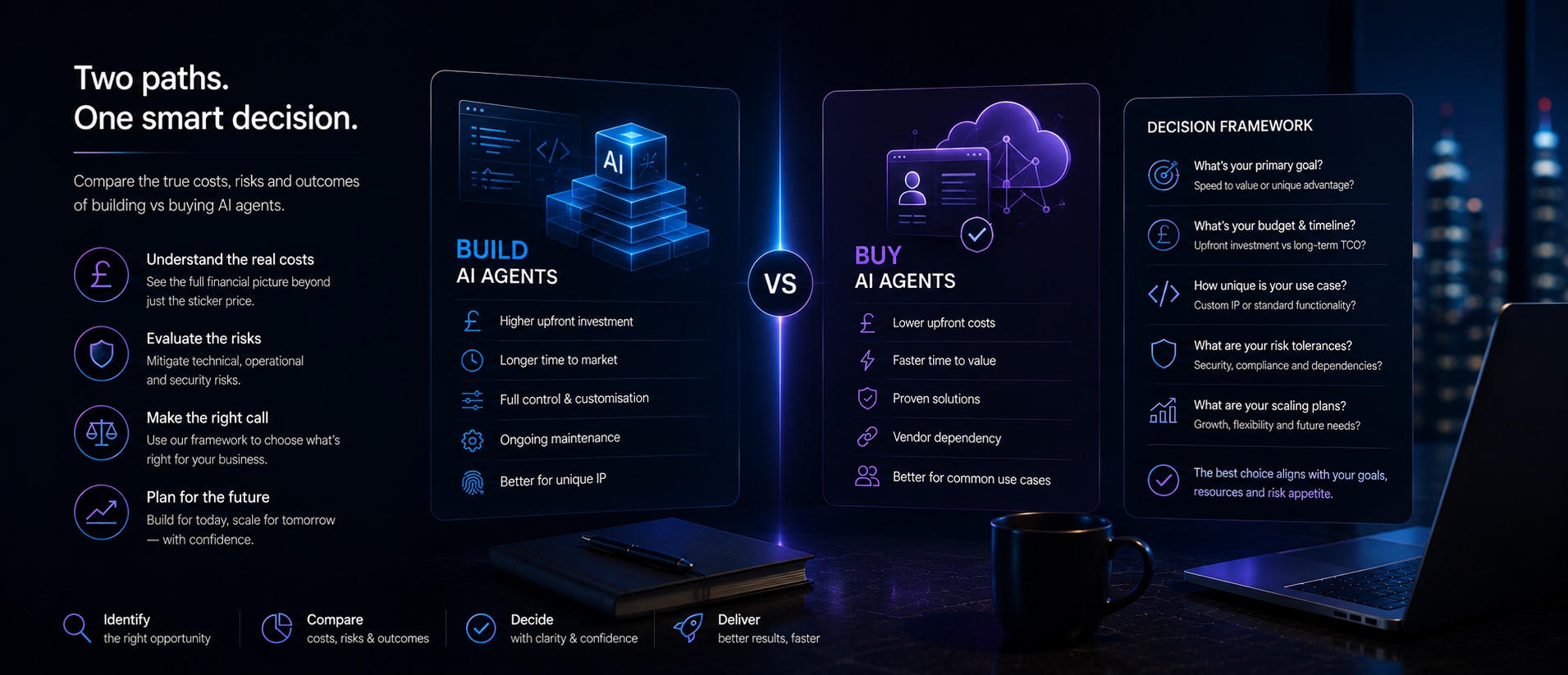
Understand the cost and risk of building, buying or extending AI agent technology, and use a practical framework to choose the right route for each workflow.
Choosing how to deploy an AI agent can materially affect its cost, implementation time, control and long-term maintainability. This guide moves beyond a simple explanation of building versus buying and gives you a practical way to work out the three-year cost and risk of each route, so you can choose the right approach for each workflow rather than applying one decision across the whole organisation. If you're starting from scratch, our business guide to AI agents is a useful primer before this one.
Quick Answer: There is no single correct route. The right choice depends on how unique the workflow is, how much differentiation depends on it, how complex the integration is, how much internal engineering capacity you have and what the workflow needs to cost over three years, not one. Most organisations end up running a mix: some workflows bought as a configured product, some extended with custom logic on top of a vendor platform, and a small number built entirely in-house. Some workflows should not be automated yet at all.
What Build, Buy and Extend Actually Mean
The spectrum is wider than a binary choice. It helps to think of four distinct routes rather than three.
Four routes, not three
Configure: Adopt an existing agent product with standard connectors and settings, with little or no custom code.
Extend: Buy a platform and add custom integrations or business logic on top of it.
Build: Create the agent application in-house using external models and infrastructure, with full control over prompt, logic and data.
Do nothing yet: Improve the workflow, data or governance before automating it.
Build rarely means training a foundation model from scratch; it almost always means building the application layer on top of models supplied by a foundation model provider. The fourth outcome, doing nothing yet, is often the most useful answer. If a workflow is not yet repeatable, measurable or owned by anyone accountable, improving the process and its data first will produce a better result than automating a workflow that is not ready for it.
Build vs Buy at a Glance
Route | Best suited to | Typical time to value | Ongoing ownership |
|---|---|---|---|
Configure | Common, well-defined workflows | Fastest | Vendor handles most maintenance |
Extend | Common workflow with a specific integration need | Medium | Shared between vendor and internal team |
Build | Unique or differentiating workflows | Slowest | Internal team owns it long-term |
Do nothing yet | Workflows without clear process, data or ownership | Not applicable | Fix the process first |
What Does Each Route Really Cost?
Cost comparisons that only look at the vendor's subscription price against the upfront build cost consistently underestimate the real figure. Each route has its own cost structure, and the categories below should all be included in any serious estimate rather than just the most visible ones.
Build costs typically include discovery and requirements work, engineering time, integration work, infrastructure and model usage fees, testing and security review, ongoing monitoring, maintenance as models and internal systems change, internal support, and the opportunity cost of the team not working on other priorities.
Buy costs typically include the subscription or usage fee, implementation and onboarding, integration work, configuration, training, internal administration of the platform, any premium support tier, price increases as usage grows, and the cost of switching platforms later if the vendor does not scale with you.
Extend costs combine platform fees with the cost of custom integration and logic layered on top, internal product ownership of that custom layer, model usage where applicable, and maintenance across both the vendor platform and the custom components.
Build, buy and extend costs can all change over time. Model usage, maintenance, vendor pricing, integration changes and organisational growth should therefore be modelled separately for each route rather than assumed to follow one fixed pattern.
Three-Year TCO Formulas
A useful audit compares all three routes over a three-year horizon rather than year one alone, using the formulas below as a starting structure for your own figures.
Route | Three-year TCO formula |
|---|---|
Build | Discovery and engineering + integrations + infrastructure and model usage + testing and security + monitoring + maintenance + internal support + opportunity cost |
Buy | Subscription and usage fees + implementation + integrations + configuration + training + internal administration + premium support + price increases + switching or exit costs |
Extend | Platform costs + custom integration and logic + internal product ownership + model usage + maintenance across both layers |
A Worked Three-Year TCO Example
The figures below are a clearly labelled hypothetical illustration, not a market average or a real client figure. They are built on the stated assumptions so the example is auditable rather than merely illustrative:
Workflow: a single customer-service workflow handling roughly 5,000 conversations a month, or approximately 180,000 conversations over three years (5,000 × 36 months).
Integrations: three systems.
UK engineering day rate: approximately £550.
Engineering days assumed: configure/buy around 27 days total, extend around 69 days total, build around 127 days total, across discovery, implementation and integration, based on a £550 day rate applied to the discovery, implementation and integration rows below.
Platform or model usage: for this hypothetical example, three-year platform and model usage is simplified to an effective cost of approximately £0.30 per conversation for configure/buy, approximately £0.23 per conversation for extend and approximately £0.20 per conversation for build. Real vendor pricing may be based on tokens, actions, successful resolutions, seats or usage tiers rather than conversations, and a "conversation" would need to be defined consistently before using this method with real figures.
Maintenance: costed in engineering days per year at the same day rate, higher for build because the internal team owns the full stack.
Internal administration: platform administration and internal support time, costed at an internal blended rate.
Security and governance: includes security review, access control setup and audit-log configuration; higher for build because there is no vendor-provided baseline.
Figures exclude VAT.
A 15 per cent contingency is applied to the subtotal of the rows above it in each column.
Cost category | Configure/buy | Extend | Build |
|---|---|---|---|
Initial discovery | £4,000 | £8,000 | £15,000 |
Implementation | £6,000 | £12,000 | £25,000 |
Integration (3 systems) | £5,000 | £18,000 | £30,000 |
Three-year platform or model usage | £54,000 | £42,000 | £36,000 |
Internal administration | £9,000 | £15,000 | £18,000 |
Maintenance and testing | £6,000 | £21,000 | £48,000 |
Security and governance | £3,000 | £6,000 | £12,000 |
Subtotal | £87,000 | £122,000 | £184,000 |
Contingency (15 per cent of subtotal) | £13,050 | £18,300 | £27,600 |
Estimated three-year TCO | £100,050 | £140,300 | £211,600 |
In this hypothetical case, buying looks cheaper over three years because the workflow is common and standard connectors already exist. The comparison would shift toward extend or build if the workflow required proprietary integration logic, handled materially higher volume, or if the vendor's usage-based pricing scaled faster than shown here. Rebuild this table with your own workflow volume, engineering day rate, integration count and maintenance hours before relying on it. For a closer look at how vendors structure their fees, see our guide to AI agent cost in the UK.
Cost Per Outcome and Net Value
Total cost of ownership alone cannot determine which route delivers the best value, because the cheapest option is not automatically the best one if it produces fewer successful outcomes. Two further calculations help complete the picture.
Cost per successful outcome = three-year TCO ÷ number of correctly completed workflow outcomes over three years
Net value = labour capacity recovered + error costs avoided + additional contribution generated − three-year TCO
Applying both calculations to each route, rather than TCO in isolation, prevents a route that looks cheapest on the cost table from being chosen when it actually delivers less value once accuracy, capacity recovered and error reduction are taken into account.
Risks of Building an AI Agent
A custom build carries a high upfront cost and the slowest time to value of the three routes, for a comparable workflow; actual results depend on architecture, contracts and internal capability. It creates high internal skills dependency, since the team that built the agent needs to remain available to maintain it. Model and API dependency remains even with a custom build, since most builds still rely on an external foundation-model provider.
Building also introduces risks that are easy to underestimate at the outset:
Key-person dependency, where knowledge of the system sits with one or two engineers
Insufficient evaluation infrastructure to test the agent before and after changes
Security responsibility that sits entirely with the internal team rather than a vendor
Poor documentation as the build evolves under time pressure
The ongoing cost of maintaining a test suite as the workflow changes
Production monitoring and incident response capacity
Exposure to model-provider price and policy changes
The engineering opportunity cost of the team not working on other priorities
Difficulty recruiting and retaining staff with the specialist skills to maintain the system
Technical debt accumulating as underlying frameworks and model APIs change faster than the internal build can be updated
Risks of Buying an AI Agent Platform
Buying an AI agent platform is usually the fastest route to value and carries a low-to-medium upfront cost, for a comparable workflow; actual results depend on architecture, contracts and internal capability. It creates the highest vendor lock-in risk of the three routes and the most contract-dependent position on data and security control. Customisation limits are typically medium-to-high, meaning your workflow may need to adapt to the platform rather than the other way around. Integration complexity is connector-dependent, so a platform's usefulness is only as good as the connectors it has already built for your systems. Exit complexity centres on data portability and migration, which should be tested before signing rather than assumed.
Not sure which route fits your workflow?
Talk through your specific workflow with AI Workforce before you commit. We can help you model the three-year cost, risk and pilot plan for build, buy or extend.
When Extending a Platform Makes Sense
An extend approach, combining a vendor platform with custom development around it, works well when some use cases are common enough for a platform to handle well and others are specific enough to need custom logic. This might mean using a vendor's platform for reasoning and orchestration while your team builds the integration layer and business logic specific to your systems. Extend carries a medium upfront cost and medium time to value, but shared maintenance and split data control, so ownership of each layer needs to be assigned clearly from the start rather than left ambiguous. Extend and hybrid describe the same route in this guide: adopting an external platform and adding proprietary integrations, controls or workflow logic on top of it.
AI Agent Risk Comparison Matrix
Typical relative risk for a comparable workflow; actual results depend on architecture, contracts and internal capability.
Risk | Build | Buy | Extend |
|---|---|---|---|
Upfront cost | High | Low-to-medium | Medium |
Time to value | Slowest | Fastest | Medium |
Internal skills dependency | High | Lower | Medium-to-high |
Vendor lock-in | Lower, but model or API dependency remains | High | Medium-to-high |
Customisation limits | Low | Medium-to-high | Low-to-medium |
Maintenance burden | High | Lower | Shared |
Data and security control | Potentially high | Contract-dependent | Split |
Model change exposure | Managed internally | Managed largely by vendor | Shared |
Integration complexity | Owned internally | Connector-dependent | Shared |
Exit complexity | Technical handover | Data portability and migration | Potentially highest |
The Build vs Buy Decision Framework
A simple additive score across ten factors does not work reliably, because the factors do not all point in the same direction. Low internal capacity supports buying, but low vendor-market maturity argues against buying, and low tolerance for vendor dependency also argues against buying; adding these together produces a misleading result. The table below solves this by scoring routes directly rather than scoring factors on one shared scale.
For each statement below that is true of your workflow, add the points shown under Buy, Extend and Build. If a statement is not true of your workflow, add no points for it. After going through all ten statements, compare the three totals, having first applied the deployment gates below.
Decision signal | Buy | Extend | Build |
|---|---|---|---|
A mature product already supports the workflow | +2 | +1 | 0 |
Standard connectors cover the required systems | +2 | +1 | 0 |
Rapid deployment is a major priority | +2 | +1 | 0 |
The workflow is common across the market | +2 | +1 | 0 |
Some proprietary integration or logic is required | 0 | +2 | +1 |
The core platform is suitable but needs adaptation | 0 | +2 | 0 |
The workflow creates material competitive advantage | 0 | +1 | +2 |
No suitable vendor supports critical requirements | 0 | +1 | +2 |
The organisation has a permanent engineering owner | 0 | +1 | +2 |
Deep control over behaviour and infrastructure is required | 0 | +1 | +2 |
Apply five gates before scoring, and let any one of them override the score. If the workflow has no repeatable process or reliable underlying data, do not deploy yet. If there is no accountable owner, do not deploy yet. If there is an unacceptable unresolved security or compliance risk, do not deploy yet. If there is no measurable baseline, prepare the workflow first, and if there is no capacity to govern the system once deployed, restrict its scope or wait.
Where none of the gates applies, the route with the highest total identifies which option to investigate first, not an automatic purchasing decision. If two routes finish within two points of each other, test both during discovery, or pilot the less complex route first. The score is a screening tool, not a substitute for technical, financial and compliance assessment, so validate the result with a pilot before committing.
A Step-by-Step Decision Tree
1. Is the workflow repeatable and measurable? If no, improve the process first. If yes, continue.
2. Does a mature product already handle most of the requirements? If yes, test the buy route first. If no, assess build or extend.
3. Is the workflow a genuine source of competitive differentiation? If no, buying is usually preferable. If yes, continue.
4. Can the organisation support the system for several years, not just build it once? If no, choose extend or buy. If yes, assess custom development.
5. Are critical data, audit or integration requirements unsupported by any available vendor? If yes, build or extend. If no, buy.
When You Should Build
Building suits workflows where your process is genuinely unusual, where the way the agent behaves is itself a competitive advantage, and where your organisation has a capable internal team willing to own ongoing maintenance for the life of the deployment, not just the initial build.
When You Should Buy
Buying suits common, well-understood workflows where a vendor has already solved the integration and reliability problems across many similar deployments, and where speed to value and lower upfront cost matter more than deep customisation.
When You Should Extend a Platform
Extend suits organisations with a mix of common and unique workflows, where a vendor platform can handle the reasoning and orchestration layer while internal engineering time is invested in the integration and logic specific to your systems.
When You Should Not Deploy Yet
Do not deploy an AI agent to a workflow that has no accountable owner, no defined process, or no reliable underlying data. Automating an unclear process usually just makes the underlying problem harder to see, not easier to fix.
AI-Agent-Specific Risks to Evaluate
The risk profile of an AI agent goes beyond a conventional SaaS comparison, because agents act rather than only display information. Specific risks to evaluate before choosing a route include:
Excessive permissions granted to the agent
Unreliable or fabricated outputs
Unintended actions taken across connected systems
Prompt injection and malicious inputs
Model or API changes affecting behaviour without warning
Inadequate audit trails
Sensitive information leaking into prompts or logs
Unpredictable usage-based costs
Human review bottlenecks when the agent escalates
Difficulty reproducing a previous decision the agent made
Vendor claims about accuracy or safety that cannot be independently evaluated
These risks should influence the build-versus-buy decision directly, not sit in a separate governance section.
Vendor Due-Diligence Checklist
Before committing to a platform, ask the vendor directly:
Can we export our prompts, configurations, logs and workflow data?
Is our data used to train any shared model?
Which subprocessors and model providers receive our data?
Where is data processed and stored?
Can agent permissions be restricted at the level of individual actions?
Is every action logged?
Can actions be reversed?
What happens when the agent's confidence is low?
Can we change the underlying model?
How is usage priced, and how does it scale?
What service levels apply?
What happens to our data when the contract ends?
Can the platform be tested against our real integrations before purchase, rather than a generic demo?
Buying a platform does not automatically transfer all maintenance to the vendor. You still own configuration, integration testing and ongoing governance, even on a fully hosted product. If UK data protection compliance is part of your due diligence, see our guide to AI and UK GDPR compliance.
How to Run a Pilot Before Committing
Test the platform, or the build prototype, against your actual systems and real workflow volume before committing to a full rollout. A generic vendor demo does not reveal integration gaps that only appear with your own data and edge cases. Ask for references from customers with a similar integration profile to your own.
Define exit criteria before the pilot starts, not after. Those exit criteria should be tied to a defined measurement framework rather than a loose impression of whether the pilot felt successful. Our guide to AI agent KPIs explains how to combine task success, correction rates, reliability, cost per successful outcome, guardrails and stop thresholds into one practical evaluation model. Set a minimum acceptable task-success rate, a maximum human-correction rate, a maximum cost per successful outcome, a maximum incident or reversal rate, a required response time, a minimum audit-log completeness threshold, an acceptable escalation rate, and the specific conditions that would require the pilot to pause. A pilot should end with one of four decisions: proceed, proceed with restrictions, redesign and retest, or stop.
How to Measure ROI
Set evaluation periods according to workflow volume and risk rather than applying one fixed timeline to every deployment. A high-volume pilot may produce useful evidence within four to eight weeks, while a lower-volume or more complex deployment may need several months. Define the evaluation period before implementation begins. Whatever the timeline, measure ROI against a clear baseline set before deployment: time saved on the workflow, error rates compared with the previous process, cost per successful outcome, and actual cost against the projected three-year total cost of ownership, not just the headline subscription price.
Common Build vs Buy Mistakes
Comparing only the upfront build cost against a vendor's subscription price, without including the full cost categories on both sides.
Testing a vendor's generic demo rather than the actual integration with your systems before committing.
Applying one build or buy decision across the whole organisation rather than scoring each use case individually.
Underestimating how usage-based pricing scales as a deployment grows, only discovering the real cost once it is already in production.
Assuming that buying a platform removes all ongoing responsibility, when configuration, integration and governance remain with the customer regardless of route.
Choosing the route with the lowest three-year TCO without also checking cost per successful outcome and net value.
Frequently Asked Questions
Is building always more expensive than buying an AI agent platform?
Not necessarily. Both routes may combine upfront, recurring, maintenance and usage-based costs. Which is cheaper depends on implementation scope, workflow volume, internal staffing, integration requirements, vendor pricing and the period being assessed.
What does it actually mean to build an AI agent?
In almost all cases, it means building the application layer, including the prompt, orchestration logic, integrations and data pipeline, on top of a foundation model supplied by an external provider, rather than training a model from scratch.
Is extending a platform cheaper than building?
Usually, because you are not building the reasoning and orchestration layer yourself, but the total cost still depends on how much custom integration and logic your workflow requires and how that scales with usage.
How do you avoid vendor lock-in?
Confirm data export and portability before signing, test the exit process during the pilot rather than assuming it will work, and avoid designing critical workflow logic in a way that only functions inside one vendor's platform.
What should be included in AI-agent TCO?
Discovery, implementation, integration, model or platform usage over three years, internal administration, maintenance and testing, security and governance, and a contingency allowance, not just the headline subscription or build cost.
When should an organisation delay deployment?
When the workflow has no repeatable process, no accountable owner, an unresolved security or compliance risk, no measurable baseline, or no internal capacity to govern the system once it is live.
Can a bought AI agent access proprietary systems safely?
Only with the right controls in place: action-level permissions, full audit logging, reversible actions where possible, and contractual clarity on data use, subprocessors and what happens to data when the contract ends.
Who owns an AI agent built on a third-party model?
Ownership depends on the contracts, employment arrangements, licences and platform terms involved. An organisation may own custom code and integrations created for it, while the foundation model remains subject to the provider's terms. Prompts, generated outputs, third-party components and vendor-configured workflows may be treated differently, so ownership and exit rights should be confirmed contractually before development begins.
Further Guidance
NCSC guidelines for secure AI system development, covering AI security and prompt-injection risks.
ICO guidance on AI and data protection, covering UK data protection and automated decision-making.
ICO guidance on controllers and processors, covering vendor and processor due diligence.
NCSC cloud security guidance, covering cloud exit planning and data portability.
DSIT AI management essentials tool, covering AI risk management and evaluation.
Related Reading
Key Things to Remember
Score each use case against the buy, extend and build signals rather than a single additive scale, and apply the deployment gates before scoring, since they can override any score.
Calculate three-year TCO for build, buy and extend using the full cost categories on each side, then check cost per successful outcome and net value before choosing the cheapest option.
Use the risk comparison matrix and the AI-agent-specific risks list together; agents introduce risks beyond a conventional SaaS comparison, including permissions, reliability, audit trails and prompt injection.
Build carries additional risks worth planning for explicitly, including key-person dependency, evaluation infrastructure, security responsibility, documentation, monitoring and incident response, and staff retention.
Not every workflow should be automated yet; where there is no clear process, data or accountable owner, fix that first.
Define pilot exit criteria before the pilot starts, and require it to end in one of four decisions: proceed, proceed with restrictions, redesign and retest, or stop.
Buying a platform does not remove all ongoing responsibility; configuration, integration testing and governance remain with the customer.
Set the evaluation period for ROI based on the workflow's volume and risk, not a single fixed timeline for every deployment.
Ready to work out the right route for your next AI agent?
Get a three-year cost, risk and pilot plan for your specific workflow from AI Workforce.