How to Build AI Agents Without Coding: A Practical Guide
Posted On: May 13, 2026
Last updated: August 2026 · Written by Rodi Taze, Co-Founder of AI Workforce · Reviewed by Luca Controlo
You do not need to be a developer to build a working AI agent. This guide walks through the practical process business users follow today, using no-code platforms, clear thinking, and no engineering background: choosing a use case, selecting a builder, connecting trusted data and tools, setting permissions, testing properly, and launching a narrow pilot.
Quick Answer: You can build an AI agent without coding by using a no-code or low-code agent builder. Start with one defined workflow, give the agent a clear role, connect approved knowledge and business tools, restrict its permissions, add human approval and escalation rules, and test normal and failure cases before launching a narrow pilot.
What's Covered
What Is a No-Code AI Agent Builder?
Can You Build an AI Agent Without Coding?
What Can a No-Code AI Agent Automate?
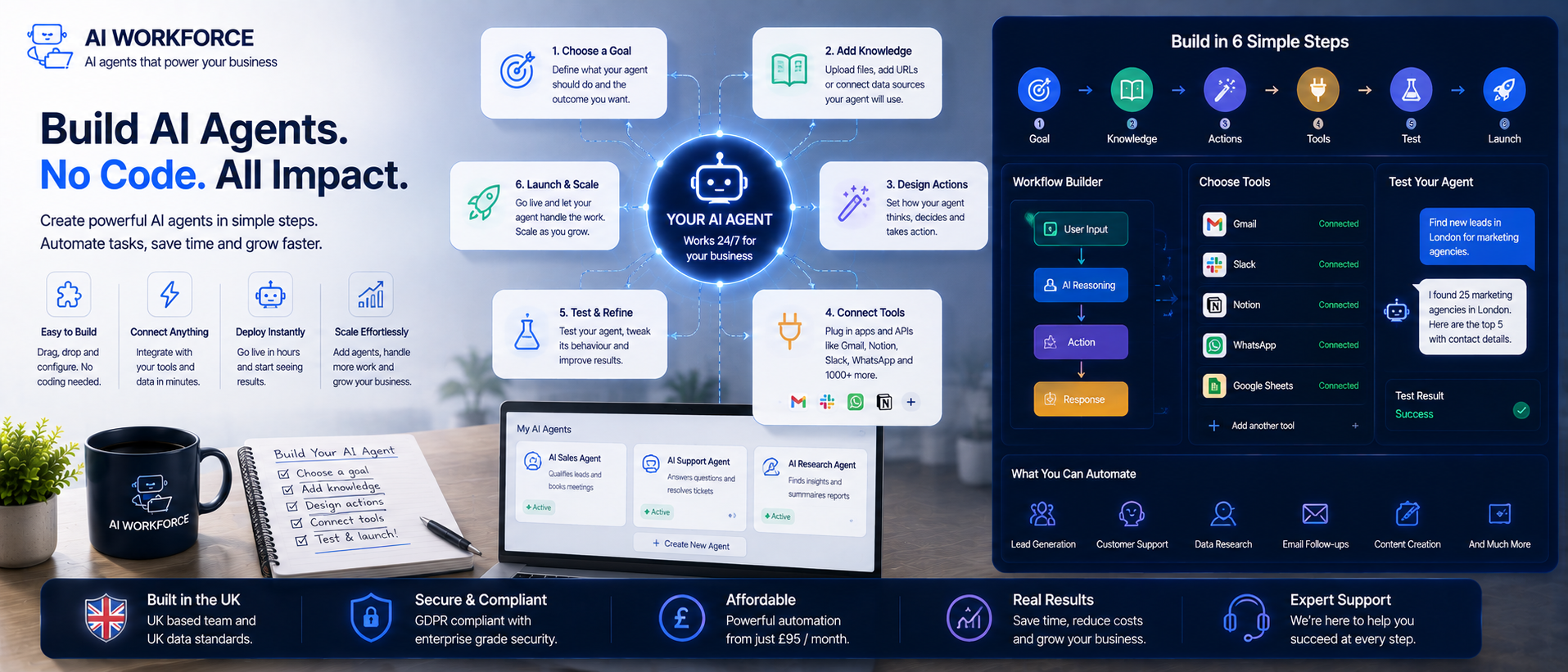
How to Build an AI Agent Without Coding: 11 Steps
Worked Example: Building a Lead-Qualification Agent
How to Choose a No-Code AI Agent Builder
How Should an Agent Use Business Data and Knowledge?
What Permissions Should a No-Code AI Agent Have?
How Do You Test a No-Code AI Agent?
Common No-Code AI Agent Mistakes
When Is No-Code Enough, and When Do You Need a Developer?
How Can Small Businesses Build Agents Without an AI Team?
What Changes for Larger Organisations?
Governance: Managing AI Agents Safely
Frequently Asked Questions
What Is a No-Code AI Agent Builder?
A no-code AI agent builder is a platform that lets someone configure a multi-step AI workflow that can act within defined permissions without a human directing every step, without writing software code. Rather than programming logic line by line, you assemble it from pre-built pieces that fit together in a visual interface. The main components are:
Visual workflows: a canvas or step list where you connect triggers, actions and decisions
Natural-language instructions: plain-English configuration of what the agent should do, in place of code
Pre-built connectors: ready-made integrations to common apps such as a CRM, inbox or calendar
Triggers and actions: the event that starts the workflow, and the steps the agent performs in response
Knowledge bases or retrieval: a connected, approved source of information the agent can search before answering
Model selection: the underlying AI model doing the reasoning, sometimes configurable, sometimes fixed by the platform
Approval steps: points where a person reviews or authorises an action before it runs
Logs and monitoring: a record of what the agent did, when, and with what result
It is worth distinguishing no-code from low-code. No-code platforms are normally built entirely from configured components, no scripting required. Low-code platforms cover most needs the same way but allow a script, custom API call or piece of code for the unusual cases a pre-built connector cannot handle. Many teams start no-code and add a small amount of low-code only when they hit a specific gap.
Can You Build an AI Agent Without Coding?
Yes, for many common business workflows that use supported software and follow predictable steps. An AI agent is autonomous software that can read a situation, decide what to do, and take action across multiple steps, without a human directing every step. It differs from a chatbot, which typically answers one question at a time within a conversation. A simple example: a prospect fills in a contact form, the agent reads the submission, looks up the company in the CRM, scores the lead, drafts a personalised follow-up, and adds the contact to the right sequence, before a human has even seen the notification. Workflows like this run today on no-code platforms without a single line of code.
An agent may act with meaningful autonomy inside a workflow, but that autonomy is usually bounded rather than unlimited; it operates within the permissions, tools and rules it has been given, not independently from start to finish. Understanding that distinction matters before you try to build one. Think of it as a junior employee with access to your tools and a defined job description. Your job as the builder is to write that job description clearly enough that the agent can follow it reliably; our guide to writing an AI agent brief covers this in detail.
Process owners bring essential operational knowledge about how a task actually works day to day, while developers may still be needed for integrations, security and technical controls on higher-risk builds. The strongest first agents tend to combine process expertise with the appropriate level of technical support, rather than assuming either one alone is sufficient.
What Can a No-Code AI Agent Automate?
The use cases are broader than most people expect when they start. Beyond sales and support, AI agents are used for internal knowledge management, answering employee questions by searching internal documents and policies. They are used for reporting, pulling data from multiple systems and generating summaries on a schedule. They can also assist with defined compliance checks, contract-review triggers and supplier communication, while anything requiring legal or regulatory judgement remains with an appropriately qualified person.
Lead qualification
Appointment booking
Customer-support triage
Sales follow-up
CRM updates
Document processing
Internal administration
Content and marketing workflows
This is not one category of use case. It is a set of capabilities that applies wherever there is a defined process, a data source, and a desired output. An AI assistant handling routine customer enquiries frees up human agents for complex cases, similar to the approach covered in our guide to AI call centre agents. An outbound version of the same idea is covered in our guide to AI SDR tools, and document-heavy workflows are covered in our guide to AI document automation.
The path is to map your highest-volume, most repetitive processes and ask: does this have a clear trigger, a defined set of steps, and a consistent output? If yes, it is a candidate. Use AI agents to handle the predictable work, and reserve human judgement for the exceptions. That division is where the real productivity gain lives.
How to Build an AI Agent Without Coding: 11 Steps
Building your first agent is simpler than it sounds when you break it into stages. Not every step needs the same depth on every project, but each is worth a deliberate decision.
1. Choose one suitable use case
Start with a single, clearly repetitive process rather than trying to automate an entire department. A simple, reliable agent is almost always more valuable than a complex one that nobody trusts. Good candidates have a defined trigger, tools that already have supported integrations or accessible APIs, and staff currently spending real hours on the manual version of the task.
2. Define the agent's role and measurable outcome
Write the goal as one specific outcome, not "help with sales," but "when a new lead submits the contact form, qualify them and send a relevant follow-up within five minutes." Specificity is everything. A vague goal produces a vague agent, and a precise outcome makes it far easier to measure success later.
3. Choose a no-code AI agent builder
Pick a platform based on the tools you already use, the reasoning quality you need, and the level of control it gives you over permissions and escalation. The selection framework below covers this in more depth.
4. Connect an approved knowledge source
Decide what the agent is allowed to treat as true: an internal knowledge base, a specific CRM field, or an approved document set, rather than letting it rely on general model knowledge for anything business-critical. This is covered in detail in the data and knowledge section below.
5. Connect the required tools and systems
Identify what the agent needs access to: does it need to read from your CRM, send emails, or check a calendar? Most no-code platforms handle this through a simple authorisation step where you connect the app and grant the agent permission to use it.
6. Define read, write and approval permissions
For each connected system, decide whether the agent can only read data, or also write and change it, and which actions need a person's sign-off before they happen. Treat this as a deliberate decision for every system, not a single blanket toggle.
7. Build the workflow logic
Link the tools into a logical sequence: trigger, action, decision, output. Most first agents follow a similar shape, and keeping the logic linear and easy to follow makes the agent easier to debug when something goes wrong.
8. Add human handoff and failure rules
Define what the agent should do when it hits something it was not briefed to handle: escalate to a person, log the issue, or stop rather than guess. An agent without a defined fallback tends to improvise in ways nobody planned for.
9. Test normal and abnormal cases
Run the workflow manually with real data before you deploy it, and deliberately include cases where something goes wrong, not just the cases where everything works. The testing section below sets out a fuller checklist.
10. Launch a narrow pilot
Roll the agent out to a small slice of real volume first, ideally with a human reviewing its output, rather than switching over every case at once. A pilot lets you observe real behaviour before you trust the agent with the full workload.
11. Monitor outcomes and improve
Track the metrics that matter for this workflow, and revisit the build if they are not moving in the right direction after a few weeks. Iteration is a normal part of the process, not a sign that the first version failed.
Illustrative sequence. A first build rarely works perfectly on the first run, and that is expected.
Worked Example: Building a Lead-Qualification Agent
An AI sales agent is a strong first build for commercial teams. Configure it to monitor inbound enquiries, research the prospect, draft a personalised outreach message, and log everything in your CRM. This single workflow touches four different tools and saves meaningful time for every rep on the team. A well-scoped first agent can often be prototyped quickly, but production-ready setup and testing depend on the platform, integrations, data quality and risk level.
The rule is: start where the pain is loudest, and the process is clearest. Success comes from matching the tool to a real problem, not from building something impressive that nobody uses. Your first agent should solve something your team actually complains about. That buy-in makes the difference between an automation that gets used and one that gets abandoned.
Illustrative example. Most first agents follow a similar shape: trigger, lookup, decision, output, optional human check.
How to Choose a No-Code AI Agent Builder
The right builder depends on what you are trying to build and which tools you already use. Some platforms are general-purpose, connecting to hundreds of apps and letting you build almost any workflow. Others are vertical-specific, designed for sales, support, or operations. Both have their place, and choosing correctly at the start saves a lot of rework later.
Swipe to see all columns →
Criterion | What to check |
|---|---|
Integrations | Native connections to your existing CRM, inbox and calendar |
Permissions | Separate read, write and approval-controlled access |
Workflow flexibility | Branches, conditions, retries and fallback paths |
Model choice | Whether models can be selected or changed |
Knowledge support | Approved sources, retrieval and source updating |
Logging | Full record of instructions, tool calls and outcomes |
Human approval | Ability to pause before sensitive actions |
Monitoring | Errors, latency, cost and outcome measurement |
Pricing | Platform, model, connector and usage charges |
Vendor lock-in | Export options and portability of workflows and data |
Some platforms support multiple agents working together, which may become useful as your implementation matures. For example, you might eventually use separate agents for lead qualification, customer support and internal reporting. Consider this capability if future expansion is likely, but prioritise the requirements of your first workflow. If you are weighing a no-code build against a pre-built vendor platform instead, our guide to build vs buy AI agents covers that decision directly.
How Should an Agent Use Business Data and Knowledge?
Business-critical agents should not rely on general model knowledge for facts about your business. Before launch, define:
Which system is the source of truth for each type of information
What happens when two sources conflict
How current the information needs to be
What the agent does when required information is missing
Whether it may use general web knowledge, or only your approved knowledge base
When it must stop and escalate rather than guess
An instruction telling the agent not to guess is a useful starting point, but it is not sufficient on its own. Reliable factual behaviour also depends on an approved knowledge source, retrieval configured against it, and a genuine escalation path for anything that source does not cover.
What Permissions Should a No-Code AI Agent Have?
Give the agent the narrowest set of permissions that lets it do its job, known as least-privilege access, and treat read and write access as genuinely different decisions rather than a single toggle. A compact access matrix keeps this explicit and auditable as the agent evolves.
Swipe to see all columns →
System | Access | Permitted action | Approval |
|---|---|---|---|
CRM | Selected records | Create leads and add notes | Approval before changing ownership |
Draft only | Prepare a follow-up | Human approves sending | |
Calendar | Limited write | Book approved meeting types | Automatic within defined rules |
Knowledge base | Read only | Retrieve approved information | Cannot edit |
Payments | No direct access | Escalate payment requests | Human required |
A read-only connection to a knowledge base carries far less risk than a write connection to a CRM, even though both might appear as one line in a simpler permissions list. Some rules, spending limits and access restrictions, among them, are more reliably enforced through the platform's own permission settings than through instructions to the agent alone.
How Do You Test a No-Code AI Agent?
"Test it with real data" is directionally right but not a sufficient pre-launch plan on its own. A genuinely tested agent is checked against normal cases and a deliberate set of abnormal ones, ideally on the real platform rather than only a general chat interface. A useful checklist covers:
A normal request
Missing information
Conflicting information
Invalid input
A tool or connector failure
An attempted action outside permissions
An unclear customer request
A high-risk request
Human escalation
A duplicate submission
Logging and audit-record accuracy
Pay particular attention to how the agent handles a complaint and an off-topic question: does it try to push through rather than escalate, and does it invent an answer rather than say it does not know. Keeping a human in the loop for your first few builds is generally the safer default, not because the technology cannot handle more autonomy, but because the observation period is how you build genuine confidence in what the agent is doing.
Common No-Code AI Agent Mistakes
The most common mistake is skipping the goal definition. People open a no-code platform, start connecting tools, and build something before they have clearly defined what success looks like. The result is an agent that does something, but not quite the right thing. Write down the goal in one sentence before you open the platform.
The second mistake is over-automation too early. Builds that fail usually try to remove humans from too many steps before the agent has proven itself. The third mistake is ignoring business needs in favour of technical interest: an automation that does not map to a real pain point will not get used, no matter how clever it is.
A related mistake is trying to make one agent do everything. A single agent given too broad a remit loses focus, becomes harder to test, and becomes harder to trust. The better approach is agents built for specific tasks, each well-defined and well-tested, working together as part of a larger system; some platforms let you build agents that can call other agents as tools, one handling intake, another research, another drafting output. Start simple, then connect.
A few other mistakes come up repeatedly once teams move past their very first build:
Connecting too many systems in the first version: each extra integration adds a new way for the workflow to fail before it has proven itself on the simple version
Failing to define approval rules: without a clear line on what needs sign-off, an agent either asks for approval too often to be useful, or not often enough to be safe
Trusting model output without validation: treating a generated answer as fact rather than checking it against an approved source invites errors that are hard to trace back
Having no fallback or human escalation: an agent without a defined path for the unexpected tends to improvise in ways nobody planned for
Automating a broken process: an agent built on top of a messy, inconsistent workflow will simply do the wrong thing faster, not fix the underlying problem
Assuming no-code requires no technical thinking: the platform removes the need to write code, not the need to think clearly about logic, permissions and edge cases
If you are seeing an agent underperform after launch, our guide to why AI agents fail works through the wider set of causes, including data, integration and model-selection issues beyond the build itself.
When Is No-Code Enough, and When Do You Need a Developer?
No-code is normally well suited to predictable workflows built on common SaaS tools with standard connectors. Development support may still be needed when a project involves:
Legacy systems
Proprietary databases
Custom authentication
Unsupported APIs
High-volume orchestration
Strict latency requirements
Complex security architecture
Consequential or regulated actions
Advanced testing and observability
For most common business workflows on well-supported platforms, a no-code agent can be a capable match for a custom-built one, though this depends heavily on the specific integrations, data quality, risk level and the definition of "working" for that use case. Custom development becomes more relevant as those conditions get harder to meet.
How Can Small Businesses Build Agents Without an AI Team?
A small business can build an AI agent without an in-house AI team by choosing one predictable workflow, using a no-code platform with existing connectors, assigning a process owner and retaining human approval during the pilot.
A small business with no dedicated AI or engineering resource can still build a working agent by staying disciplined about scope. Choose one process that a specific person already owns, keep the tool list short, and lean on the platform's own connectors rather than requesting custom integrations. Our guide to AI agents for small businesses covers the broader landscape of what is realistic to build without in-house technical staff, and if you are unsure whether a given process is ready for automation, our AI readiness assessment is a useful starting point before choosing a platform.
What Changes for Larger Organisations?
Larger organisations tend to run more agents in parallel, across more teams, which makes governance and access control matter earlier rather than later. The core building steps do not change, but the permissions matrix, approval thresholds and audit requirements typically need to be more formal from the outset, since more people will be able to build or edit agents, and more systems will be at stake if something goes wrong. A named owner and a review schedule per agent become essential rather than optional at this scale.
Governance: Managing AI Agents Safely
Even a handful of AI agents running in the background need some structure around them, particularly once more than one person in your business can build or edit them. A simple governance checklist for most small and medium-sized teams:
Named owner for each agent, someone accountable for how it performs
Approval step before a new agent goes live, even if it is just a second pair of eyes
Access permissions defined clearly: what data and tools each agent can reach
Audit trail of what the agent has done, especially for anything customer-facing
Escalation rules for when the agent should hand off to a human
Review schedule, even a quick monthly check-in on performance and errors
Version control, so you know what changed and when if something breaks
None of this needs to be elaborate. For most small teams, a shared document listing each live agent, its owner, and what it is allowed to do is enough to start. The point is to make sure nobody is surprised by what an agent is doing months after it was built.
Not sure whether your first workflow is suitable for no-code automation? Use our AI readiness assessment before choosing a platform.
Frequently Asked Questions
Do I need to know how to code to build an AI agent?
No. Modern no-code platforms let business users build agents through visual workflows and plain-language instructions. Coding knowledge can help for advanced customisation, but it is not required to get started.
What is the difference between an AI agent and a chatbot?
A chatbot typically answers one question at a time within a conversation. An AI agent can complete a multi-step task using tools and data, within the permissions and rules it has been given, without a human directing every step.
What is a no-code AI agent builder?
A platform that lets you configure an AI agent through visual workflows, natural-language instructions and pre-built connectors, rather than writing code. It typically includes triggers and actions, knowledge or retrieval support, model selection, approval steps, and logging.
What is the fastest way to build an AI agent without code?
Start with one narrow, repetitive workflow with a clear trigger, connect only the tools it needs, and use a platform's existing connectors rather than custom integrations. A well-scoped first agent can often be prototyped quickly, but production-ready setup and testing depend on the platform, integrations, data quality and risk level.
Do no-code AI agents need APIs?
Most no-code platforms handle API connections for you through a simple authorisation step, so you do not need to write API calls yourself. An API may still be needed behind the scenes if you are connecting a system without a pre-built connector.
How do you connect an agent to a CRM without coding?
Most no-code platforms offer a native CRM connector: you authorise the connection once, then select which records, fields and actions the agent can read or write, with approval required for higher-risk actions such as changing lead ownership.
What permissions should a no-code agent have?
Only the access it needs for its defined role, following least-privilege principles. Document each connected system, whether access is read-only or read/write, exactly which actions are permitted, and which of those actions require human approval.
How should you test a no-code agent?
Test normal cases and a deliberate set of abnormal ones, including missing information, conflicting information, invalid input, a tool failure, an attempted action outside permissions, and a high-risk request, ideally on the real platform rather than only a general chat interface.
When is no-code not enough?
No-code usually struggles with legacy systems, proprietary databases, custom authentication, unsupported APIs, high-volume orchestration, strict latency requirements, complex security needs, and consequential or regulated actions. These typically need development support.
Are no-code agents safe for customer-facing work?
They can be, provided permissions are scoped tightly, escalation rules are defined, and a human reviews performance during an initial pilot period. Safety depends on the governance around the agent, not just the platform it was built on.
Key Takeaways
Business users can build working AI agents today using no-code platforms, visual workflows and plain-language instructions
Start with one clearly repetitive process with a defined trigger, not an entire department
Follow the 11-step process: use case, role and outcome, platform, knowledge source, tools, permissions, workflow logic, human handoff, testing, pilot, monitoring
Business-critical agents should draw on an approved knowledge source, not general model knowledge, with a defined escalation path for gaps
Define read, write and approval permissions per system using a least-privilege access matrix
Test normal and abnormal cases, including failures, missing information and out-of-scope requests, before launch
No-code covers most common business workflows well, but legacy systems, custom security and regulated actions often still need development support
One agent trying to do everything loses focus; specialised agents connected together stay easier to test and trust
Set up basic governance early: a named owner, an approval step, an audit trail and a review schedule for each agent
Document every build. Reusable frameworks make each subsequent agent faster and more reliable
Ready to Build Your First AI Agent?
Getting started is easier with a second pair of eyes on the workflow. If you would like help mapping your first automation, from choosing the right process to setting it up safely, we are happy to talk it through.
About the Author
Rodi Taze is Co-Founder of AI Workforce. He works with UK businesses to identify suitable no-code automation use cases and implement AI agents with appropriate governance and human oversight. This article was reviewed by Luca Controlo, who leads AI adoption and marketing automation work at AI Workforce, with a focus on connecting AI tools to practical business workflows.
Reviewed: August 2026